Section Introduction:
In the previous two sections, we covered Android's built-in HTTP request methods: HttpURLConnection and HttpClient. We originally thought OkHttp had already been integrated, and then wanted to explain the basic usage of OkHttp. Later we found it still requires importing a third-party library, so let's leave it for the advanced section. In this section, we will learn about three XML parsing solutions provided by Android for us! They are: SAX, DOM, and PULL. Below, let's learn about them!
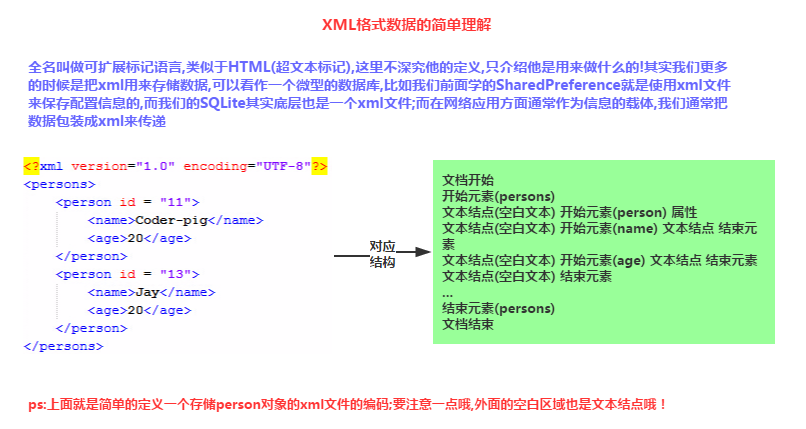
1. Key Points of XML Data
First, let's take a look at some requirements and concepts of XML data:
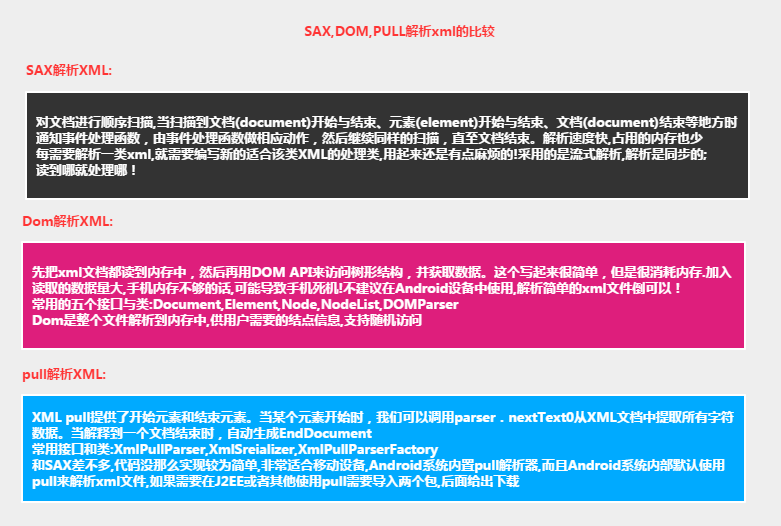
2. Comparison of Three XML Parsing Methods
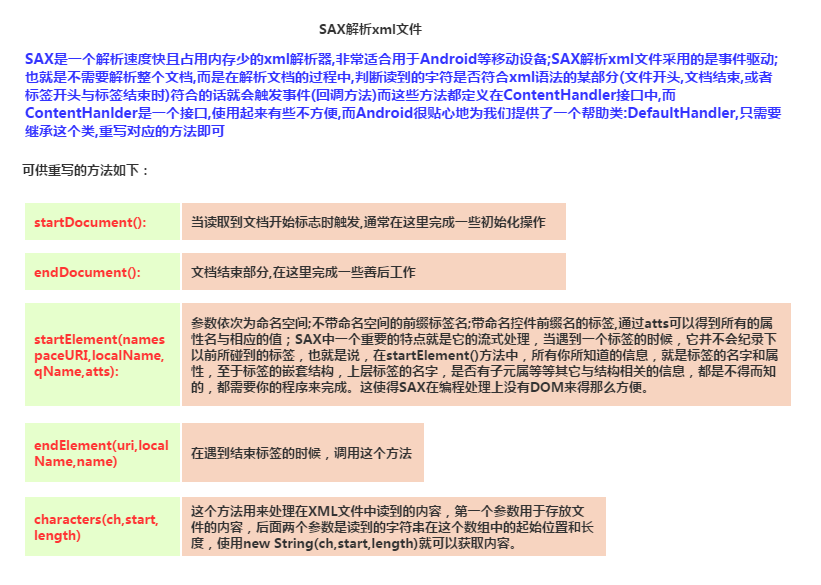
3. SAX Parsing XML Data
Core Code:
SAX Parsing Class:SaxHelper.java:
/**
 * Created by Jay on 2015/9/8 0008.
 */
public class SaxHelper extends DefaultHandler {
    private Person person;
    private ArrayList<Person> persons;
    //当前解析的元素标签
    private String tagName = null;

    /**
     * 当读取到文档开始标志是触发,通常在这里完成一些初始化操作
     */
    @Override
    public void startDocument() throws SAXException {
        this.persons = new ArrayList<Person>();
        Log.i("SAX", "读取到文档头,开始解析xml");
    }


    /**
     * 读到一个开始标签时调用,第二个参数为标签名,最后一个参数为属性数组
     */
    @Override
    public void startElement(String uri, String localName, String qName,
                             Attributes attributes) throws SAXException {
        if (localName.equals("person")) {
            person = new Person();
            person.setId(Integer.parseInt(attributes.getValue("id")));
            Log.i("SAX", "开始处理person元素~");
        }
        this.tagName = localName;
    }


    /**
     * 读到到内容,第一个参数为字符串内容,后面依次为起始位置与长度
     */

    @Override
    public void characters(char[] ch, int start, int length)
            throws SAXException {
        //判断当前标签是否有效
        if (this.tagName != null) {
            String data = new String(ch, start, length);
            //读取标签中的内容
            if (this.tagName.equals("name")) {
                this.person.setName(data);
                Log.i("SAX", "处理name元素内容");
            } else if (this.tagName.equals("age")) {
                this.person.setAge(Integer.parseInt(data));
                Log.i("SAX", "处理age元素内容");
            }

        }

    }

    /**
     * 处理元素结束时触发,这里将对象添加到结合中
     */
    @Override
    public void endElement(String uri, String localName, String qName)
            throws SAXException {
        if (localName.equals("person")) {
            this.persons.add(person);
            person = null;
            Log.i("SAX", "处理person元素结束~");
        }
        this.tagName = null;
    }

    /**
     * 读取到文档结尾时触发,
     */
    @Override
    public void endDocument() throws SAXException {
        super.endDocument();
        Log.i("SAX", "读取到文档尾,xml解析结束");
    }

    //获取persons集合
    public ArrayList<Person> getPersons() {
        return persons;
    }

}
Then in MainActivity.java, we write such a method, and just call it when we need to parse XML.
private ArrayList<Person> readxmlForSAX() throws Exception {
    //获取文件资源建立输入流对象
    InputStream is = getAssets().open("person1.xml");
    //①创建XML解析处理器
    SaxHelper ss = new SaxHelper();
    //②得到SAX解析工厂
    SAXParserFactory factory = SAXParserFactory.newInstance();
    //③创建SAX解析器
    SAXParser parser = factory.newSAXParser();
    //④将xml解析处理器分配给解析器,对文档进行解析,将事件发送给处理器
    parser.parse(is, ss);
    is.close();
    return ss.getPersons();
}
Some additional notes:
Well, by the way, I forgot to tell you that we defined a person1.xml file as below, and placed it in the assets directory! The file content is as follows:person1.xml
<?xml version="1.0" encoding="UTF-8"?>
<persons>
    <person id = "11">
        <name>SAX解析</name>
        <age>18</age>
    </person>
    <person id = "13">
        <name>XML1</name>
        <age>43</age>
    </person>
</persons>
We combined all three parsing methods into one demo, so we'll post the overall effect screenshots at the end. Here, let's post the printed Logs; I believe everyone will have a clearer understanding of the SAX XML parsing process:
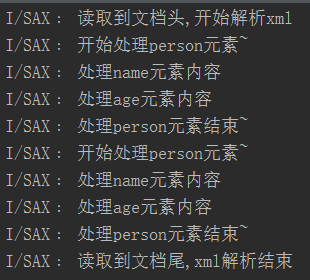
In addition, the blank text outside is also a text node! During parsing, these nodes are traversed as well!
4. DOM Parsing XML Data
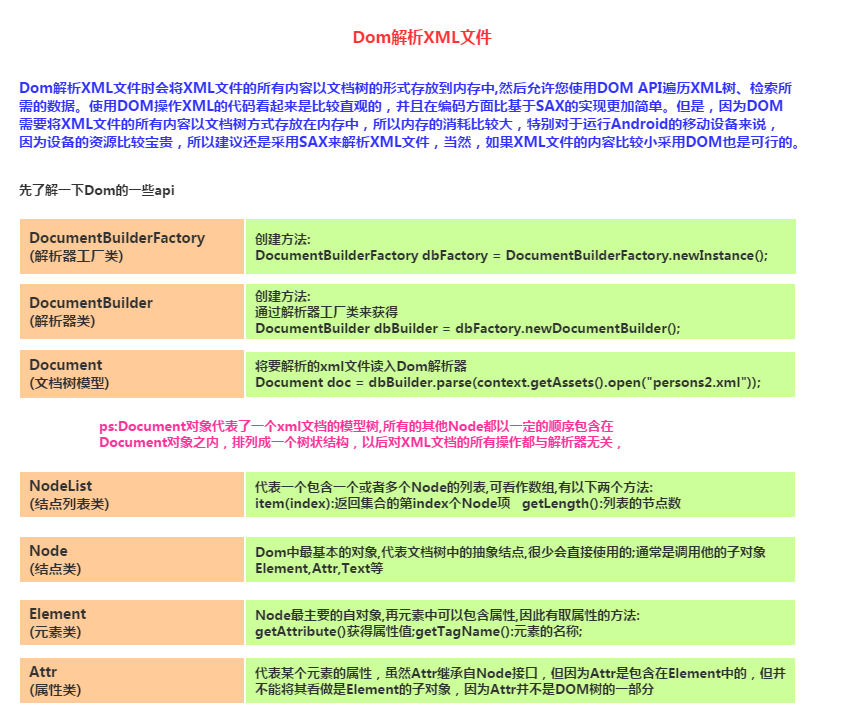
Core Code:
DomHelper.java
/**
 * Created by Jay on 2015/9/8 0008.
 */
public class DomHelper {
    public static ArrayList<Person> queryXML(Context context)
    {
        ArrayList<Person> Persons = new ArrayList<Person>();
        try {
            //①获得DOM解析器的工厂示例:
            DocumentBuilderFactory dbFactory = DocumentBuilderFactory.newInstance();
            //②从Dom工厂中获得dom解析器
            DocumentBuilder dbBuilder = dbFactory.newDocumentBuilder();
            //③把要解析的xml文件读入Dom解析器
            Document doc = dbBuilder.parse(context.getAssets().open("person2.xml"));
            System.out.println("处理该文档的DomImplemention对象=" + doc.getImplementation());
            //④得到文档中名称为person的元素的结点列表
            NodeList nList = doc.getElementsByTagName("person");
            //⑤遍历该集合,显示集合中的元素以及子元素的名字
            for(int i = 0;i < nList.getLength();i++)
            {
                //先从Person元素开始解析
                Element personElement = (Element) nList.item(i);
                Person p = new Person();
                p.setId(Integer.valueOf(personElement.getAttribute("id")));

                //获取person下的name和age的Note集合
                NodeList childNoList = personElement.getChildNodes();
                for(int j = 0;j < childNoList.getLength();j++)
                {
                    Node childNode = childNoList.item(j);
                    //判断子note类型是否为元素Note
                    if(childNode.getNodeType() == Node.ELEMENT_NODE)
                    {
                        Element childElement = (Element) childNode;
                        if("name".equals(childElement.getNodeName()))
                            p.setName(childElement.getFirstChild().getNodeValue());
                        else if("age".equals(childElement.getNodeName()))
                            p.setAge(Integer.valueOf(childElement.getFirstChild().getNodeValue()));
                    }
                }
                Persons.add(p);
            }
        } catch (Exception e) {e.printStackTrace();}
        return Persons;
    }
}
Code Analysis:
From the code, we can see the process of DOM parsing XML: first the entire file is read into the DOM parser, then a tree is formed, and then we can traverse the node list to get the data we need!
5. PULL Parsing XML Data
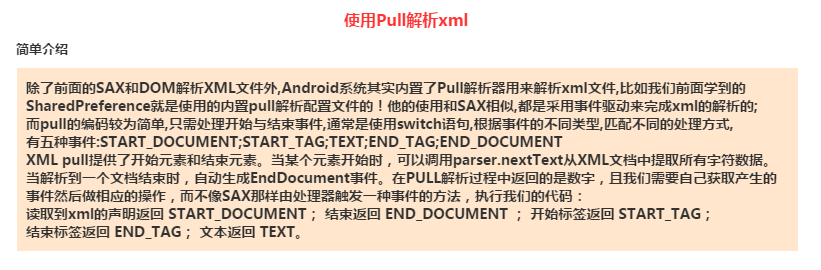
The process of using PULL to parse XML data:
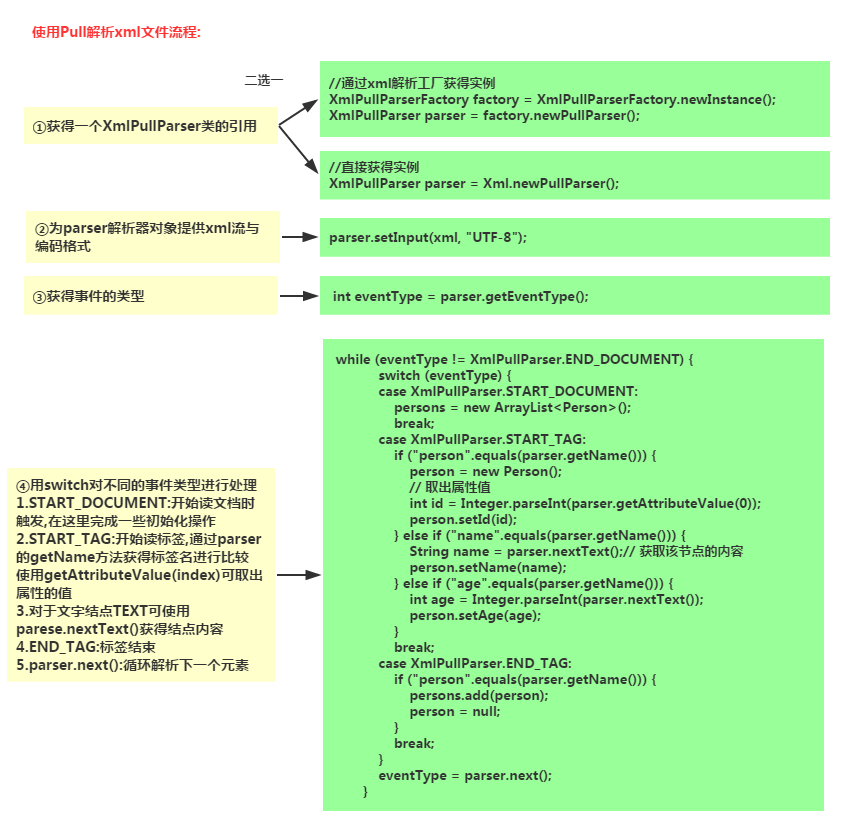
Core Code:
public static ArrayList<Person> getPersons(InputStream xml)throws Exception
{
    //XmlPullParserFactory pullPaser = XmlPullParserFactory.newInstance();
    ArrayList<Person> persons = null;
    Person person = null;
    // 创建一个xml解析的工厂
    XmlPullParserFactory factory = XmlPullParserFactory.newInstance();
    // 获得xml解析类的引用
    XmlPullParser parser = factory.newPullParser();
    parser.setInput(xml, "UTF-8");
    // 获得事件的类型
    int eventType = parser.getEventType();
    while (eventType != XmlPullParser.END_DOCUMENT) {
        switch (eventType) {
        case XmlPullParser.START_DOCUMENT:
            persons = new ArrayList<Person>();
            break;
        case XmlPullParser.START_TAG:
            if ("person".equals(parser.getName())) {
                person = new Person();
                // 取出属性值
                int id = Integer.parseInt(parser.getAttributeValue(0));
                person.setId(id);
            } else if ("name".equals(parser.getName())) {
                String name = parser.nextText();// 获取该节点的内容
                person.setName(name);
            } else if ("age".equals(parser.getName())) {
                int age = Integer.parseInt(parser.nextText());
                person.setAge(age);
            }
            break;
        case XmlPullParser.END_TAG:
            if ("person".equals(parser.getName())) {
                persons.add(person);
                person = null;
            }
            break;
        }
        eventType = parser.next();
    }
    return persons;
}
The process of using Pull to generate XML data:
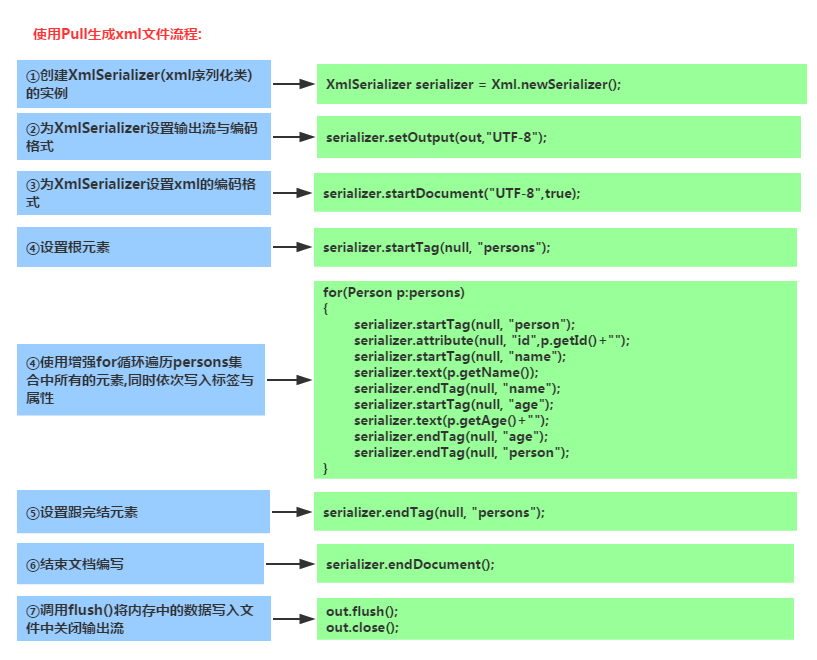
Core Code:
public static void save(List<Person> persons, OutputStream out) throws Exception {
    XmlSerializer serializer = Xml.newSerializer();
    serializer.setOutput(out, "UTF-8");
    serializer.startDocument("UTF-8", true);
    serializer.startTag(null, "persons");
    for (Person p : persons) {
        serializer.startTag(null, "person");
        serializer.attribute(null, "id", p.getId() + "");
        serializer.startTag(null, "name");
        serializer.text(p.getName());
        serializer.endTag(null, "name");
        serializer.startTag(null, "age");
        serializer.text(p.getAge() + "");
        serializer.endTag(null, "age");
        serializer.endTag(null, "person");
    }

    serializer.endTag(null, "persons");
    serializer.endDocument();
    out.flush();
    out.close();
}
6. Code Example Download:
Running Result Screenshot:
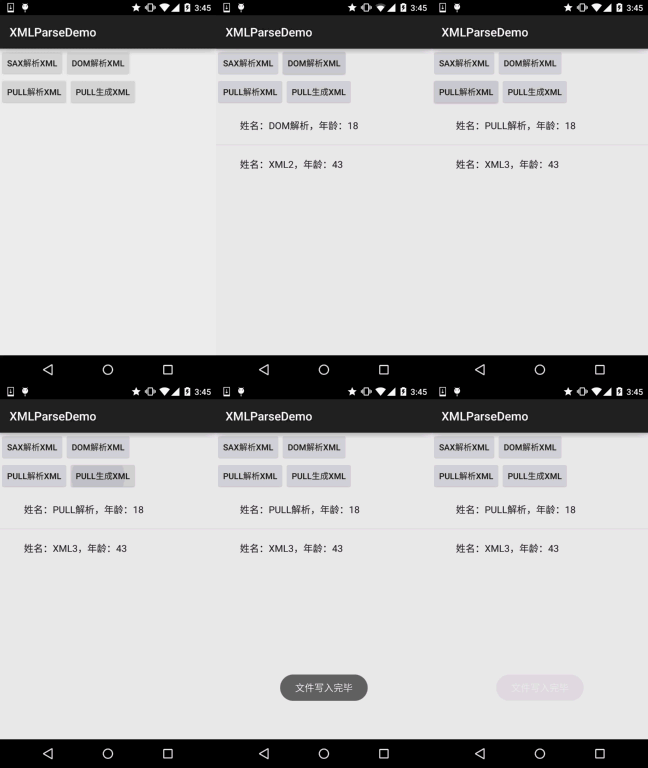
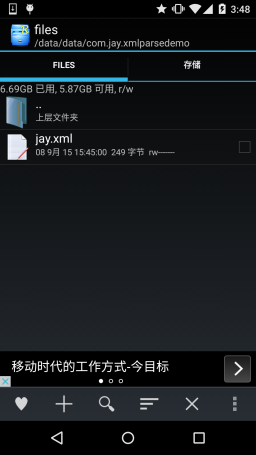
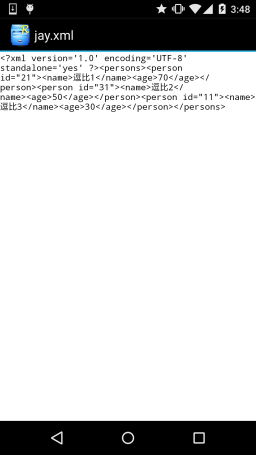
Code Download: XMLParseDemo.zip:Download XMLParseDemo.zip
Section Summary:
This section introduces three commonly used XML parsing methods in Android: DOM, SAX, and PULL. For mobile devices, we recommend the latter two, and PULL is simpler to use. There's not much more to say here; code is the best teacher. That's all for this section. In the next section, we will learn about the simple Json parsing method provided by Android. Thanks!