Introduction to this section:
Before we knew it, we have finally arrived at the Android network programming chapter. Everything we played with before was standalone, so it must be not satisfying, right? Starting from this section, we will learn some things related to Android network programming: What does Android-side network programming do? Learning the HTTP protocol, using the built-in JSON parsing class to parse JSON, several common XML parsing methods, the use of HttpUrlConnection and HttpClient, file upload and download; the use of WebService, WebView, Socket communication, and so on!
Also, we are the client; server-side content is not within our scope, and Little Pig is not good at it either. Our minimum requirement is:To be able to master the ability to obtain and parse the data fed back by the server!Alright, enough talk, let's start the content of this section!
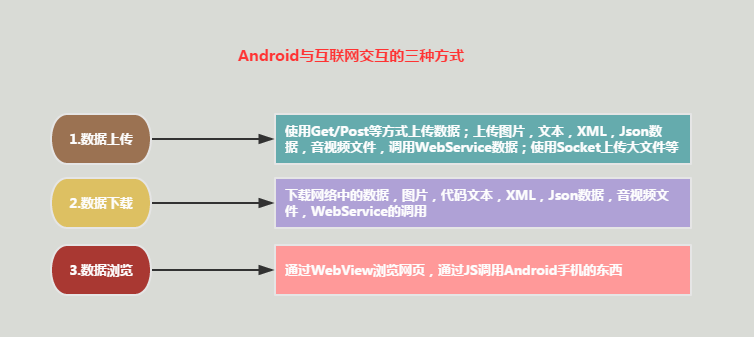
1. Three ways Android interacts with the Internet
2. First understanding of the HTTP protocol
In actual development, when we deal with the server, we generally use communication based on the HTTP protocol, so learning the HTTP protocol well is very important. Of course, we don't need to be too particular about details; a general understanding is enough! These are all conceptual things!
1) What is the HTTP protocol?
Answer: HTTP (Hypertext Transfer Protocol), an application-layer protocol of the TCP/IP protocol, used to define the process of data exchange between a web browser and a web server. After a client connects to a web server, if it wants to obtain a web resource on the web server, it must follow certain communication formats. The HTTP protocol is used to define the communication format between the client and the web server.
2) Differences between HTTP 1.0 and HTTP 1.1
Answer: In the 1.0 protocol, after the client establishes a connection with the web server, it can only obtain one web resource! In the 1.1 protocol, after the client establishes a connection with the web server, it is allowed to obtain multiple web resources on one connection!
3) Underlying working process of the HTTP protocol:
Answer: First we need to know two terms:
- SYNSYN (synchronous): the handshake signal used when establishing a TCP/IP connection
- ACKACK (Acknowledgement): confirmation character, confirming that the data sent has been received correctly
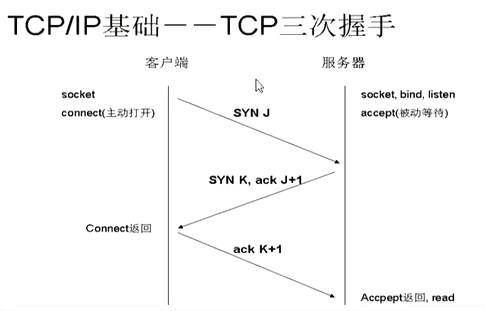
Then comesTCP/IP three-way handshakeconcept:
- The client sends a SYN packet (syn = j) to the server, enters the SYN_SEND state, and then waits for the server's confirmation.
- The server receives the SYN packet, acknowledges the client's SYN (ack = j + 1), and at the same time also sends a SYN packet (syn = k), i.e., a SYN + ACK packet. The server enters the SYN_RECV state.
- The client receives the SYN + ACK packet and sends a confirmation packet ACK (ack = k + 1) to the server. After sending it, the client and the server enter the ESTABLISHED state, completing the three-way handshake, and then the two begin to transmit data.
If it is still not clear, let's look at the schematic diagram of the three-way handshake:
You understand it now, right? Then let's take a look at a flow of HTTP operations:
- The user clicks a URL (hyperlink) in the browser, and the web browser establishes a connection with the web server.
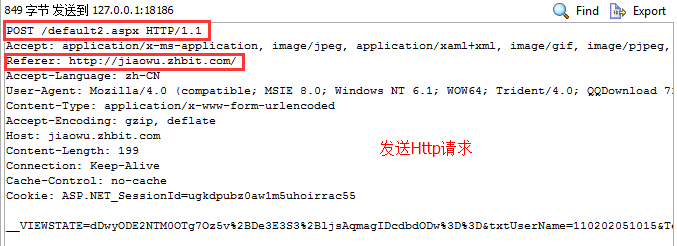
- After the connection is established, the client sends a request to the server. The request format is: Uniform Resource Identifier (URL) + protocol version number (usually 1.1) + MIME information (multiple message headers) + a blank line
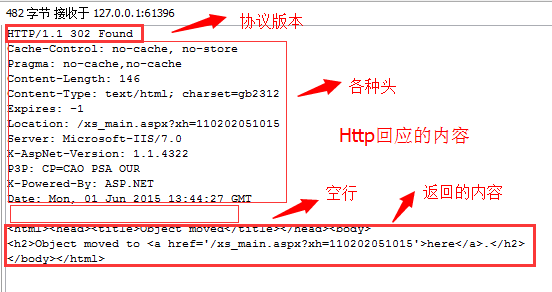
- After receiving the request, the server provides corresponding return information. The return format is: protocol version number + status line (processing result) + multiple information headers + blank line + entity content (such as the returned HTML)
- The client receives the return information from the server, displays it through the browser, and then disconnects from the server. Of course, if an error occurs at some step in the middle, the error information will be returned to the client and displayed, such as the classic 404 error!
If the above flow is still not clear, we can use HttpWatch or Firefox to capture packets. PS: The test site is the academic affairs system of Little Pig's school. After entering the account and password and requesting login, we can see the following information:
Contents included in an HTTP request:
Contents included in an HTTP response:
Now it is clear at a glance, right!
4) Business process of the HTTP protocol
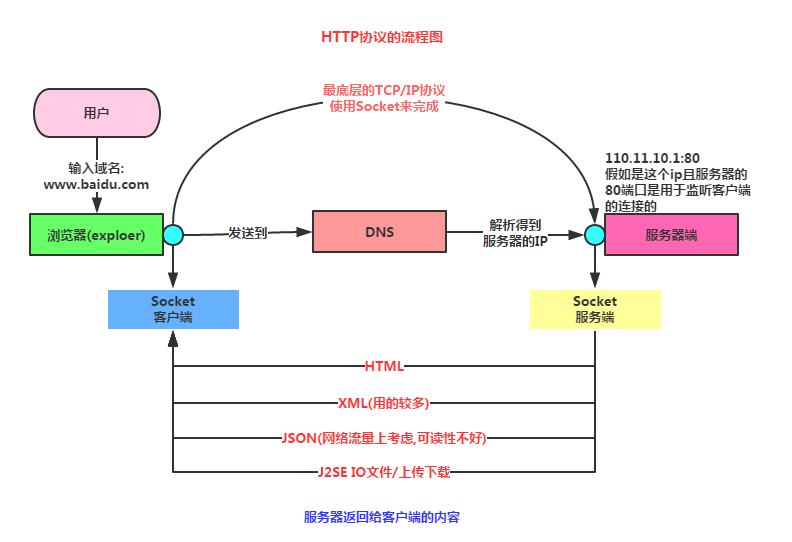
5) Several request methods of HTTP
In actual development, we use GET and POST more often, but in actual development we may also use other request methods, such as PUT. Little Pig has used it in actual projects. Below, for everyone's convenience, let's list all the request methods:
- GetRequest to obtain the resource identified by Request-URI
- POSTAppend new data after the resource identified by Request-URI
- HEADRequest to obtain the response message header of the resource identified by Request-URI
- PUTRequest the server to store a resource and use Request-URI as its identifier
- DELETERequest the server to delete the resource identified by Request-URI
- TRACERequest the server to echo back the received request information, mainly used for testing or diagnosis
- CONNECTReserved for future use
- OPTIONSRequest to query server performance, or query options related to the resource
6) Comparison of GET and POST
The two most used ones, of course we need to compare them!
- GETGET: Append data to be submitted to the server after the request URL address in the form of `?`, with multiple data items separated by `&`, but the data capacity usually cannot exceed 2K, for example: `http://xxx?username=…&pawd=…` this is GET.
- POSTPOST: This one can send data to the server in the request's entity content, and there is no limit on the amount of transmission.
- Another thing to mention: these two are both for sending data, but the sending mechanisms are different. Don't believe what is said online: 'GET obtains server data, POST sends data to the server'!! In addition, GET security is very low, POST security is relatively high, but the execution efficiency is better than the POST method. Generally, we use GET for queries, and POST for adding, deleting, and modifying data!!
7) HTTP status code collection
Of course, these status codes are only for reference; in fact,the decision is in the hands of the server side (backend).One solution is: after a request, the server returns a status to us; or another, which is best used when the app doesn't need multi-language versions, is to directly return a JSON string of result information to us, and we just display it. This can save a lot of effort! Below is the list of status codes, just for reference:
- 100~199: The request has been successfully accepted; the client needs to submit the next request to complete the entire processing process.
- 200: OK, the client request was successful.
- 300~399: The requested resource has been moved to a new address (302, 307, 304).
- 401: Unauthorized request; this status code needs to be used with the WWW-Authenticate header field.
- 403: Forbidden. The server received the request but refuses to provide the service.
- 404: Not Found. The requested resource does not exist. No need to say more about this.
- 500: Internal Server Error. An unexpected error occurred on the server.
- 503: Server Unavailable. The server cannot currently process the client request; it may return to normal after a period of time.
8) Characteristics of the HTTP protocol
These are conceptual things; just know them, don't memorize them. This is from Baidu Baike, directly copied and pasted:
1. Supports client/server mode.。
2. Simple and fast.When a client requests a service from a server, it only needs to transmit the request method and path. Common request methods are GET, HEAD, POST. Each method specifies a different type of contact between the client and the server. Because the HTTP protocol is simple, the program size of an HTTP server is small, so communication speed is fast.
3. Flexible.HTTP allows transmitting any type of data object. The type being transmitted is marked by Content-Type.
4. Connectionless.The meaning of connectionless is to limit each connection to processing only one request. After the server processes the client's request and receives the client's response, it disconnects. This method can save transmission time.
5. Stateless.:The HTTP protocol is a stateless protocol. Stateless means that the protocol has no memory capability for transaction processing. The lack of state means that if subsequent processing requires previous information, it must be retransmitted, which may cause the amount of data transmitted per connection to increase. On the other hand, when the server does not need previous information, its response is faster.
PS: Regarding the OSI seven-layer protocol and the TCP four-layer model, they will not be explained in the basic series~ If you are interested, you can learn about them yourself!
Summary of this section:
This section explained the tools we need to complete in network-related Android development, as well as the related concepts of the HTTP protocol. I believe everyone now has a vague impression of the interaction between Android mobile clients and servers. In the next section, we will study the request headers and response headers of the HTTP protocol! This section ends here, thank you~