Introduction to this section:
In order to take care of beginners who haven't learned Java Socket, or to sort out the concepts related to network protocols involved in Android development, after all, during an interview, the interviewer might say, "Tell me how many layers the network protocols have? Then which layer is the IP protocol on? What the heck is Socket? How many types are there? And which layer are TCP and UDP protocols on? What's the difference..." Well, this... So it is quite necessary to learn the conceptual theories in this section! Without further ado, let's begin the content of this section~
1. Brief Analysis of the OSI Seven-Layer Network Model
Of course, we are not network engineering professionals; we just need to know what layers there are and roughly what they are used for!
OSI Seven-Layer Network Model (from bottom to top):
- Physical Layer: Provides transmission media and interconnection devices for data communication between devices, providing a reliable environment for data transmission. It can be understood as the physical media part of network transmission, such asnetwork interface cards, network cables, hubs, repeaters, and modemsetc.! At this layer, data has not been organized yet; it is only processed as raw bit streams or electrical voltages. The unit of this layer is:bit
- Data Link Layer: It can be understood as a data channel. Its main function is how to reliably transmit data over unreliable physical lines. This layer's functions include: physical address addressing, data framing, flow control, data error detection, and retransmission, etc.! In addition, thisdata link refers to: The physical layer must provide transmission media and connections for data communication between terminal devices. The media is long-term, while connections have a lifetime. During the connection's lifetime, the sending and receiving ends can conduct one or more data communications of varying durations. Each communication must go through two processes: establishing a communication link and dismantling the communication link! This establisheddata sending/receiving relationship~ The devices at this layer include:network interface cards, bridges, and network switches, and the unit of this layer is:frame
- Network Layer: Its main function is to translate network addresses into corresponding physical addresses and determine how to route data from the sender to the receiver. The so-called routing and addressing: a terminal may need to communicate with multiple terminals, which creates the problem of linking data between any two terminal devices! Simply put: establish network connections and provide services for upper layers! The devices at this layer include:routers! The unit of this layer is:data packet, and the IP protocol is at this layer!
- Transport Layer: It provides communication services to the application layer above. It is the highest layer in the communication-oriented part and also the lowest layer in user functions. It receives data from the session layer, splits the data when necessary, hands these data to the network layer, and ensures that these data segments effectively reach the peer! So the unit of this layer is:data segment; and there are two very important protocols in this layer:TCP (Transmission Control Protocol)andUDP (User Datagram Protocol), which is also the core part of this chapter!
- Session Layer: It is responsible for establishing, maintaining, and terminating communication between two nodes in a network. It establishes a communication link, keeps the communication link smooth during the session, synchronizes the dialogue between the two nodes, decides whether communication is interrupted, and decides where to resend from when communication is interrupted. That is, the establishment and management of sessions between users on different machines!
- Presentation Layer: It interprets commands and data from the application layer, gives corresponding meanings to various syntaxes, and transmits them to the session layer in a certain format. Its main function is to "handle the representation issues of user information, such as encoding, data format conversion, encryption and decryption, compression and decompression," etc.
- Application Layer: It is the highest layer of the OSI reference model and provides network services for user applications. Based on the work of the other six layers, it is responsible for completing the connection between applications in the network and the network operating system, establishing and terminating connections between users, and completing various protocols needed for supervision, management, and services required by network users' network services and applications. In addition, this layer is also responsible for coordinating the work among applications. The services and protocols provided by the application layer to users include: file services, directory services, file transfer services (FTP), remote login services (Telnet), email services (E-mail), printing services, security services, network management services, database services, etc.
Well, above we briefly described the OSI seven-layer network model. Below is a summary:
OSI is an ideal model. A typical network system only involves a few of its layers. In the seven-layer model, each layer provides a special network function. From the perspective of network functions:
- The lower 4 layers (physical layer, data link layer, network layer, and transport layer) mainly provide data transmission and exchange functions, i.e., they focus on node-to-node communication.
- The 4th layer serves as a bridge between the upper and lower parts and is the most critical part of the entire network architecture;
- The upper 3 layers (session layer, presentation layer, and application layer) mainly provide information and data processing functions between users and applications.
In short, the lower 4 layers mainly complete the functions of the communication subnet, while the upper 3 layers mainly complete the functions of the resource subnet.
—The above content is referenced from:Detailed Explanation of the OSI Seven-Layer Model
2. The TCP/IP Four-Layer Model
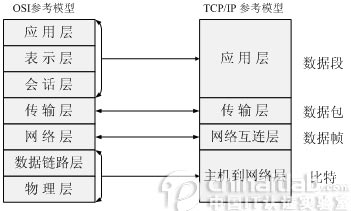
TCP/IP is a collective term for a group of protocols; it also includes many protocols, forming the TCP/IP protocol suite. The TCP/IP protocol suite is divided into four layers. IP is at the second layer of the suite (corresponding to the third layer of OSI), and TCP is at the third layer of the suite (corresponding to the fourth layer of OSI). The TCP/IP communication protocol adopts a 4-layer hierarchy, and each layer calls upon the network provided by the layer below it to fulfill its own needs. These four layers are:
- Application layer: The layer for communication between applications, such as Simple Mail Transfer Protocol (SMTP), File Transfer Protocol (FTP), Telnet, etc.
- Transport layer: At this layer, it provides data transmission services between nodes, such as Transmission Control Protocol (TCP) and User Datagram Protocol (UDP). TCP and UDP add transmission data to data packets and transmit them to the next layer. This layer is responsible for transmitting data and confirming that the data has been delivered and received.
- Network interconnection layer: Responsible for providing the basic data packet transmission function, allowing each data packet to reach the destination host (but without checking whether it is correctly received), such as the Internet Protocol (IP).
- Host-to-network layer: Management of the actual network media, defining how to use the actual network (such as Ethernet, Serial Line, etc.) to transmit data.
3. Explanation of Differences Between TCP and UDP
Alright, the first two points were just rambling to popularize the concepts of the OSI seven-layer model and the TCP/IP four-layer model. Next, we will talk about some concepts and terms related to our Socket development!
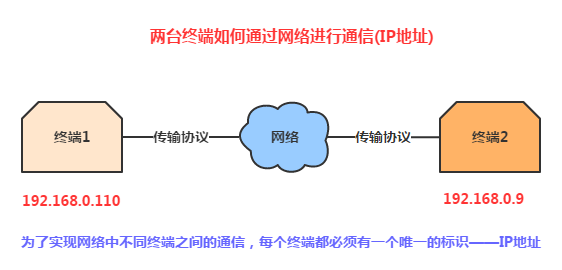
1) IP Address
2) Port
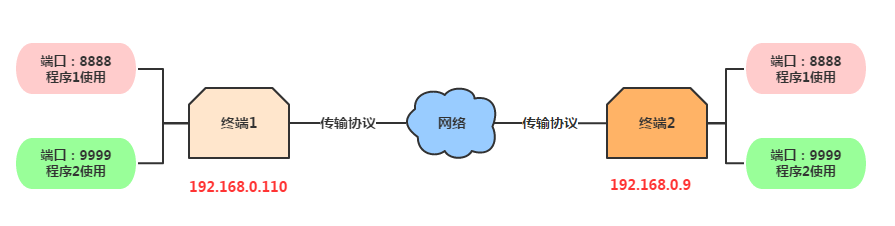
1.Used to distinguish different applications
2.The port number ranges from 0 to 65535, where 0-1023 are reserved ports of the system. Our programs should try not to use these ports as much as possible!
3.IP addresses and port numbers make up our Socket. A Socket is the endpoint of a bidirectional communication link between network-running programs and is the foundation of TCP and UDP!
4.Ports used by common protocols: HTTP:80, FTP:21, TELNET:23
3) Comparison of TCP Protocol and UDP Protocol:
Detailed Explanation of the TCP Protocol Flow:
First, TCP/IP is a protocol suite that includes many protocols. UDP is just one of them. It is named TCP/IP because TCP and IP are two very important protocols, so they are used for the name.
Next, let's explain the differences between TCP and UDP protocols:
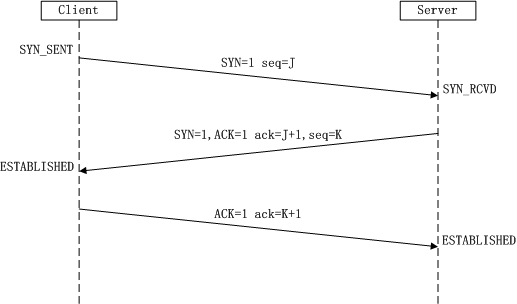
TCP(Transmission Control Protocol) is a connection-oriented protocol. That is, before sending and receiving data, a reliable connection needs to be established with the opposite side. This is also the TCP'sthree-way handshakeand TCP'sfour-way handshake! Three-way handshake: When establishing a TCP connection, the client and server need to send a total of 3 packets to confirm the establishment of the connection. In Socket programming, this process is triggered by the client executing connect. The specific flowchart is as follows:
- First handshake: The Client sets the SYN flag to 1, randomly generates a value seq=J, and sends this data packet to the Server. The Client enters the SYN_SENT state and waits for the Server's confirmation.
- Second handshake: After the Server receives the packet, it knows from the SYN=1 flag that the Client requests to establish a connection. The Server sets both the SYN and ACK flags to 1, ack=J+1, randomly generates a value seq=K, and sends this packet to the Client to confirm the connection request. The Server enters the SYN_RCVD state.
- The third handshake: After receiving the confirmation, the Client checks whether ack is J+1 and ACK is 1. If correct, it sets the ACK flag to 1, ack=K+1, and sends the packet to the Server. The Server checks whether ack is K+1 and ACK is 1. If correct, the connection is established successfully, and the Client and Server enter the ESTABLISHED state, completing the three-way handshake. After that, data transmission can begin between the Client and the Server.
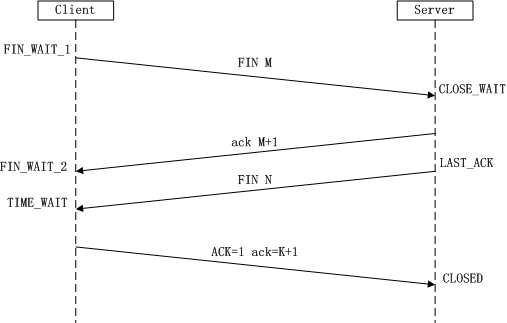
Four-way wave: Terminating a TCP connection means that when disconnecting a TCP connection, the client and server need to send a total of 4 packets to confirm the connection is closed. In Socket programming, this process is triggered by either the client or the server executing close. The specific flow chart is as follows:
- The first wave: The Client sends a FIN to close the data transmission from the Client to the Server. The Client enters the FIN_WAIT_1 state.
- The second wave: After receiving the FIN, the Server sends an ACK to the Client. The acknowledgment number is the received sequence number + 1 (same as SYN; a FIN occupies one sequence number). The Server enters the CLOSE_WAIT state.
- The third wave: The Server sends a FIN to close the data transmission from the Server to the Client. The Server enters the LAST_ACK state.
- The fourth wave: After receiving the FIN, the Client enters the TIME_WAIT state, then sends an ACK to the Server. The acknowledgment number is the received sequence number + 1. The Server enters the CLOSED state, completing the four-way wave.
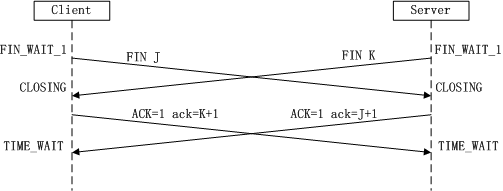
Another possibility is that both sides initiate active close at the same time: Another common question is: why is establishing a connection a three-way handshake, while closing a connection is a four-way wave? Answer: Because when the server is in the LISTEN state and receives a SYN packet for a connection request, it puts ACK and SYN in the same packet and sends it to the client. When closing the connection, upon receiving the other party's FIN packet, it only means that the other party will no longer send data, but can still receive data. Also, our side may not have sent all data to the other party yet, so our side can either close immediately, or after sending some data to the other party, send a FIN packet to the other party to indicate agreement to close the connection now. Therefore, our side's ACK and FIN are generally sent separately.
Detailed explanation of the UDP protocol:
UDP(User Datagram Protocol) User Datagram Protocol, a connectionless protocol. Before transmitting data, the source and destination do not establish a connection. When it wants to transmit, it simply grabs data from the application and throws it onto the network as quickly as possible. On the sending side, the speed of UDP data transmission is limited only by the speed at which the application generates data, the computer's capabilities, and the transmission bandwidth; on the receiving side, UDP places each message segment in a queue, and the application reads one message segment from the queue at a time. Compared to TCP, it does not need to establish a connection, has a simple structure, cannot guarantee correctness, and is prone to packet loss.
——The above content is partially excerpted from:
TCP/IP three-way handshake and four-way wave
The difference between TCP and UDP (reposted)
4. Several Key Classes Provided by Java for Networking:
For different network communication layers, Java provides us with four major categories of network functions:
- InetAddress: Used to identify hardware resources on the network.
- URL: Uniform Resource Locator. Through a URL, you can directly read or write data on the network.
- Socket and ServerSocket: Socket-related classes that use the TCP protocol to implement network communication.
- Datagram: Uses the UDP protocol, stores data in datagrams, and communicates over the network.
In this section, we only introduce the first two classes. Socket and Datagram will be explained in the chapters on TCP and UDP!
~Example of using InetAddress:
Sample code:
public class InetAddressTest {
    public static void main(String[] args) throws Exception{
        //获取本机InetAddress的实例:
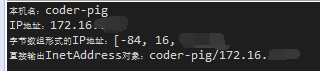
        InetAddress address = InetAddress.getLocalHost();
        System.out.println("本机名:" + address.getHostName());
        System.out.println("IP地址:" + address.getHostAddress());
        byte[] bytes = address.getAddress();
        System.out.println("字节数组形式的IP地址:" + Arrays.toString(bytes));
        System.out.println("直接输出InetAddress对象:" + address);
    }
}
Running result diagram:
~URL: No need to explain this one, right? If you forgot, you can review the earlier HTTP protocol explanation~
Summary of this section:
This section is all concepts; it may be tough to read. But it's okay if you don't understand. Just know what each layer of the seven-layer model is called and roughly what it is used for, plus the TCP three-way handshake and four-way wave; that's enough! Of course, this is just to handle interviews~ In actual development, why would we worry about this... just use Socket directly, right? Well, in the next section, we will start learning Socket communication in Android~ Thanks~