1. Android Background and Current Status
The Android system was created by Andy Rubin and later acquired by Google; the earliest version was Android 1.1. Now the latest version is Android M, launched at the Google I/O conference on May 28 this year. Interestingly, Android versions are all named after desserts. The table below lists the 15 Android version names, corresponding API numbers, and release dates!
| System Version Name | API Version Number | Release Date |
|---|---|---|
| Android 1.5: Cupcake | 3 | 2009.4.30 |
| Android 1.6: Donut | 4 | 2009.9.15 |
| Android 2.0/2.0.1/2.1: Eclair | 5/6/7 | 2009.10.26 |
| Android 2.2/2.2.1: Froyo | 8 | 2010.5.20 |
| Android 2.3: Gingerbread | 9 | 2010.12.7 |
| Android 3.0: Honeycomb | 11 | 2011.2.2 |
| Android 3.1: Honeycomb | 12 | 2011.5.11 |
| Android 3.2: Honeycomb | 13 | 2011.7.13 |
| Android 4.0: Ice Cream Sandwich | 14 | 2011.10.19 |
| Android 4.1: Jelly Bean | 16 | 2012.6.28 |
| Android 4.2: Jelly Bean | 17 | 2012.10.30 |
| Android 4.3: Jelly Bean | 18 | 2013.7.25 |
| Android 4.4: KitKat | 19 | 2013.11.01 |
| Android 5.0: Lollipop | 21 | 2014.10.16 |
| Android M: Preview Version | 22 | 2015.5.28 |
OK, besides the public versions above, there are of course some other versions. As of January 2015, the market share of each version is as follows:
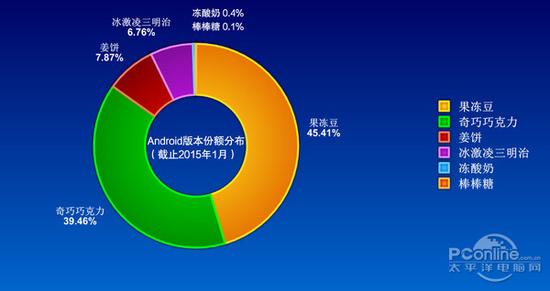
After reading the above information, we might have this question: With so many system versions, which version should we target for development? This is the Android "fragmentation" problem that every Android developer must face, and this problem is divided into two parts: ① System fragmentation: When developing apps, we may need to ensure compatibility with lower versions, for example, a minimum compatible version of 2.3. Due to the prevalence of custom ROMs, people in China like to make modifications to the stock system, which leads to problems where things work on the stock system but not on custom ROMs, such as camera calls~ ② Screen fragmentation: There are phones with all kinds of screen sizes on the market, 4.3", 4.5", 4.7", 5.0", 5.3"... etc. Besides phones, there are also Android tablets, so during development we may need to handle the issue of screen adaptation. Of course, since we are just learning, we don't need to consider these complex things; we'll delve deeper into them in actual development later!
2. Android System Features and Platform Architecture
System Features:
- Application framework supportComponent reuse and replacement(If an app follows the framework conventions when released, other apps can also use its modules)
- DalvikVirtual machine: optimized specifically for mobile devices - Integrated browser: open sourceWebKitEngine
- SQLiteStructured data storage
- Optimized graphics libraries, multimedia support, GSM telephony, Bluetooth, etc.
- Adoptingsoftware stackas the building approach
Platform Architecture Diagram:

Simple Understanding of the Architecture:
- Application (Application Layer)The application layer development we usually talk about is carried out at this level, which of course includes a set of built-in system applications, using the Java language
- Application Framework (Application Framework Layer)Whether they are system built-in apps or apps we write ourselves, they all need to use this layer. For example, if we want to create a call blacklist or automatically hang up calls, we need to use TelephonyManager. Through this layer, we can easily implement the hang-up operation without worrying about the underlying implementation
- Libraries + Android RuntimeAndroid provides us with a set of C/C++ libraries used by different components of the platform, such as the media framework. The Android Runtime is composed of the Android core library set and the Dalvik virtual machine. The Dalvik VM is a virtual machine designed for mobile devices. Its features: it does not require very fast CPU computing speed or a large amount of memory space. Each app runs independently in its own Dalvik VM (each app corresponds to one Dalvik process). Its simple execution flow is as follows:
- Linux KernelThis is where the underlying drivers come in, along with some system services such as security, memory management, and process management

3. Summary of This Section:
In this section, we reviewed Android's historical background and current status, then briefly analyzed Android's system features and system architecture. These conceptual things just need a brief understanding. In the next section, we will start setting up the Android environment!