Introduction to this section:
The conceptual lesson in the previous section was dry and boring, right? But you still gained something, right? Starting from this section, we will study Socket communication based on the TCP protocol. First, let's understand the concept of Socket, the Socket communication model, the steps to implement Socket, and what the Socket server and client each need to do! Alright, let's dig into this Socket step by step from easy to deep!
1. What is Socket?

2. Socket communication model:
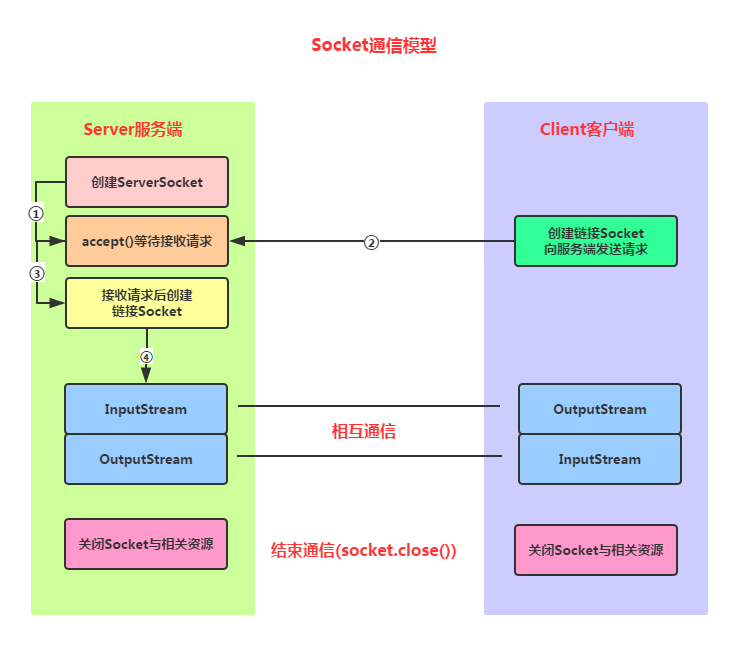
Analysis of Socket communication implementation steps:
Step 1: Create ServerSocket and Socket
Step 2: Open the input/output streams of the connected Socket
Step 3: Perform read/write operations on the Socket according to the protocol
Step 4: Close the input/output streams and the Socket
Alright, let's write a simple example. After starting the server, the client clicks a button to connect to the server, and sends a string to the server, indicating that it has connected to the server through Socket~
3. Writing the Socket server:
The things the server needs to do are as follows:
Step 1: Create a ServerSocket object and bind the listening port
Step 2: Call the accept() method to listen for client requests
Step 3: After the connection is established, read the request information sent by the client through the input stream
Step 4: Send response information to the client through the output stream
Step 5: Close related resources
Code implementation:
Just create a Java project in Eclipse and paste the Java code in!
public class SocketServer {
    public static void main(String[] args) throws IOException {
        //1.创建一个服务器端Socket,即ServerSocket,指定绑定的端口,并监听此端口
        ServerSocket serverSocket = new ServerSocket(12345);
        InetAddress address = InetAddress.getLocalHost();
        String ip = address.getHostAddress();
        Socket socket = null;
        //2.调用accept()等待客户端连接
        System.out.println("~~~服务端已就绪,等待客户端接入~,服务端ip地址: " + ip);
        socket = serverSocket.accept();
        //3.连接后获取输入流,读取客户端信息
        InputStream is=null;
        InputStreamReader isr=null;
        BufferedReader br=null;
        OutputStream os=null;
        PrintWriter pw=null;
        is = socket.getInputStream();     //获取输入流
        isr = new InputStreamReader(is,"UTF-8");
        br = new BufferedReader(isr);
        String info = null;
        while((info=br.readLine())!=null){//循环读取客户端的信息
            System.out.println("客户端发送过来的信息" + info);
        }
        socket.shutdownInput();//关闭输入流
        socket.close();
    }
}
Then we run the code, and the console will print:

Alright, next is the Android client!
4. Writing the Socket client:
The things the client needs to do are as follows:
Step 1: Create a Socket object, specifying the address and port number of the server to connect to
Step 2: After the connection is established, send request information to the server through the output stream
Step 3: Obtain the server's response information through the input stream
Step 4: Close related resources
Code implementation:
MainActivity.java:
public class MainActivity extends AppCompatActivity implements View.OnClickListener {

    @Override
    protected void onCreate(Bundle savedInstanceState) {
        super.onCreate(savedInstanceState);
        setContentView(R.layout.activity_main);
        Button btn_accept = (Button) findViewById(R.id.btn_accept);
        btn_accept.setOnClickListener(this);
    }

    @Override
    public void onClick(View v) {
        new Thread() {
            @Override
            public void run() {
                try {
                    acceptServer();
                } catch (IOException e) {
                    e.printStackTrace();
                }
            }
        }.start();
    }

    private void acceptServer() throws IOException {
        //1.创建客户端Socket,指定服务器地址和端口
        Socket socket = new Socket("172.16.2.54", 12345);
        //2.获取输出流,向服务器端发送信息
        OutputStream os = socket.getOutputStream();//字节输出流
        PrintWriter pw = new PrintWriter(os);//将输出流包装为打印流
        //获取客户端的IP地址
        InetAddress address = InetAddress.getLocalHost();
        String ip = address.getHostAddress();
        pw.write("客户端:~" + ip + "~ 接入服务器!!");
        pw.flush();
        socket.shutdownOutput();//关闭输出流
        socket.close();
    }
}
Because Android does not allow network operations on the main thread (UI thread), here we need to start another thread ourselves to connect the Socket!
Running result:
After clicking the button, the server console prints:

5. Enhanced example: Piggy Simple Chat Room
Just clicking a button and then the server returns a piece of information is definitely boring, right? Next, let's build a very simple chat room. We need to use a thread pool, a collection to store Socket connections, and we also need to write a thread ourselves. We'll experience the details in the code!
Just clicking a button and then the server returns a piece of information is definitely boring, right? Next, let's build a very simple chat room. We need to use a thread pool, a collection to store Socket connections, and we also need to write a thread ourselves. We'll experience the details in the code!
Implementation effect diagram:
First, let's run our server:

Then run our program on two emulators respectively:
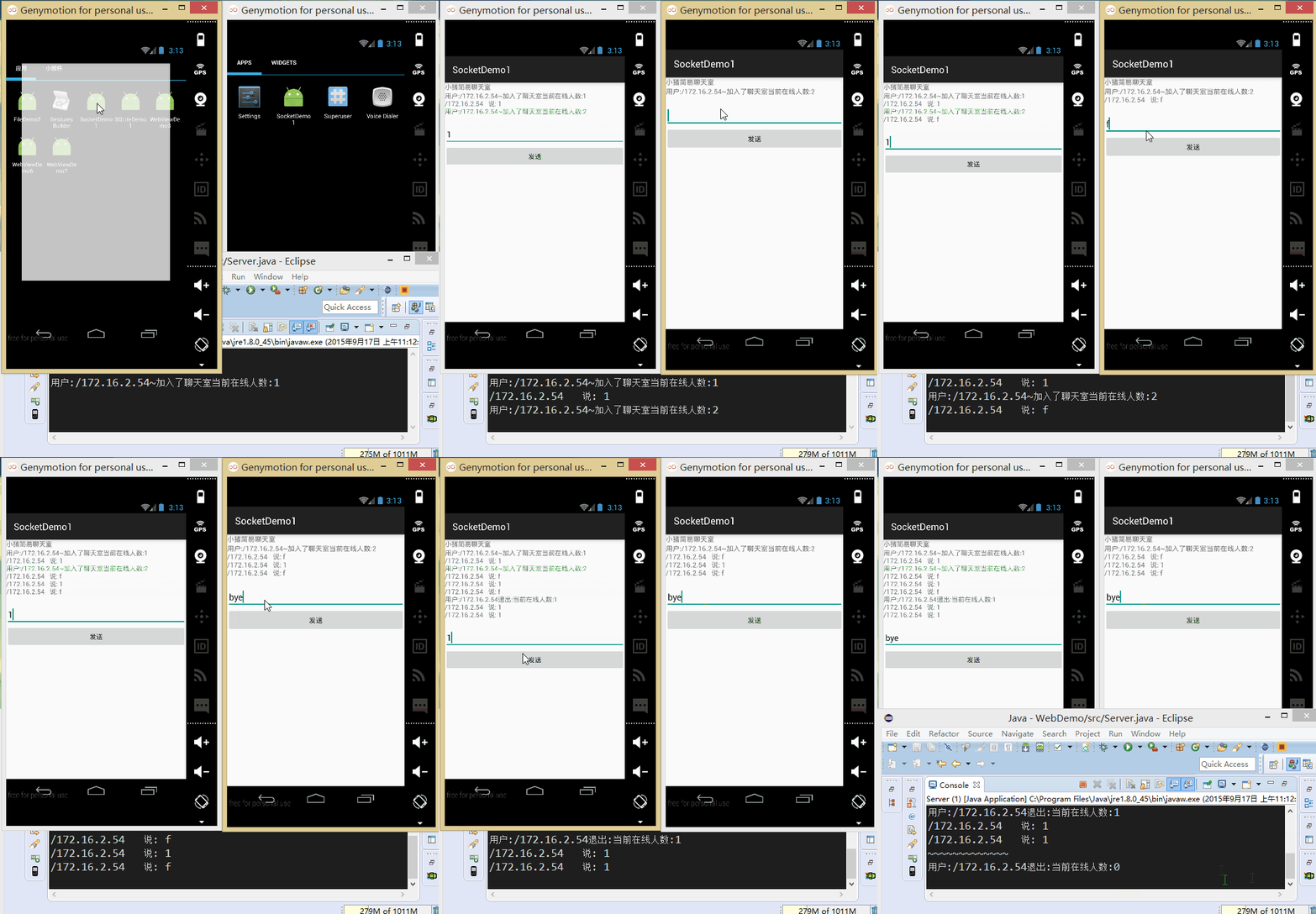
Next, let's write the code:
First is the server. It puts the socket read/write operations into a custom thread. After creating ServerSocket, it calls the accept method in a loop. When a new client connects, it adds the socket to the collection and creates a new thread in the thread pool!
In addition, in the method for reading information, the input string is checked. If it is the string "bye", the socket is removed from the collection and then closed!
Server.java:
public class Server {
    //定义相关的参数,端口,存储Socket连接的集合,ServerSocket对象
    //以及线程池
    private static final int PORT = 12345;
    private List<Socket> mList = new ArrayList<Socket>();
    private ServerSocket server = null;
    private ExecutorService myExecutorService = null;


    public static void main(String[] args) {
        new Server();
    }

    public Server()
    {
        try
        {
            server = new ServerSocket(PORT);
            //创建线程池
            myExecutorService = Executors.newCachedThreadPool();
            System.out.println("服务端运行中...\n");
            Socket client = null;
            while(true)
            {
                client = server.accept();
                mList.add(client);
                myExecutorService.execute(new Service(client));
            }

        }catch(Exception e){e.printStackTrace();}
    }

    class Service implements Runnable
    {
        private Socket socket;
        private BufferedReader in = null;
        private String msg = "";

        public Service(Socket socket) {
            this.socket = socket;
            try
            {
                in = new BufferedReader(new InputStreamReader(socket.getInputStream()));
                 msg = "用户:" +this.socket.getInetAddress() + "~加入了聊天室"
                            +"当前在线人数:" +mList.size();
                this.sendmsg();
            }catch(IOException e){e.printStackTrace();}
        }


        @Override
        public void run() {
            try{
                while(true)
                {
                    if((msg = in.readLine()) != null)
                    {
                        if(msg.equals("bye"))
                        {
                            System.out.println("~~~~~~~~~~~~~");
                            mList.remove(socket);
                            in.close();
                            msg = "用户:" + socket.getInetAddress()
                                    + "退出:" +"当前在线人数:"+mList.size();
                            socket.close();
                            this.sendmsg();
                            break;
                        }else{
                            msg = socket.getInetAddress() + "   说: " + msg;
                            this.sendmsg();
                        }
                    }
                }
            }catch(Exception e){e.printStackTrace();}
        }

        //为连接上服务端的每个客户端发送信息
        public void sendmsg()
        {
            System.out.println(msg);
            int num = mList.size();
            for(int index = 0;index < num;index++)
            {
                Socket mSocket = mList.get(index);
                PrintWriter pout = null;
                try {
                    pout = new PrintWriter(new BufferedWriter(
                            new OutputStreamWriter(mSocket.getOutputStream(),"UTF-8")),true);
                    pout.println(msg);
                }catch (IOException e) {e.printStackTrace();}
            }
        }

    }
}
Then comes the client. The difficulty of the client lies in the need to open another thread, because Android does not allow network operations directly on the main thread, and does not allow operations on the UI in threads other than the main thread. The approach here is to create a new thread by yourself and use a Handler to update the UI. In actual development, doing this directly is not recommended!!!
Layout file:activity_main.xml:
<LinearLayout xmlns:android="http://schemas.android.com/apk/res/android"
    android:layout_width="match_parent"
    android:layout_height="match_parent"
    android:orientation="vertical" >

    <TextView
        android:layout_width="wrap_content"
        android:layout_height="wrap_content"
        android:text="小猪简易聊天室" />
    <TextView
        android:id="@+id/txtshow"
        android:layout_width="match_parent"
        android:layout_height="wrap_content"
        />
    <EditText
        android:id="@+id/editsend"
        android:layout_width="match_parent"
        android:layout_height="wrap_content"
        />
    <Button
        android:id="@+id/btnsend"
        android:layout_width="match_parent"
        android:layout_height="wrap_content"
        android:text="发送"
        />
</LinearLayout>
MainActivity.java:
public class MainActivity extends AppCompatActivity implements Runnable {

    //定义相关变量,完成初始化
    private TextView txtshow;
    private EditText editsend;
    private Button btnsend;
    private static final String HOST = "172.16.2.54";
    private static final int PORT = 12345;
    private Socket socket = null;
    private BufferedReader in = null;
    private PrintWriter out = null;
    private String content = "";
    private StringBuilder sb = null;

    //定义一个handler对象,用来刷新界面
    public Handler handler = new Handler() {
        public void handleMessage(Message msg) {
            if (msg.what == 0x123) {
                sb.append(content);
                txtshow.setText(sb.toString());
            }
        }

        ;
    };


    @Override
    protected void onCreate(Bundle savedInstanceState) {
        super.onCreate(savedInstanceState);
        setContentView(R.layout.activity_main);
        sb = new StringBuilder();
        txtshow = (TextView) findViewById(R.id.txtshow);
        editsend = (EditText) findViewById(R.id.editsend);
        btnsend = (Button) findViewById(R.id.btnsend);

        //当程序一开始运行的时候就实例化Socket对象,与服务端进行连接,获取输入输出流
        //因为4.0以后不能再主线程中进行网络操作,所以需要另外开辟一个线程
        new Thread() {

            public void run() {
                try {
                    socket = new Socket(HOST, PORT);
                    in = new BufferedReader(new InputStreamReader(socket.getInputStream(), "UTF-8"));
                    out = new PrintWriter(new BufferedWriter(new OutputStreamWriter(
                            socket.getOutputStream())), true);
                } catch (IOException e) {
                    e.printStackTrace();
                }
            }
        }.start();

        //为发送按钮设置点击事件
        btnsend.setOnClickListener(new View.OnClickListener() {

            @Override
            public void onClick(View v) {
                String msg = editsend.getText().toString();
                if (socket.isConnected()) {
                    if (!socket.isOutputShutdown()) {
                        out.println(msg);
                    }
                }
            }
        });
        new Thread(MainActivity.this).start();
    }

    //重写run方法,在该方法中输入流的读取
    @Override
    public void run() {
        try {
            while (true) {
                if (socket.isConnected()) {
                    if (!socket.isInputShutdown()) {
                        if ((content = in.readLine()) != null) {
                            content += "\n";
                            handler.sendEmptyMessage(0x123);
                        }
                    }
                }
            }
        } catch (Exception e) {
            e.printStackTrace();
        }
    }
}
Summary of this section:
Alright, this section explained Socket communication based on TCP. The article introduced the Socket communication model, implemented a simple Socket communication example, and wrote an enhanced example: Piggy Chat Room. I believe it will bring convenience to those just getting involved in Socket programming~ Thank you~