Introduction to this section:
In this section, we continue to study the Service component. We will learn some concepts of AIDL cross-process communication in Android. We won't go deep into the source code level; for now, just know what it is and how to use it! Let's start the content of this section. The official documentation corresponding to this section:Binder
1. First Look at the Binder Mechanism
1) What the heck are IBinder and Binder?
Let's see what the official documentation says:

Chinese translation:
IBinder is the base interface for remote objects, and is the core part of a lightweight remote invocation mechanism designed for high performance. But it is used not only for remote calls, but also for in-process calls. This interface defines the protocol for interacting with remote objects. However, do not implement this interface directly; insteadinherit(extends)Binder。
The main API of IBinder istransact(), and the corresponding API isBinder.onTransact(). Through the former, you can send calls to a remote IBinder object, and the latter allows your remote object to respond to received calls. The APIs of IBinder are allSynchronousexecuted, for exampletransact()until the other party'sBinder.onTransact()method call finishes before returning.IPCwith the help of, the same effect is achieved.
Throughtransact()the data sent isParcel, Parcel is a general-purpose buffer that, in addition to data, also carries some metadata describing its contents. The metadata is used to manage references to IBinder objects, so that these references can be preserved when the buffer is moved from one process to another. This ensures that when an IBinder is written to a Parcel and sent to another process, if the other process sends the reference to the same IBinder back to the original process, then the original process can receive the reference to that IBinder that it sent out. This mechanism manages IBinder and Binder across processes like unique identifiers.
The system maintains a thread pool for each process that stores interaction threads. These interaction threads are used to dispatch all IPC calls sent from other processes. For example: when an IPC is sent from process A to process B, the thread in A that issued the call (this thread should not be in the thread pool) blocks ontransact(). A thread in the interaction thread pool of process B receives this call, and it callsBinder.onTransact(), and after completion, returns a Parcel as the result. Then the waiting thread in process A can continue executing after receiving the returned Parcel. In fact, another process looks like a thread of the current process, but it was not created by the current process.
The Binder mechanism also supports recursive calls between processes. For example, process A executes its own IBinder's transact() to call process B's Binder, and process B, in its Binder.onTransact(), uses transact() to initiate a call to process A. Then process A, while waiting for its issued call to return, will also use Binder.onTransact() to respond to process B's transact(). In short, the result of Binder is that it makes us feel that cross-process calls are no different from in-process calls.
When operating on remote objects, you often need to check whether they are valid. There are three methods you can use:
- 1. The transact() method will throw a RemoteException when the process where the IBinder resides no longer exists.
- 2. If the target process does not exist, calling pingBinder() returns false.
- 3. You can use the linkToDeath() method to register an IBinder.DeathRecipient with the IBinder, which is called when the process represented by the IBinder exits.
PS: The Chinese translation is excerpted from:Android Development: What is IBinder
Well, after reading this whole string of content, you might be confused. Here is a brief summary:
IBinder is an interface for inter-process communication provided to us by Android, and we generally do not implement this interface directly. Instead, we implement inter-process communication by inheriting the Binder class! It is one way to implement IPC (inter-process communication) in Android!
2) Brief Analysis of the Binder Mechanism
The Binder mechanism in Android consists of a series of system components:Client, Server, Service Manager, and Binder driver
The approximate call flow is as follows. In addition, Service Manager is quite complex, so we won't study it in detail here!
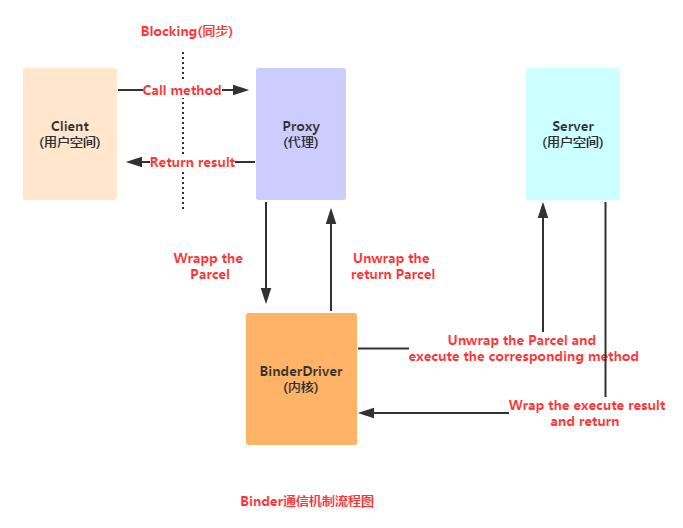
Flow analysis:
->When the Client calls a method in a proxy interface, the method of the proxy interface packages the parameters passed by the Client into a Parcel object;
->Then the proxy interface sends the Parcel object to the Binder driver in the kernel;;
->Then the Server reads the request data in the Binder Driver. If it is sent to itself, it unpacks the Parcel object, processes it, and returns the result;
PS: The methods defined in the proxy interface correspond one-to-one with the methods defined in the Server. In addition, the entire call process is synchronous, that is, while the Server is processing, the Client will be Blocked (locked)! And the definition of the proxy interface mentioned here is what we are about to discuss next:AIDL(Android Interface Definition Language)!
3) Why does Android use the Binder mechanism for inter-process communication?
- Reliability: On mobile devices, a Client-Server based communication method is usually adopted to achieve internal communication between the Internet and the device. Currently, Linux-supported IPC includes traditional pipes, System V IPC, namely message queues/shared memory/semaphores, and sockets. Among these, only sockets support the Client-Server communication method. The Android system provides developers with a wealth of functional interfaces for inter-process communication, such as media playback, sensors, and wireless transmission. These functions are managed by different servers. Developers only need to care about establishing communication between their application's client and the server to use this service. Undoubtedly, if a set of protocols is set up at the underlying layer to implement Client-Server communication, it increases the complexity of the system. Implementing such a complex environment on a phone with limited resources makes reliability difficult to guarantee.
- Transmission performance: Socket is mainly used for inter-process communication across networks and between processes on the same machine, but it has low transmission efficiency and high overhead. Message queues and pipes use a store-and-forward method, that is, data is first copied from the sender's buffer to a buffer opened in the kernel, and then copied from the kernel buffer to the receiver's buffer. This process involves at least two copies. Although shared memory requires no copying, it is complex to control. Compare the number of data copies for various IPC methods. Shared memory: 0 times. Binder: 1 time. Socket/pipe/message queue: 2 times.
- Security: Android is an open platform, so ensuring application security is very important. Android assigns a UID/PID to every installed application, where the process UID can be used to identify the process identity. Traditionally, users could only fill in UID/PID in the data packet, which is unreliable and easily exploited by malicious programs. We require the kernel to add reliable UIDs. Therefore, for reliability, transmission performance, and security, Android has established a new inter-process communication method. — Excerpted from:A Brief Understanding of the Binder Mechanism in Android
Of course, as junior developers, we don't care about the above. The most direct benefit the Binder mechanism brings us is:We don't need to care about how the underlying layer is implemented. We only need to define an interface file according to the AIDL rules, and then call the methods in the interface to complete communication between two processes!
2. Detailed Explanation of AIDL Usage
1) What is AIDL?
Hehe, earlier we mentionedIPCthis term. Its full name is:Interprocess Communication, Because in the Android system, every application runs in its own process, and generally processes cannot directly exchange data with each other. To achieve cross-process communication, Android provides us with the Binder mechanism mentioned above, and the interface language used by this mechanism is:AIDL(Android Interface Definition Language). Its syntax is very simple, and this interface language is not a real programming language; it only defines the communication interface between two processes! The Java code that conforms to the communication protocol is generated by theaidl.exetool. The corresponding interface file is generated in the gen directory, generally an interface like Xxx.java! And this interface contains anStubinner class. In this class, it implementsIBinderthe interface and the custom communication interface. This class will serve as the callback class of the remote Service — it implements the IBinder interface, so it can be used as the return value of Service's onBind() method!
2) AIDL Implements Simple Communication Between Two Processes
Before writing AIDL interface files, we need to know some points for attention when writing AIDL:
AIDL points for attention:
- The interface name must be the same as the AIDL file name.
- In front of interfaces and methods,do not add access modifiers,such as public, private, protected, etc., and cannot use static final!
- The types supported by AIDL by default includeJava primitive types.,String,List,Map,CharSequenceBesides these, all other types need import declarations. For custom types used as parameters or return values, the custom type needs to implement the Parcelable interface. For details, see the later section on passing complex data types.
- Custom types and other interface types generated by AIDL should be explicitly imported in the AIDL description file, even if these classes are in the same package as the defined package.
In addition, if the compiler you use for writing AIDL is Eclipse, pay attention: do not directly create a new file and set it up! If you do, the file cannot be opened, so you cannot write code!
① Directly create a new txt file, write the content, save it as .aidl format, then copy it to the corresponding path.
② Because AIDL is similar to an interface, you can directly create a new interface, write the content, then go to the directory where the corresponding Java file is located and modify the file extension.If you are using Android Studio, unlike Eclipse, if you create an AIDL file the same way as in Eclipse, you will find that the corresponding XXX.java file is not compiled. To create an AIDL file in Android Studio, you need to create a new aidl folder under the main directory, define a package with the same name as the AIDL package, and finally create an aidl file. Then press ctrl + F9 to recompile, and that's it!
The results of successful compilation of the above two methods are as follows; you can find the corresponding AIDL files in the corresponding directories.
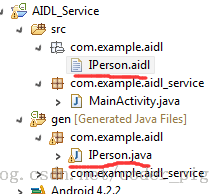
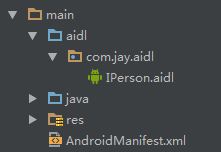
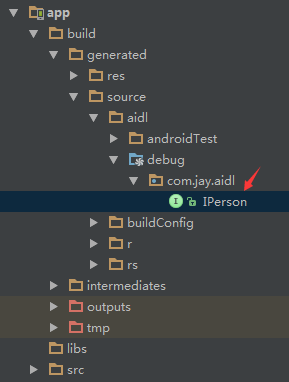
1. Server side:
Step 1:Create an AIDL file:
IPerson.aidl
package com.jay.aidl;

interface IPerson {
    String queryPerson(int num);
}
Let's open IPerson.java and look at the code inside:
IPerson.java
/*
 * This file is auto-generated.  DO NOT MODIFY.
 * Original file: C:\\Code\\ASCode\\AIDLServer\\app\\src\\main\\aidl\\com\\jay\\aidl\\IPerson.aidl
 */
package com.jay.aidl;
public interface IPerson extends android.os.IInterface
{
/** Local-side IPC implementation stub class. */
public static abstract class Stub extends android.os.Binder implements com.jay.aidl.IPerson
{
private static final java.lang.String DESCRIPTOR = "com.jay.aidl.IPerson";
/** Construct the stub at attach it to the interface. */
public Stub()
{
this.attachInterface(this, DESCRIPTOR);
}
/**
 * Cast an IBinder object into an com.jay.aidl.IPerson interface,
 * generating a proxy if needed.
 */
public static com.jay.aidl.IPerson asInterface(android.os.IBinder obj)
{
if ((obj==null)) {
return null;
}
android.os.IInterface iin = obj.queryLocalInterface(DESCRIPTOR);
if (((iin!=null)&&(iin instanceof com.jay.aidl.IPerson))) {
return ((com.jay.aidl.IPerson)iin);
}
return new com.jay.aidl.IPerson.Stub.Proxy(obj);
}
@Override public android.os.IBinder asBinder()
{
return this;
}
@Override public boolean onTransact(int code, android.os.Parcel data, android.os.Parcel reply, int flags) throws android.os.RemoteException
{
switch (code)
{
case INTERFACE_TRANSACTION:
{
reply.writeString(DESCRIPTOR);
return true;
}
case TRANSACTION_queryPerson:
{
data.enforceInterface(DESCRIPTOR);
int _arg0;
_arg0 = data.readInt();
java.lang.String _result = this.queryPerson(_arg0);
reply.writeNoException();
reply.writeString(_result);
return true;
}
}
return super.onTransact(code, data, reply, flags);
}
private static class Proxy implements com.jay.aidl.IPerson
{
private android.os.IBinder mRemote;
Proxy(android.os.IBinder remote)
{
mRemote = remote;
}
@Override public android.os.IBinder asBinder()
{
return mRemote;
}
public java.lang.String getInterfaceDescriptor()
{
return DESCRIPTOR;
}
@Override public java.lang.String queryPerson(int num) throws android.os.RemoteException
{
android.os.Parcel _data = android.os.Parcel.obtain();
android.os.Parcel _reply = android.os.Parcel.obtain();
java.lang.String _result;
try {
_data.writeInterfaceToken(DESCRIPTOR);
_data.writeInt(num);
mRemote.transact(Stub.TRANSACTION_queryPerson, _data, _reply, 0);
_reply.readException();
_result = _reply.readString();
}
finally {
_reply.recycle();
_data.recycle();
}
return _result;
}
}
static final int TRANSACTION_queryPerson = (android.os.IBinder.FIRST_CALL_TRANSACTION + 0);
}
public java.lang.String queryPerson(int num) throws android.os.RemoteException;
}
Here we only care about **asInterface(IBinder)** and the **queryPerson()** method we defined in the interface!
This method converts an object of type IBinder into IPerson type, and generates a proxy object to return the result when necessary!
We can ignore the rest and skip directly to the next step.
Step 2: **Customize our Service class and complete the following operations:**
1) Inherit the Service class, and also define a custom PersonQueryBinder class toinherit the IPerson.Stub class,that is,implement the IPerson interface and the IBinder interface.
2) Instantiate the custom Stub class, override the Service's onBind method, and return a binder object!
AIDLService.java
package com.jay.aidlserver;

import android.app.Service;
import android.content.Intent;
import android.os.IBinder;
import android.os.RemoteException;
import com.jay.aidl.IPerson.Stub;

/**
 * Created by Jay on 2015/8/18 0018.
 */
public class AIDLService extends Service {

    private IBinder binder = new PersonQueryBinder();
    private String[] names = {"B神","艹神","基神","J神","翔神"};

    private String query(int num)
    {
        if(num > 0 && num < 6){
            return names[num - 1];
        }
        return null;
    }

    @Override
    public IBinder onBind(Intent intent) {
        return null;
    }

    private final class PersonQueryBinder extends Stub{
        @Override
        public String queryPerson(int num) throws RemoteException {
            return query(num);
        }
    }
}
Step 3:Register the Service in the AndroidManifest.xml file.
<service android:name=".AIDLService">
            <intent-filter>
                <action android:name="android.intent.action.AIDLService" />
                <category android:name="android.intent.category.DEFAULT" />
            </intent-filter>
        </service>
Here we do not provide an Activity interface, but the Service provided by this app can be called by other apps!
2. Client side:
Directly copy that AIDL file from the server side, then we directly complete it in MainActivity. This is similar to the operation of binding a local Service,
and the process is as follows:
1) Define a custom PersonConnection classimplementing the ServiceConnection interface.
2) Use the PersonConnection object as a parameter and call bindService to bind the remote Service.
bindService(service,conn,BIND_AUTO_CREATE);
ps: The third parameter is to set that if the service is not started, it will be created automatically.
3) Unlike a local Service,the ServiceConnection that binds a remote Service cannot directly obtain the IBinder object returned by the Service's onBind() method; it can only return
the returned IBinder object, but actually only theonBind( )object returned by the method, namely theproxy object.The following processing is needed:
iPerson = IPerson.Stub.asInterface(service);
Then complete the initialization and button events, and that's it.
The specific code is as follows:
MainActivity.java
package com.jay.aidlclient;

import android.content.ComponentName;
import android.content.Intent;
import android.content.ServiceConnection;
import android.os.Bundle;
import android.os.IBinder;
import android.os.RemoteException;
import android.support.v7.app.AppCompatActivity;
import android.view.View;
import android.widget.Button;
import android.widget.EditText;
import android.widget.TextView;

import com.jay.aidl.IPerson;

public class MainActivity extends AppCompatActivity implements View.OnClickListener{

    private EditText edit_num;
    private Button btn_query;
    private TextView txt_name;
    private IPerson iPerson;
    private PersonConnection conn = new PersonConnection();


    @Override
    protected void onCreate(Bundle savedInstanceState) {
        super.onCreate(savedInstanceState);
        setContentView(R.layout.activity_main);
        bindViews();
        //绑定远程Service
        Intent service = new Intent("android.intent.action.AIDLService");
        service.setPackage("com.jay.aidlserver");

        bindService(service, conn, BIND_AUTO_CREATE);
        btn_query.setOnClickListener(this);
    }

    private void bindViews() {
        edit_num = (EditText) findViewById(R.id.edit_num);
        btn_query = (Button) findViewById(R.id.btn_query);
        txt_name = (TextView) findViewById(R.id.txt_name);
    }

    @Override
    public void onClick(View v) {
        String number = edit_num.getText().toString();
        int num = Integer.valueOf(number);
        try {
            txt_name.setText(iPerson.queryPerson(num));
        } catch (RemoteException e) {
            e.printStackTrace();
        }
        edit_num.setText("");
    }

    private final class PersonConnection implements ServiceConnection {
        public void onServiceConnected(ComponentName name, IBinder service) {
            iPerson = IPerson.Stub.asInterface(service);
        }
        public void onServiceDisconnected(ComponentName name) {
            iPerson = null;
        }
    }
}
Next, first start AIDLService, then start AIDLClient, enter the query sequence number, and you can get the corresponding name! Of course, you can also directly start AIDLClient and get the same effect:
The effect diagram is as follows:

3) AIDL Service for Passing Complex Data
In the above example, we only passed an int type parameter, and the server returned a String type parameter. It seems to meet our basic needs, but in actual development, we may need to consider passing complex data types! Below we will learn how to pass complex data to the server! Before we start, let's first understandthe Parcelable interface.!
——Introduction to the Parcelable interface:
I believe everyone who has used serialization basically knows this interface. Besides it, there is another one, Serializable, also used for serialization. However, Parcelable is more lightweight and faster! But writing it is a bit troublesome. Of course, if you use Android Studio (AS), you can use plugins to complete serialization, such as:Android Parcelable Code GeneratorOf course, here we will still teach you step by step to implement this interface~
First,you need to implement:writeToParcelandreadFromPacelThe write method writes the object into the parcel, and the read method reads the object from the parcel. Note that the order of writing properties must be the same as the order of reading.
Next,you need to add a field in this class, calledCREATORofstatic finalan attribute. This attribute needs to implement: android.os.Parcelable.Creator
Then,you need to override the two methods in the interface:createFromParcelThe (Parcel source) method: implements the function of creating a JavaBean instance from source.newArray(int size): creates an array of type T with length size. It only has a simple `return new T[size];` (Here T is the Person class).
Finally, describeContents(): I don't know what this is for either; just return 0! No need to worry about it.
——In addition,,among non-primitive types,exceptStringandCharSequenceall the others require adirection indicator.The direction indicators includein、out、and inout.`in` means set by the client, `out` means set by the server, and `inout` means the value is set by both the client and the server.
Okay, next let's write code and try it (In Android Studio, custom types have some issues that haven't been solved yet, so we switch back to Eclipse~):
Code example:
Define two custom object types: Person and Salary. Person is used as the parameter for calling the remote Service, and Salary is used as the return value! So the first thing to do is create the Person and Salary classes, and they need to implement the Parcelable interface.
1. —Server side
Step 1: Create the Person.aidl and Salary.aidl files. Because they need to implement the Parcelable interface, just the following one statement:
Person.aidl:     parcelable Person;
Salary.aidl:     parcelable Salary;
Step 2: Create the Person class and Salary class separately, implement the Parcelable interface, and override the corresponding methods!
PS: Because later we will get data from the Map collection based on the Person object, we overrode the hashCode and equals methods in Person.java; the Salary class does not need this!
Person.java:
package com.jay.example.aidl;

import android.os.Parcel;
import android.os.Parcelable;

/**
 * Created by Jay on 2015/8/18 0018.
 */
public class Person implements Parcelable{

    private Integer id;
    private String name;

    public Person() {}

    public Person(Integer id, String name) {
        this.id = id;
        this.name = name;
    }

    public Integer getId() {
        return id;
    }

    public void setId(Integer id) {
        this.id = id;
    }

    public void setName(String name) {
        this.name = name;
    }

    public String getName() {
        return name;
    }


    //实现Parcelable必须实现的方法,不知道拿来干嘛的,直接返回0就行了
    @Override
    public int describeContents() {
        return 0;
    }


    //写入数据到Parcel中的方法
    @Override
    public void writeToParcel(Parcel dest, int flags) {
        //把对象所包含的数据写入到parcel中
        dest.writeInt(id);
        dest.writeString(name);
    }

    //必须提供一个名为CREATOR的static final属性 该属性需要实现
    //android.os.Parcelable.Creator<T>接口
    public static final Parcelable.Creator<Person> CREATOR = new Parcelable.Creator<Person>() {
        //从Parcel中读取数据,返回Person对象
        @Override
        public Person createFromParcel(Parcel source) {
            return new Person(source.readInt(),source.readString());
        }
        @Override
        public Person[] newArray(int size) {
            return new Person[size];
        }
    };

    //因为我们集合取出元素的时候是根据Person对象来取得,所以比较麻烦,
    //需要我们重写hashCode()和equals()方法
    @Override
    public int hashCode()
    {
        final int prime = 31;
        int result = 1;
        result = prime * result + ((name == null) ? 0 : name.hashCode());
        return result;
    }
    @Override
    public boolean equals(Object obj)
    {
        if (this == obj)
            return true;
        if (obj == null)
            return false;
        if (getClass() != obj.getClass())
            return false;
        Person other = (Person) obj;
        if (name == null)
        {
            if (other.name != null)
                return false;
        }
        else if (!name.equals(other.name))
            return false;
        return true;
    }
}
<pre><p><strong>Salary.java</strong>~照葫芦画瓢</p>

<pre>
package com.jay.example.aidl;

import android.os.Parcel;
import android.os.Parcelable;

/**
 * Created by Jay on 2015/8/18 0018.
 */
public class Salary implements Parcelable {

    private String type;
    private Integer salary;

    public Salary() {
    }

    public Salary(String type, Integer salary) {
        this.type = type;
        this.salary = salary;
    }

    public String getType() {
        return type;
    }

    public Integer getSalary() {
        return salary;
    }

    public void setType(String type) {
        this.type = type;
    }

    public void setSalary(Integer salary) {
        this.salary = salary;
    }

    @Override
    public int describeContents() {
        return 0;
    }

    @Override
    public void writeToParcel(Parcel dest, int flags) {
        dest.writeString(type);
        dest.writeInt(salary);
    }

    public static final Parcelable.Creator<Salary> CREATOR = new Parcelable.Creator<Salary>() {
        //从Parcel中读取数据,返回Person对象
        @Override
        public Salary createFromParcel(Parcel source) {
            return new Salary(source.readString(), source.readInt());
        }

        @Override
        public Salary[] newArray(int size) {
            return new Salary[size];
        }
    };

    public String toString() {
        return "工作:" + type + "    薪水: " + salary;
    }
}
Step 3: Create an ISalary.aidl file, and write a simple method in it to get salary information:
package com.jay.example.aidl;

import com.jay.example.aidl.Salary;
import com.jay.example.aidl.Person;
interface ISalary
{
    //定义一个Person对象作为传入参数
    //接口中定义方法时,需要制定新参的传递模式,这里是传入,所以前面有一个in
    Salary getMsg(in Person owner);
}
ps:Here, remember that if you are using custom data types, you need to import them!!! Keep it in mind!!!
Step 4:Writing the core Service: define a SalaryBinder class inheriting from Stub, thereby implementing the ISalary and IBinder interfaces; define a Map collection for storing information; override the onBind method and return an instance of the SalaryBinder class!
AidlService.java
package com.jay.example.aidl_complexservice;

import java.util.HashMap;
import java.util.Map;
import com.jay.example.aidl.ISalary.Stub;
import com.jay.example.aidl.Person;
import com.jay.example.aidl.Salary;
import android.app.Service;
import android.content.Intent;
import android.os.IBinder;
import android.os.RemoteException;

public class AidlService extends Service {

    private SalaryBinder salaryBinder;
    private static Map<Person,Salary> ss = new HashMap<Person, Salary>();
    //初始化Map集合,这里在静态代码块中进行初始化,当然你可也以在构造方法中完成初始化
    static
    {
        ss.put(new Person(1, "Jay"), new Salary("码农", 2000));
        ss.put(new Person(2, "GEM"), new Salary("歌手", 20000));
        ss.put(new Person(3, "XM"), new Salary("学生", 20));
        ss.put(new Person(4, "MrWang"), new Salary("老师", 2000));
    }


    @Override
    public void onCreate() {
        super.onCreate();
        salaryBinder = new SalaryBinder();
    }

    @Override
    public IBinder onBind(Intent intent) {
        return salaryBinder;
    }


    //同样是继承Stub,即同时实现ISalary接口和IBinder接口
    public class SalaryBinder extends Stub
    {
        @Override
        public Salary getMsg(Person owner) throws RemoteException {
            return ss.get(owner);
        }
    }

    @Override
    public void onDestroy() {
        System.out.println("服务结束!");
        super.onDestroy();
    }
}
Register the Service:
<service android:name=".AidlService">
    <intent-filter>
        <action android:name="android.intent.action.AIDLService" />
        <category android:name="android.intent.category.DEFAULT" />
    </intent-filter>
</service>
2 — Client-side coding
Step 1:Copy the server's AIDL file. The directory after copying is as follows:
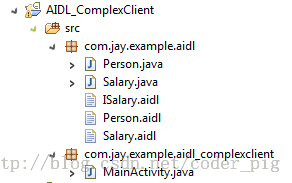
Step 2Write a simple layout, then implement the core MainActivity. Define a ServiceConnection object, override the corresponding methods, similar to the previous ordinary data. Then call bindService, and in the Button click event, obtain the Salary object and display it!
MainActivity.java
package com.jay.example.aidl_complexclient;

import com.jay.example.aidl.ISalary;
import com.jay.example.aidl.Person;
import com.jay.example.aidl.Salary;

import android.app.Activity;
import android.app.Service;
import android.content.ComponentName;
import android.content.Intent;
import android.content.ServiceConnection;
import android.os.Bundle;
import android.os.IBinder;
import android.os.RemoteException;
import android.view.View;
import android.view.View.OnClickListener;
import android.widget.Button;
import android.widget.EditText;
import android.widget.TextView;


public class MainActivity extends Activity {

    private ISalary salaryService;
    private Button btnquery;
    private EditText editname;
    private TextView textshow;
    private ServiceConnection conn = new ServiceConnection() {

        @Override
        public void onServiceDisconnected(ComponentName name) {
            salaryService = null;
        }

        @Override
        public void onServiceConnected(ComponentName name, IBinder service) {
            //返回的是代理对象,要调用这个方法哦!
            salaryService = ISalary.Stub.asInterface(service);
        }
    };


    @Override
    protected void onCreate(Bundle savedInstanceState) {
        super.onCreate(savedInstanceState);
        setContentView(R.layout.activity_main);

        btnquery = (Button) findViewById(R.id.btnquery);
        editname = (EditText) findViewById(R.id.editname);
        textshow = (TextView) findViewById(R.id.textshow);

        Intent it = new Intent();
        it.setAction("com.jay.aidl.AIDL_SERVICE");
        bindService(it, conn, Service.BIND_AUTO_CREATE);

        btnquery.setOnClickListener(new OnClickListener() {
            @Override
            public void onClick(View v) {
                try
                {
                    String name = editname.getText().toString();
                    Salary salary = salaryService.getMsg(new Person(1,name));
                    textshow.setText(name + salary.toString());
                }catch(RemoteException e){e.printStackTrace();}
            }
        });

    }
    @Override
    protected void onDestroy() {
        super.onDestroy();
        this.unbindService(conn);
    }

}
Running screenshot:

PS:This code was previously written with Eclipse. Custom types have some issues under Android Studio. I have not found a solution yet. If anyone knows, please let me know! Extremely grateful! The problems are as follows:
Download links for the code of the two examples (based on Eclipse):
1)Using AIDL to accomplish simple inter-process communication
2)Implementation of an AIDL Service for passing complex data
3. Directly Completing Cross-Process Communication via Binder's onTransact
As mentioned above, Android can use Binder's onTransact method to communicate. Let's simply try it below. Still the previous example of querying a name by index:
Server-side implementation:
/**
 * Created by Jay on 2015/8/18 0018.
 */
public class IPCService extends Service{

    private static final String DESCRIPTOR = "IPCService";
    private final String[] names = {"B神","艹神","基神","J神","翔神"};
    private MyBinder mBinder = new MyBinder();


    private class MyBinder extends Binder {
        @Override
        protected boolean onTransact(int code, Parcel data, Parcel reply, int flags) throws RemoteException {
            switch (code){
                case 0x001: {
                    data.enforceInterface(DESCRIPTOR);
                    int num = data.readInt();
                    reply.writeNoException();
                    reply.writeString(names[num]);
                    return true;
                }
            }
            return super.onTransact(code, data, reply, flags);
        }
    }

    @Override
    public IBinder onBind(Intent intent) {
        return mBinder;
    }
}
Client-side implementation:
public class MainActivity extends AppCompatActivity implements View.OnClickListener{

    private EditText edit_num;
    private Button btn_query;
    private TextView txt_result;
    private IBinder mIBinder;
    private ServiceConnection PersonConnection  = new ServiceConnection()
    {
        @Override
        public void onServiceDisconnected(ComponentName name)
        {
            mIBinder = null;
        }

        @Override
        public void onServiceConnected(ComponentName name, IBinder service)
        {
            mIBinder = service;
        }
    };

    @Override
    protected void onCreate(Bundle savedInstanceState) {
        super.onCreate(savedInstanceState);
        setContentView(R.layout.activity_main);
        bindViews();

        //绑定远程Service
        Intent service = new Intent("android.intent.action.IPCService");
        service.setPackage("com.jay.ipcserver");
        bindService(service, PersonConnection, BIND_AUTO_CREATE);
        btn_query.setOnClickListener(this);
    }

    private void bindViews() {
        edit_num = (EditText) findViewById(R.id.edit_num);
        btn_query = (Button) findViewById(R.id.btn_query);
        txt_result = (TextView) findViewById(R.id.txt_result);
    }

    @Override
    public void onClick(View v) {
        int num = Integer.parseInt(edit_num.getText().toString());
        if (mIBinder == null)
        {
            Toast.makeText(this, "未连接服务端或服务端被异常杀死", Toast.LENGTH_SHORT).show();
        } else {
            android.os.Parcel _data = android.os.Parcel.obtain();
            android.os.Parcel _reply = android.os.Parcel.obtain();
            String _result = null;
            try{
                _data.writeInterfaceToken("IPCService");
                _data.writeInt(num);
                mIBinder.transact(0x001, _data, _reply, 0);
                _reply.readException();
                _result = _reply.readString();
                txt_result.setText(_result);
                edit_num.setText("");
            }catch (RemoteException e)
            {
                e.printStackTrace();
            } finally
            {
                _reply.recycle();
                _data.recycle();
            }
        }
    }
}
Running screenshot:

The code is relatively simple, so I won't explain much. Just modify it as needed for your use!PSCode reference:A Brief Analysis of the Android AIDL Binder Framework
4. Things to Note About Service After Android 5.0:
Today, when implicitly starting a Service, I encountered this problem
Then the program crashed as soon as it started. After a long time, I found out it was Android 5.0's fault. It turns out that after 5.0 there is a new feature, namely:Service Intent must be explitict!Well, you simply cannot implicitly start a Service. The solution is also very simple! For example, for startService:
startService(new Intent(getApplicationContext(), "com.aaa.xxxserver"));Writing it this way will cause the program to crash directly. It should be written like this:startService(new Intent(getApplicationContext(), LoadContactsService.class));
If it is for bindService:Intent service = new Intent("android.intent.action.AIDLService");On the basis of it, add the package name:service.setPackage("com.jay.ipcserver");That will do~
Official documentation:http://developer.android.com/intl/zh-cn/guide/components/intents-filters.html#TypesDocumentation explanation:
Summary of this section:
Alright, that's all for the last section on Service. This section explained the basic concepts of Binder and two ways to implement inter-process communication: achieving cross-process communication through AIDL and Binder.onTransact()! Finally, it also explained the note that after Android 5.0, Services cannot be implicitly started! That's all, thank you~