Introduction to this section:
InAndroid Basic Introductory Tutorial - 8.3.1 Detailed Explanation of Three Drawing Tool ClassesIn the method parameters of Paint, we have already encountered a few things: Paint.Style, Paint.Cap, Paint.Join, etc. These are some enum values in Paint. Through related methods, we can set specific effects by setting these enum values, for example: Style: brush style, Join: shape joining method, etc. In this section, let's go into the source code of Paint and introduce these enum values one by one. In addition, we will also talk about ShadowLayer for setting a Paint with shadow effects! Open the source code of the Paint class, and we can see the following enum values:
Alright, no more chit-chat, let's start the content of this section!
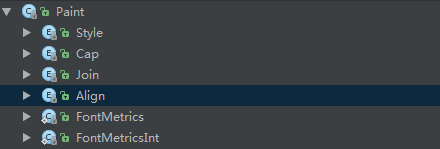
1. Usage of enumerations:
Whether you are familiar or unfamiliar with enums, here I'll paste the calling code related to Paint.Style (an enum with a parameterized constructor) so everyone can get a sense of it:
public enum Style {
    //定义枚举,通过括号赋值
    FILL            (0),
    STROKE          (1),
    FILL_AND_STROKE (2);
    //有参构造方法
    Style(int nativeInt) {
        this.nativeInt = nativeInt;
    }
    final int nativeInt;
}
//设置画笔Style的方法
public void setStyle(Style style) {
    native_setStyle(mNativePaint, style.nativeInt);
}
//JNI设置画笔风格的方法,这里我们无需关注
private static native void native_setStyle(long native_object, int style);
Below, we will explain the functions of these enum values one by one!
1.Paint.Style
Function: the style of the brush Optional values:
- FILL: Fill the interior (default)
- STROKE: Only stroke
- FILL_AND_STROKE: Fill the interior and stroke
Method call:setStyle(Paint.Style style)Corresponding effect:

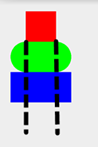
2.Paint.Cap
Function: stroke style, sets the shape of the beginning and end of the brush (the first point and the last point where the brush starts drawing) Optional values:
- BUTT: The stroke is rectangular and does not exceed the path (default)
- ROUND: The stroke is round
- SQUARE: The stroke is square
Method call:setStrokeCap(Paint.Cap cap)
Corresponding effect: Usually, when we draw directly, it is the first one. The other two will have a little extra area compared with the normal one. The second is rounded, and the third is rectangular!
3.Paint.Join
Function: set the state at the joint, for example, if your line is formed by joining multiple small lines, the shape at the joint Optional values:
- MITER: The joint is a sharp angle (default)
- ROUND: The joint is an arc
- BEVEL: The joint is a straight line
Method call:setStrokeJoin(Paint.Join join)
Generally, arcs are used more often; you can refer to the previousDemo of Erasing the Beauty's Clothes
There is also another one:setStrokeMiter(float miter)It sets the slant of the stroke, miter >= 0; For example: with the pencils used in childhood, the effect of a nib cut at an angle is different from one cut perpendicularly. It is mainly used to set the style at the joints of the stroke. You can compare it with setStrokeJoin().
4.Paint.Align
Function: set the alignment of drawn text, that is, relative to the [x,y] starting coordinates of the drawn text Optional values:
- LEFT: Draw text to the left of the starting coordinate
- RIGHT: Draw text to the right of the starting coordinate
- CENTER: Draw text centered on the starting coordinate
Method call:setTextAlign(Paint.Align align)
Corresponding effect: In addition, you can call setTextSize() to set the size of the drawn text~

5. Paint.FontMetrics and Paint.FontMetricsInt
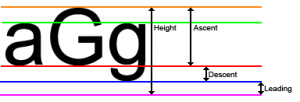
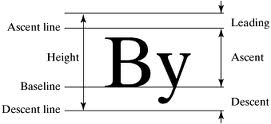
Font properties and measurement. In addition, these two methods are the same, except that the value obtained by the latter is an integer. Here we choose FontMetricsInt to explain it to everyone. There are the following five constant values. The reference point here is: the position of the baseline (Baseline)
- top: The distance from the highest character to the baseline, i.e., the maximum value of ascent
- ascent: The value of the distance from the highest point of characters to the baseline
- descent: The distance from the baseline to the lowest point of characters
- bottom: The distance from the baseline to the lowest character, i.e., the maximum value of descent
- leading: The distance between the descent of the characters in the previous line and the ascent of the next line
Let's look at a few diagrams to help understand:

Then we randomly draw a string of letters and print out these values:canvas.drawText("abcdefghijklnmopqrstuvwxyz", 400, 400, mPaint1);
Log.e("HEHE", mPaint1.getFontMetricsInt().toString());
Run it, and we can see that the printed log is as follows:
After reading, think about it and draw a bit; it should not be hard to understand! Here we just need to know this. If you want to study more deeply, you can refer to this article:Android String Advanced (Part 3): Font Properties and Measurement (FontMetrics)

6. ShadowLayer Sets Shadow Effect
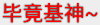
In the TextView section, we taught everyone how to set shadow effect for the text of TextView. In fact, Paint also provides an API for setting shadow effects:setShadowLayer(float radius, float dx, float dy, int shadowColor)
Parameters: radius is the angle of the shadow, dx and dy are the distances of the shadow on the x-axis and y-axis, shadowColor is the color of the shadow. We can write a very simple sentence to verify:
mPaint1.setShadowLayer(5,0,0,Color.BLACK);
canvas.drawText("毕竟基神~", 400, 400, mPaint1);    //绘制文字
The effect is as follows:
In addition, we can also callclearShadowLayer()to clear this shadow layer~
Summary of this section:
Okay, in this section, we explained to you several enum values and static constants in Paint, as well as ShadowLayer for setting shadow effects for the brush or calling clearShadowLayer() to clear the shadow layer. Actually, you can look at the source code and documentation yourself for these things. If you have doubts, just write a Demo, and many things will naturally become clear. Well, that's all, thank you~
In addition, maybe you don't know where you saw my QQ, but if possible, please try to join the group. I have to work on weekdays. One or two people are fine, but if there are a bunch of people, I have the intention but not the energy. Sometimes I help solve problems and end up doing nothing all day. I hope you understand. If you have questions, please join the Piggy Group. The group administrators are very enthusiastic:421858269~
