Introduction to this section:
Reference original text for this section:Android 4.4 WebView Usage Notes.md
Starting from Android 4.4, WebView in Android is no longer based on WebKit, but on Chromium. This change significantly improves WebView performance and provides better support for HTML5, CSS, and JavaScript!
Although Chromium completely replaces the previous WebKit for Android, the Android WebView API interface has not changed and is fully compatible with older versions. The benefit is that apps built on WebView can enjoy the efficiency and power of the Chromium engine without any modification.
For WebView after 4.4, we need to pay attention to the following issues:
1. Multithreading
If you call WebView-related methods in a child thread instead of the UI thread, unpredictable errors may occur. Therefore, when your program needs to use multithreading, please also use the runOnUiThread() method to ensure that your operations on WebView are performed in the UI thread:
runOnUiThread(newRunnable(){
@Override
publicvoid run(){
   // Code for WebView goes here
   }
});
2. Thread blocking
Never block the UI thread; this is a truth of Android development. Although it is a truth, we often unconsciously make mistakes that violate it. A common mistake in development is waiting for JavaScript callbacks on the UI thread. For example:
// This code is BAD and will block the UI thread
webView.loadUrl("javascript:fn()");
while(result ==null) {
    Thread.sleep(100);
}
Never do this. Android 4.4 provides a new API to do this. evaluateJavascript() is specifically for executing JavaScript code asynchronously.
3. The evaluateJavascript() method
It is specifically used to asynchronously call JavaScript methods and can obtain a callback result.
Example:
mWebView.evaluateJavascript(script, new ValueCallback<String>() {
 @Override
 public void onReceiveValue(String value) {
      //TODO
 }
});
4. Handling URL redirects in WebView
The new WebView imposes stricter restrictions on URL redirects with custom schemes. When you implement the shouldOverrideUrlLoading() or shouldInterceptRequest() callback, WebView will only redirect if the redirect URL is a legal URL. For example, if you use a URL like this:
<a href="showProfile.html">Show Profile</a>
shouldOverrideUrlLoading() will not be called.
The correct way to use it is:
<a href="showProfile.html">Show Profile</a>
The corresponding way to detect URL redirects:
// The URL scheme should be non-hierarchical (no trailing slashes)
 privatestaticfinalString APP_SCHEME ="example-app:";
 @Override
 publicboolean shouldOverrideUrlLoading(WebView view,String url){
     if(url.startsWith(APP_SCHEME)){
         urlData =URLDecoder.decode(url.substring(APP_SCHEME.length()),"UTF-8");
         respondToData(urlData);
         returntrue;
     }
     returnfalse;
}
Of course, you can also use it like this:
webView.loadDataWithBaseURL("example-app://example.co.uk/", HTML_DATA,null,"UTF-8",null);
5. UserAgent changes
If your app's server-side program does different things based on the UserAgent sent by the client, you need to note that in the new version of WebView, the UserAgent has undergone subtle changes:
Mozilla/5.0 (Linux; Android 4.4; Nexus 4 Build/KRT16H)
AppleWebKit/537.36(KHTML, like Gecko) Version/4.0 Chrome/30.0.0.0
Mobile Safari/537.36
UsegetDefaultUserAgent()You can obtain the default UserAgent with this method, or you can use:
mWebView.getSettings().setUserAgentString(ua);
mWebView.getSettings().getUserAgentString();
to set and get a custom UserAgent.
6. Notes on using addJavascriptInterface()
Starting from Android 4.2, only Java methods declared with @JavascriptInterface can be called by JavaScript. For example:
class JsObject {
    @JavascriptInterface
    public String toString() { return "injectedObject"; }
}

webView.addJavascriptInterface(new JsObject(), "injectedObject");
webView.loadData("", "text/html", null);
webView.loadUrl("javascript:alert(injectedObject.toString())");
7.Remote Debugging
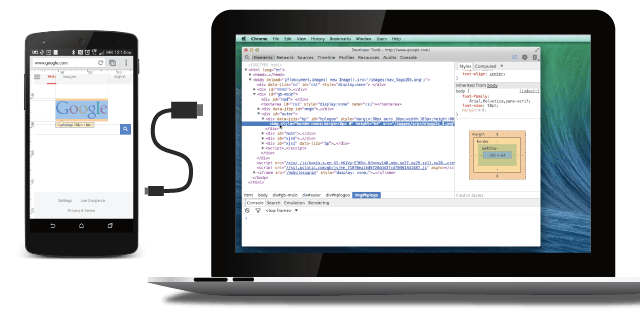
The new WebView also provides a great feature: using Chrome to debug programs running in your WebView. For details, see:remote-debuggingPS: You need a ladder (VPN)~ You can also directly search Baidu for remote-debugging to learn more and how to use it!
Solving the problem of reading contacts on the N5 from the previous section:
Haha, after reading the above, we know that after Android 4.2, only Java methods declared with @JavascriptInterface can be called by JavaScript. So we added @JavascriptInterface to the two previous methods.
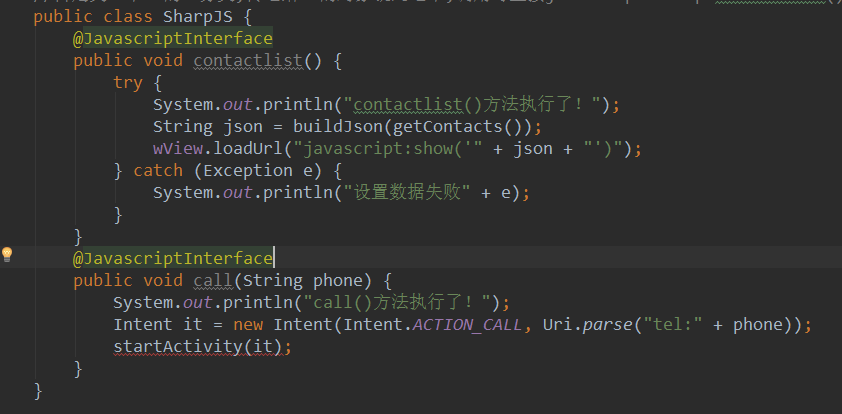
But after adding it, the contact list we wanted did not appear as expected. Why? By checking the Log, we found the following message:

It roughly means: all WebView methods should be called in the same thread, but the contactlist method here was called in the JavaBridge thread! So we need to put the stuff in contactlist into the same thread. One solution is as follows:
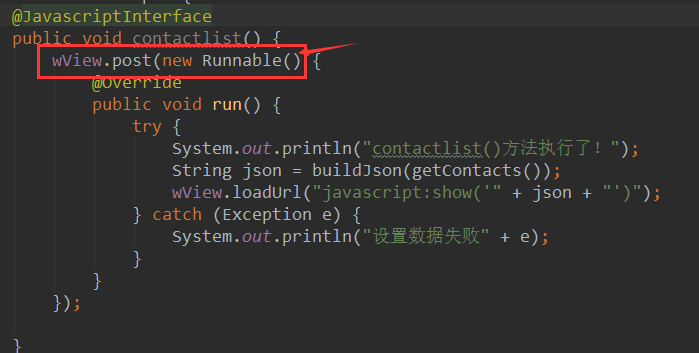
Haha, then run the program. Magically, we can read the contacts on our N5 phone~
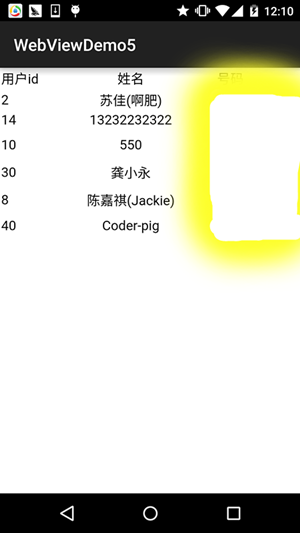
Similarly, the first example can also be solved in this way~
Summary of this section:
In this section, we went through the matters needing attention for WebView after Android 4.4, and some solutions to the N5 problem from the previous section~ I believe this will bring convenience to everyone when using WebView in actual development~ Thank you.