Section Introduction:
This section brings you several controls provided by Android for displaying time. They are: TextClock, AnalogClock, Chronometer. There is also an outdated DigitalClock, but we won't cover it! Alright, let's start this section!
1. TextClock (Text Clock)
TextClock is a control introduced after Android 4.2 (API 17) to replace DigitalClock!
TextClock can display the current date and time in string format, so it is recommended to use TextClock after Android 4.2.
This control is recommended for use in 24-hour Android systems. TextClock provides two different formats: one displays time and date in 24-hour format, and the other displays time and date in 12-hour format. Most people prefer the default settings.
You can call the is24HourModeEnabled() method provided by TextClock to check whether the system is using 24-hour time display! In 24-hour mode:
- If the time is not obtained, first use the return value of getFormat24Hour();
- If retrieval fails, use the return value of getFormat12Hour();
- If all above fail, use the default;
In addition, it provides us with the following methods, and the corresponding get methods:
| Attribute Name | Related Method | Description |
|---|---|---|
| android:format12Hour | setFormat12Hour(CharSequence) | Set the 12-hour format |
| android:format24Hour | setFormat24Hour(CharSequence) | Set the 24-hour format |
| android:timeZone | setTimeZone(String) | Set the time zone |
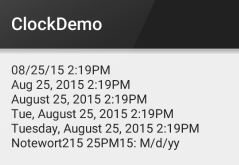
Actually, most of the time is spent on defining the time format, that is, the CharSequence inside! Here are common usage patterns and results:
<TextClock
        android:layout_width="wrap_content"
        android:layout_height="wrap_content"
        android:format12Hour="MM/dd/yy h:mmaa"/>
    <TextClock
        android:layout_width="wrap_content"
        android:layout_height="wrap_content"
        android:format12Hour="MMM dd, yyyy h:mmaa"/>
    <TextClock
        android:layout_width="wrap_content"
        android:layout_height="wrap_content"
        android:format12Hour="MMMM dd, yyyy h:mmaa"/>
    <TextClock
        android:layout_width="wrap_content"
        android:layout_height="wrap_content"
        android:format12Hour="E, MMMM dd, yyyy h:mmaa"/>
    <TextClock
        android:layout_width="wrap_content"
        android:layout_height="wrap_content"
        android:format12Hour="EEEE, MMMM dd, yyyy h:mmaa"/>
    <TextClock
        android:layout_width="wrap_content"
        android:layout_height="wrap_content"
        android:format12Hour="Noteworthy day: 'M/d/yy"/>
Running result:
PS:Also, minsdk must be greater than or equal to 17!
2. AnalogClock (Analog Clock)
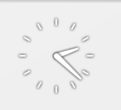
It is like the image below:
On the official website, we can see these three attributes:
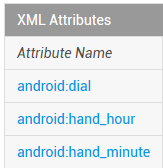
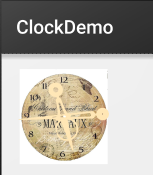
They are respectively: dial background, hour hand, and minute hand images, which we can customize ourselves:
The sample code is as follows:
<AnalogClock
        android:layout_width="100dp"
        android:layout_height="100dp"
        android:dial="@mipmap/ic_c_bg"
        android:hand_hour="@mipmap/zhen_shi"
        android:hand_minute="@mipmap/zhen_fen" />
Running result:
3. Chronometer (Timer)
As the title says, it is a simple timer. Let's go straight to a usage example:
Usage example:
Implementation code:
Layout code:
<LinearLayout xmlns:android="http://schemas.android.com/apk/res/android"
    xmlns:tools="http://schemas.android.com/tools"
    android:layout_width="match_parent"
    android:layout_height="match_parent"
    android:orientation="vertical"
    tools:context=".MainActivity">


    <Chronometer
        android:id="@+id/chronometer"
        android:layout_width="fill_parent"
        android:layout_height="wrap_content"
        android:gravity="center"
        android:textColor="#FF0000"
        android:textSize="60dip" />

    <LinearLayout
        android:layout_width="fill_parent"
        android:layout_height="wrap_content"
        android:layout_margin="10dip"
        android:orientation="horizontal">

        <Button
            android:id="@+id/btnStart"
            android:layout_width="fill_parent"
            android:layout_height="wrap_content"
            android:layout_weight="1"
            android:text="开始记时" />

        <Button
            android:id="@+id/btnStop"
            android:layout_width="fill_parent"
            android:layout_height="wrap_content"
            android:layout_weight="1"
            android:text="停止记时" />

        <Button
            android:id="@+id/btnReset"
            android:layout_width="fill_parent"
            android:layout_height="wrap_content"
            android:layout_weight="1"
            android:text="重置" />

        <Button
            android:id="@+id/btn_format"
            android:layout_width="wrap_content"
            android:layout_height="wrap_content"
            android:text="格式化" />
    </LinearLayout>

</LinearLayout>
MainActivity.java
public class MainActivity extends AppCompatActivity implements View.OnClickListener,Chronometer.OnChronometerTickListener{

    private Chronometer chronometer;
    private Button btn_start,btn_stop,btn_base,btn_format;

    @Override
    protected void onCreate(Bundle savedInstanceState) {
        super.onCreate(savedInstanceState);
        setContentView(R.layout.activity_main);
        initView();
    }

    private void initView() {
        chronometer = (Chronometer) findViewById(R.id.chronometer);
        btn_start = (Button) findViewById(R.id.btnStart);
        btn_stop = (Button) findViewById(R.id.btnStop);
        btn_base = (Button) findViewById(R.id.btnReset);
        btn_format = (Button) findViewById(R.id.btn_format);

        chronometer.setOnChronometerTickListener(this);
        btn_start.setOnClickListener(this);
        btn_stop.setOnClickListener(this);
        btn_base.setOnClickListener(this);
        btn_format.setOnClickListener(this);

    }

    @Override
    public void onClick(View v) {
        switch (v.getId()){
            case R.id.btnStart:
                chronometer.start();// 开始计时
                break;
            case R.id.btnStop:
                chronometer.stop();// 停止计时
                break;
            case R.id.btnReset:
                chronometer.setBase(SystemClock.elapsedRealtime());// 复位
                break;
            case R.id.btn_format:
                chronometer.setFormat("Time:%s");// 更改时间显示格式
                break;
        }
    }

    @Override
    public void onChronometerTick(Chronometer chronometer) {
        String time = chronometer.getText().toString();
        if(time.equals("00:00")){
            Toast.makeText(MainActivity.this,"时间到了~",Toast.LENGTH_SHORT).show();
        }
    }
}
Running screenshot:
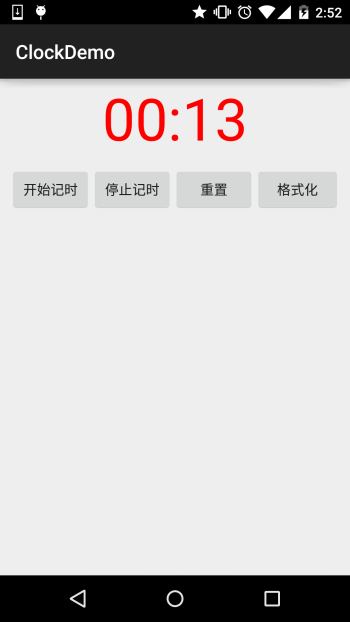
Section Summary:
This section briefly introduced three components: TextClock, AnalogClock, and Chronometer. As you can see from the length, these things are not used much, almost never... Just know about them, the usage is also very simple... That's it, this section ends here. Thanks.