Introduction to This Section:
In the previous section, we already learned the basic usage of Bitmap. In this section, we will discuss the OOM issues caused by Bitmap. You may or may not have encountered OOM issues caused by Bitmap in actual development. In this section, we will study this topic: understand what OOM is, why it causes OOM, and improve OOM issues caused by Bitmap.
1. What is OOM? Why does it cause OOM?
Answer:Out Of Memory(Out of Memory). We all know that the Android system allocates an independent workspace for each APP, or allocates a separate Dalvik virtual machine, so that each APP can run independently without affecting each other! Android has a maximum memory limit for each Dalvik virtual machine. If the currently occupied memory plus the memory resources we apply for exceeds this limit, the system will throw an OOM error! In addition, don't confuse this with RAM. Even if there is more than 1G of RAM remaining, OOM can still occur! Don't equate RAM (physical memory) with OOM! In addition, if RAM is insufficient, the application is killed, not just OOM! The maximum memory standard in Dalvik varies for different devices. You can call:
ActivityManager activityManager = (ActivityManager)context.getSystemService(Context.ACTIVITY_SERVICE);
Log.e("HEHE","最大内存:" + activityManager.getMemoryClass());
to get the normal maximum memory standard, or directly type in the command line:
adb shell getprop | grep dalvik.vm.heapgrowthlimit
You can also open the system source code /system/build.prop file, and look at this part of the information in the file to find out:
dalvik.vm.heapstartsize=8m
dalvik.vm.heapgrowthlimit=192m
dalvik.vm.heapsize=512m
dalvik.vm.heaptargetutilization=0.75
dalvik.vm.heapminfree=2m
dalvik.vm.heapmaxfree=8m
There are three places we care about: heapstartsize is the initial size of the heap memory, heapgrowthlimit is the maximum heap memory size of a standard application, and heapsize is the maximum heap memory size of an application set to use android:largeHeap!
Here I tested the normal maximum memory allocation standards of a few devices at hand:
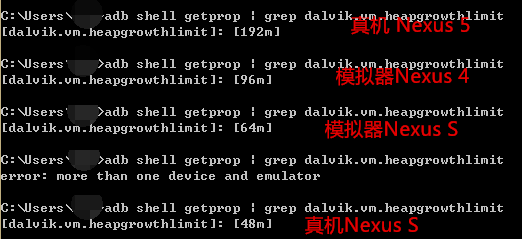
You can also try your own device.
Alright, enough digression. Regarding the generation of OOM problems, we will stop here. If we go further, we would reach memory management, which is a big topic and too hard to tackle now... Below, let's look at some tips for avoiding Bitmap OOM!
2. Summary of Tips to Avoid OOM Caused by Bitmap
1) Use a low-memory-usage encoding method
As mentioned in the previous sectionBitmapFactory.OptionsIn this class, we can set its inPreferredConfig property, which defaults toBitmap.Config.ARGB_8888, we can change it to:Bitmap.Config.ARGB_4444
Bitmap.Config ARGB_4444: each pixel occupies four bits, i.e., A=4, R=4, G=4, B=4, so a pixel occupies 4+4+4+4=16 bits
Bitmap.Config ARGB_8888: each pixel occupies eight bits, i.e., A=8, R=8, G=8, B=8, so a pixel occupies 8+8+8+8=32 bits
By default, ARGB_8888 is used, which means one pixel occupies 4 bytes!
2) Image compression
Still using BitmapFactory.Options, we can useinSampleSizeto set the scaling factor. For example, setting 2 means the width and height become 1/2 of the original, and the image becomes 1/4 of the original. If no scaling is needed, set it to 1. However, you cannot compress blindly. After all, if this value is too small, the image will be very blurry, and you need to avoid stretching and distortion. Therefore, we need to dynamically calculate the appropriate value of inSampleSize in the program. Options also has such a method:inJustDecodeBoundsAfter setting this parameter to true, decodeFile will not allocate memory space, but it can calculate the width and height of the original image. Call options.outWidth/outHeightto get the width and height of the image, then through a certain algorithm, you can get a suitable inSampleSize. Thanks here toJie Shenfor providing the code — excerpted from Hongyang's blog!
public static int caculateInSampleSize(BitmapFactory.Options options, int reqWidth, int reqHeight) {
    int width = options.outWidth;
    int height = options.outHeight;
    int inSampleSize = 1;
    if (width > reqWidth || height > reqHeight) {
        int widthRadio = Math.round(width * 1.0f / reqWidth);
        int heightRadio = Math.round(height * 1.0f / reqHeight);
        inSampleSize = Math.max(widthRadio, heightRadio);
    }
    return inSampleSize;
}
Then you can use the above method:
BitmapFactory.Options options = new BitmapFactory.Options();
options.inJustDecodeBounds = true; // 设置了此属性一定要记得将值设置为false
Bitmap bitmap = null;
bitmap = BitmapFactory.decodeFile(url, options);
options.inSampleSize = computeSampleSize(options,128,128);
options.inPreferredConfig = Bitmap.Config.ARGB_4444;
/* 下面两个字段需要组合使用 */
options.inPurgeable = true;
options.inInputShareable = true;
options.inJustDecodeBounds = false;
try {
    bitmap = BitmapFactory.decodeFile(url, options);
} catch (OutOfMemoryError e) {
        Log.e(TAG, "OutOfMemoryError");
}
3. Recycle images promptly
If a large number of Bitmap objects are referenced and the application does not need to display all images at the same time, you can promptly recycle the Bitmap objects that are not needed temporarily. For some scenarios where the usage of images is clearly known, you can actively call recycle to reclaim them, such as images on the guide page: recycle them after use. For frame animation, load one, draw one, release one! Load when in use, and directly set to null or recycle when not displayed! For example: imageView.setImageResource(0); However, in some cases, there will be inefficient things like repeatedly loading, releasing, and reloading a specific image...
4. Other methods
I have not used the following methods. You can consult relevant materials on your own:
1. Simply use SoftReference to manage image resources
Create a HashMap of SoftReference. When using an image, first check whether this HashMap has a SoftReference and whether the image in the SoftReference is empty. If it is empty, load the image into the SoftReference and add it to the HashMap. There is no need to explicitly handle image recycling and release in the code; GC will automatically handle resource release. This method is simple and practical, and can avoid to a certain extent the inefficiency of repeatedly loading and releasing in the previous method. But it is not optimized enough.
Sample code:
private Map<String, SoftReference<Bitmap>> imageMap
                                           = new HashMap<String, SoftReference<Bitmap>>();

public Bitmap loadBitmap(final String imageUrl,final ImageCallBack imageCallBack) {
    SoftReference<Bitmap> reference = imageMap.get(imageUrl);
    if(reference != null) {
        if(reference.get() != null) {
            return reference.get();
        }
    }
    final Handler handler = new Handler() {
        public void handleMessage(final android.os.Message msg) {
            //加入到缓存中
            Bitmap bitmap = (Bitmap)msg.obj;
            imageMap.put(imageUrl, new SoftReference<Bitmap>(bitmap));
            if(imageCallBack != null) {
                imageCallBack.getBitmap(bitmap);
            }
        }
    };
    new Thread(){
        public void run() {
            Message message = handler.obtainMessage();
            message.obj = downloadBitmap(imageUrl);
            handler.sendMessage(message);
        }
    }.start();
    return null ;
}

// 从网上下载图片
private Bitmap downloadBitmap (String imageUrl) {
    Bitmap bitmap = null;
    try {
        bitmap = BitmapFactory.decodeStream(new URL(imageUrl).openStream());
        return bitmap ;
    } catch (Exception e) {
        e.printStackTrace();
        return null;
    }
}
public interface ImageCallBack{
    void getBitmap(Bitmap bitmap);
}
2. LruCache + SD card caching approach
Since Android 3.1, the official provides LruCache for cache processing. When the size of stored images exceeds the value set by LruCache, the least recently used images will be recycled, and the system will automatically free memory!
Usage example:
Steps:
1) First, set the memory size of the cached images. Here I set it to 1/8 of the phone's memory. How to get the phone's memory: int MAXMEMONRY = (int) (Runtime.getRuntime() .maxMemory() / 1024);
2) The key-value pairs in LruCache are the URL and the corresponding image.
3) Override a method called sizeOf, which returns the number of images.
private LruCache<String, Bitmap> mMemoryCache;
private LruCacheUtils() {
    if (mMemoryCache == null)
        mMemoryCache = new LruCache<String, Bitmap>(
                MAXMEMONRY / 8) {
            @Override
            protected int sizeOf(String key, Bitmap bitmap) {
                // 重写此方法来衡量每张图片的大小,默认返回图片数量。
                return bitmap.getRowBytes() * bitmap.getHeight() / 1024;
            }

            @Override
            protected void entryRemoved(boolean evicted, String key,
                    Bitmap oldValue, Bitmap newValue) {
                Log.v("tag", "hard cache is full , push to soft cache");

            }
        };
}
4) The following methods are: clear the cache, add an image to the cache, get an image from the cache, and remove an image from the cache.
Removing and clearing the cache is a must, because improper handling of the image cache will cause out-of-memory errors, so you must pay attention.
public void clearCache() {
    if (mMemoryCache != null) {
        if (mMemoryCache.size() > 0) {
            Log.d("CacheUtils",
                    "mMemoryCache.size() " + mMemoryCache.size());
            mMemoryCache.evictAll();
            Log.d("CacheUtils", "mMemoryCache.size()" + mMemoryCache.size());
        }
        mMemoryCache = null;
    }
}

public synchronized void addBitmapToMemoryCache(String key, Bitmap bitmap) {
    if (mMemoryCache.get(key) == null) {
        if (key != null && bitmap != null)
            mMemoryCache.put(key, bitmap);
    } else
        Log.w(TAG, "the res is aready exits");
}

public synchronized Bitmap getBitmapFromMemCache(String key) {
    Bitmap bm = mMemoryCache.get(key);
    if (key != null) {
        return bm;
    }
    return null;
}

/**
 * 移除缓存
 *
 * @param key
 */
public synchronized void removeImageCache(String key) {
    if (key != null) {
        if (mMemoryCache != null) {
            Bitmap bm = mMemoryCache.remove(key);
            if (bm != null)
                bm.recycle();
        }
    }
}
The above content is excerpted from —Image caching: memory cache technology LruCache, soft references
Summary of This Section:
In this section, we explained the cause of OOM problems and summarized some solutions found online for avoiding OOM caused by Bitmap. Because the APPs my company makes are all map-related and rarely involve images, the author has never encountered OOM problems, so I am not very familiar with this. Later, in the advanced course on memory management, we will slowly deal with this OOM issue. Okay, that's it for this section, thanks.
References: Analysis and Solutions of OOM Problems in Android Applications