Introduction to This Section:
In the previous section, we learned about network programming in Android and also studied the basic concepts of HTTP. In this section, we will learn about HTTP request headers and response headers. Of course, you can also treat this section as a document and look it up when needed.
1. HTTP Request Message Headers:
Here is the figure from the previous section. Based on the table given below, you can get a feel for the functions of the relevant request headers. PS: The first line is the request line: request method + resource name + HTTP protocol version number. In addition, the request headers only provide information to the server, and it is up to the server to decide how to handle it.
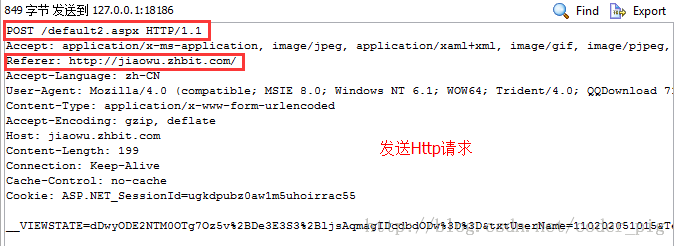
HTTP Request Header Reference Table:
| Header | Explanation | Example |
|---|---|---|
| Accept | Specifies the content types the client can accept | Accept: text/plain, text/html |
| Accept-Charset | The character encoding sets the browser can accept. | Accept-Charset: iso-8859-5 |
| Accept-Encoding | Specifies the compression encoding types for web server returned content that the browser can support. | Accept-Encoding: compress, gzip |
| Accept-Language | Languages the browser can accept | Accept-Language: en,zh |
| Accept-Ranges | Can request one or more sub-ranges of a web page entity | Accept-Ranges: bytes |
| Authorization | Authorization certificate for HTTP authorization | Authorization: Basic QWxhZGRpbjpvcGVuIHNlc2FtZQ== |
| Cache-Control | Specifies the caching mechanism that requests and responses follow | Cache-Control: no-cache |
| Connection | Indicates whether a persistent connection is required. (HTTP 1.1 uses persistent connections by default) | Connection: close |
| Cookie | When an HTTP request is sent, all cookie values stored under the requested domain name are sent to the web server along with the request. | Cookie: $Version=1; Skin=new; |
| Content-Length | Length of the request content | Content-Length: 348 |
| Content-Type | MIME information corresponding to the request entity | Content-Type: application/x-www-form-urlencoded |
| Date | Date and time the request was sent | Date: Tue, 15 Nov 2010 08:12:31 GMT |
| Expect | Specific server behavior requested | Expect: 100-continue |
| From | Email of the user making the request | From: user@email.com |
| Host | Specifies the domain name and port number of the requested server | Host: www.zcmhi.com |
| If-Match | Only valid if the request content matches the entity | If-Match: "737060cd8c284d8af7ad3082f209582d" |
| If-Modified-Since | The request succeeds only if the requested part has been modified after the specified time; if not modified, a 304 code is returned | If-Modified-Since: Sat, 29 Oct 2010 19:43:31 GMT |
| If-None-Match | Returns a 304 code if the content has not changed. The parameter is the Etag previously sent by the server, compared with the server's returned Etag to determine whether it has changed | If-None-Match: "737060cd8c284d8af7ad3082f209582d" |
| If-Range | If the entity has not changed, the server sends the part the client lost; otherwise, it sends the entire entity. The parameter is also Etag | If-Range: "737060cd8c284d8af7ad3082f209582d" |
| If-Unmodified-Since | The request succeeds only if the entity has not been modified after the specified time | If-Unmodified-Since: Sat, 29 Oct 2010 19:43:31 GMT |
| Max-Forwards | Limits the time information is transmitted through proxies and gateways | Max-Forwards: 10 |
| Pragma | Used to include implementation-specific directives | Pragma: no-cache |
| Proxy-Authorization | Authorization certificate for connecting to a proxy | Proxy-Authorization: Basic QWxhZGRpbjpvcGVuIHNlc2FtZQ== |
| Range | Request only a part of the entity, specifying the range | Range: bytes=500-999 |
| Referer | The address of the previous webpage, which the current request follows; that is, the referrer | Referer: http://blog.csdn.net/coder_pig |
| TE | The transfer encodings the client is willing to accept, and notifies the server to accept trailing header information | TE: trailers,deflate;q=0.5 |
| Upgrade | Specifies a certain transfer protocol to the server so that the server can convert (if supported) | Upgrade: HTTP/2.0, SHTTP/1.3, IRC/6.9, RTA/x11 |
| User-Agent | The content of User-Agent contains user information about the requester | User-Agent: Mozilla/5.0 (Linux; X11) |
| Via | Notifies the intermediate gateway or proxy server of the address and communication protocol | Via: 1.0 fred, 1.1 nowhere.com (Apache/1.1) |
| Warning | Warning information about the message entity | Warn: 199 Miscellaneous warning |
2. HTTP Response Headers:
Here is the figure from the previous section. PS: The first line is, in order: protocol version, status code. 302 means it is not here, but it is in another place, and the page is redirected via the Location header.
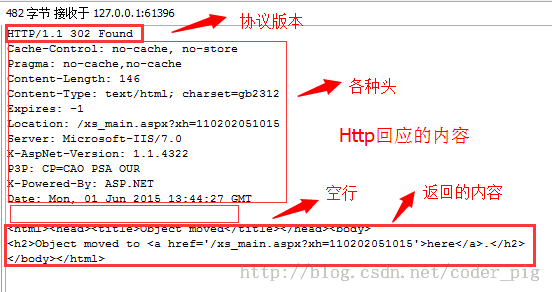
HTTP Response Header Reference Table:
| Header | Explanation | Example |
|---|---|---|
| Accept-Ranges | Indicates whether the server supports the specified range request and which type of partial request | Accept-Ranges: bytes |
| Age | Estimated time from the origin server to the proxy cache (in seconds, non-negative) | Age: 12 |
| Allow | Valid request behavior for a certain network resource; if not allowed, returns 405 | Allow: GET, HEAD |
| Cache-Control | Tells all caching mechanisms whether caching is allowed and which type | Cache-Control: no-cache |
| Content-Encoding | Compression encoding types supported by the web server for returned content | Content-Encoding: gzip |
| Content-Language | Language of the response body | Content-Language: en,zh |
| Content-Length | Length of the response body | Content-Length: 348 |
| Content-Location | Alternative address for the requested resource | Content-Location: /index.htm |
| Content-MD5 | MD5 checksum of the returned resource | Content-MD5: Q2hlY2sgSW50ZWdyaXR5IQ== |
| Content-Range | Byte position of this part within the entire response body | Content-Range: bytes 21010-47021/47022 |
| Content-Type | MIME type of the returned content | Content-Type: text/html; charset=utf-8 |
| Date | Time the origin server sent the message | Date: Tue, 15 Nov 2010 08:12:31 GMT |
| ETag | Current value of the entity tag for the request variable | ETag: "737060cd8c284d8af7ad3082f209582d" |
| Expires | Date and time the response expires | Expires: Thu, 01 Dec 2010 16:00:00 GMT |
| Last-Modified | Last modification time of the requested resource | Last-Modified: Tue, 15 Nov 2010 12:45:26 GMT |
| Location | Used to redirect the recipient to a non-requested URL to complete the request or identify a new resource | Location: http://blog.csdn.net/coder_pig |
| Pragma | Contains implementation-specific directives that may apply to any recipient in the response chain | Pragma: no-cache |
| Proxy-Authenticate | It indicates the authentication scheme and parameters applicable to the proxy for this URL | Proxy-Authenticate: Basic |
3. Verifying the Role of Response Headers with Code:
Okay, after reading so many conceptual things, how can we not get our hands dirty? Right? So let's write some simple code to verify the functions of some common response headers, so as to deepen our understanding. Here, the server side will be implemented with the simplest Servlet. If you don't know Java Web, just copy the code, configure web.xml, and fill in the Servlet class name, for example:
<servlet>
    <servlet-name>FirstServlet</servlet-name>
    <servlet-class>com.jay.server.FirstServlet</servlet-class>
</servlet>
<servlet-mapping>
    <servlet-name>FirstServlet</servlet-name>
    <url-pattern>/FirstServlet</url-pattern>
</servlet-mapping>
Just change it to the corresponding class name!
1) Implement page redirection via Location
Implementation code:
package com.jay.http.test;

import java.io.IOException;
import javax.servlet.ServletException;
import javax.servlet.http.HttpServlet;
import javax.servlet.http.HttpServletRequest;
import javax.servlet.http.HttpServletResponse;

public class ServletOne extends HttpServlet {
    @Override
    protected void doGet(HttpServletRequest req, HttpServletResponse resp)
            throws ServletException, IOException {
        //告诉浏览器响应码,以及重定向页面
        resp.setStatus(302);
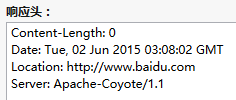
        resp.setHeader("Location", "http://www.baidu.com");
    }
    @Override
    protected void doPost(HttpServletRequest req, HttpServletResponse resp)
            throws ServletException, IOException {
        this.doGet(req, resp);
    }
}
Running result:
When we visit http://localhost:8080/HttpTest/ServletOne, we will find that the page redirects to Baidu. Then, using FireFox's developer tools, we can see the HTTP content we sent:
2) Tell the browser the data compression format via Content-Encoding
Implementation code:
package com.jay.http.test;

import java.io.ByteArrayOutputStream;
import java.io.IOException;
import java.util.zip.GZIPOutputStream;
import javax.servlet.ServletException;
import javax.servlet.http.HttpServlet;
import javax.servlet.http.HttpServletRequest;
import javax.servlet.http.HttpServletResponse;

public class ServletTwo extends HttpServlet {
    @Override
    protected void doGet(HttpServletRequest req, HttpServletResponse resp)
            throws ServletException, IOException {
        String data = "Fresh air and sunshine can have an amazing effect on our feelings. "
                + "Sometimes when we are feeling down, all that we need to do is simply to go "
                + "outside and breathe. Movement and exercise is also a fantastic way to feel better. "
                + "Positive emotions can be generated by motion. So if we start to feel down,"
                + " take some deep breathes, go outside, feel the fresh air, "
                + "let the sun hit our face, go for a hike, a walk, a bike ride, "
                + "a swim, a run, whatever. We will feel better if we do this.";
        System.out.println("原始数据长度:" + data.getBytes().length);
        // 对数据进行压缩:
        ByteArrayOutputStream bout = new ByteArrayOutputStream();
        GZIPOutputStream gout = new GZIPOutputStream(bout);
        gout.write(data.getBytes());
        gout.close();
        // 得到压缩后的数据
        byte gdata[] = bout.toByteArray();
        resp.setHeader("Content-Encoding", "gzip");
        resp.setHeader("Content-Length", gdata.length + "");
        resp.getOutputStream().write(gdata);

    }
    protected void doPost(HttpServletRequest req, HttpServletResponse resp)
            throws ServletException, IOException {
        doGet(req, resp);
    };
}
Running result:
Console output:

Browser output:
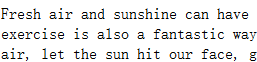
Let's take a look at our HTTP content:
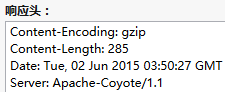

ThisgzipCompressing strings is not efficient for simple strings. For example, the author originally wrote a string of a "Quiet Night Thought" poem, but later found that the compressed size was actually larger than the original = - =...
3) Set the returned data type via content-type
The server may sometimes return text/html, sometimes image/jpeg, or a video like video/avi. The browser can display the data in different ways according to the corresponding data type! Okay, here we will make one that reads a PDF.
Implementation code:
package com.jay.http.test;

import java.io.IOException;
import java.io.InputStream;
import java.io.OutputStream;

import javax.servlet.ServletException;
import javax.servlet.http.HttpServlet;
import javax.servlet.http.HttpServletRequest;
import javax.servlet.http.HttpServletResponse;

public class ServletThree extends HttpServlet {
    @Override
    protected void doGet(HttpServletRequest req, HttpServletResponse resp)
            throws ServletException, IOException {
        resp.setHeader("content-type", "application/pdf");
        InputStream in = this.getServletContext().getResourceAsStream("/file/android编码规范.pdf");
        byte buffer[] = new byte[1024];
        int len = 0;
        OutputStream out = resp.getOutputStream();
        while((len = in.read(buffer)) > 0)
        {
            out.write(buffer,0,len);
        }
    }

    protected void doPost(HttpServletRequest req, HttpServletResponse resp) throws
       ServletException ,IOException
    {
        doGet(req, resp);
    };
}
Running result:
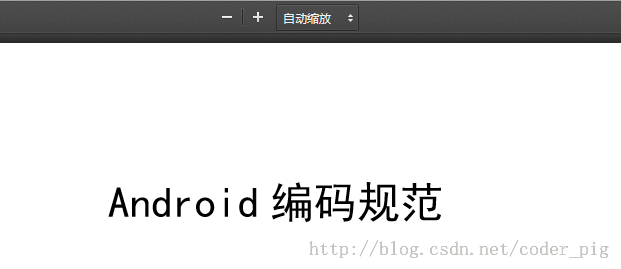
Enter http://localhost:8080/HttpTest/ServletThree in the browser
Great, we can indeed read the PDF. By the way, I have placed this PDF in the file directory under webroot, otherwise it will throw a null pointer exception~:
Of course, you can also try playing a piece of music or video; you just need to modify the content-type parameter.
Here is also a quick reference table for HTTP Content-type:HTTP Content-type Reference Table
4) Use the refresh response header to make the browser jump to another page after a few seconds
Yes, we may often have such requirements, such as refreshing a page every few seconds, or jumping to another page a few seconds after loading a page. Then refresh can meet your needs~
Implementation code:
package com.jay.http.test;

import java.io.IOException;

import javax.servlet.ServletException;
import javax.servlet.http.HttpServlet;
import javax.servlet.http.HttpServletRequest;
import javax.servlet.http.HttpServletResponse;

public class ServletFour extends HttpServlet {
    public int second = 0;
    @Override
    protected void doGet(HttpServletRequest req, HttpServletResponse resp)
            throws ServletException, IOException {
        //1.浏览器每隔2秒定时刷新页面
//        resp.setHeader("refresh", "2");
//        resp.getWriter().write(++second + "");
//        System.out.println("doGet方法被调用~");

        //2.进入页面5s后,然页跳到百度~
        resp.setHeader("refresh", "5;url='http://www.baidu.com'");
        resp.getWriter().write("HE HE DA~");
    }

    protected void doPost(HttpServletRequest req, HttpServletResponse resp) throws ServletException ,IOException
    {
        doGet(req, resp);
    };
}
Running result:
- 1) The page refreshes every 2 seconds. We can see that the displayed number is incrementing, and the doGet method is also being called continuously, which shows that the page is indeed refreshing!
- 2) After entering the page, after 5 seconds, it automatically jumps to Baidu~
5) Use the content-disposition response header to make the browser download a file
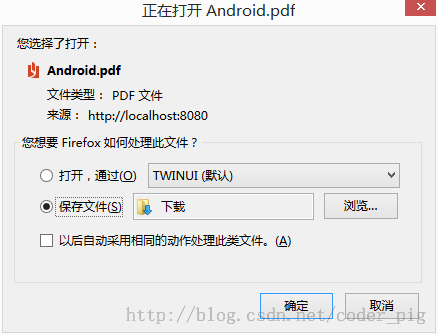
This is very simple. We just need to remove the line that sets Content-type in ③ and add: resp.setHeader("content-disposition", "attachment;filename=Android.pdf");
Implementation code:
package com.jay.http.test;

import java.io.IOException;
import java.io.InputStream;
import java.io.OutputStream;

import javax.servlet.ServletException;
import javax.servlet.http.HttpServlet;
import javax.servlet.http.HttpServletRequest;
import javax.servlet.http.HttpServletResponse;

public class ServletFive extends HttpServlet {

    @Override
    protected void doGet(HttpServletRequest req, HttpServletResponse resp)
            throws ServletException, IOException {
        resp.setHeader("content-disposition", "attachment;filename=Android.pdf");
        InputStream in = this.getServletContext().getResourceAsStream("/file/android编码规范.pdf");
        byte buffer[] = new byte[1024];
        int len = 0;
        OutputStream out = resp.getOutputStream();
        while((len = in.read(buffer)) > 0)
        {
            out.write(buffer,0,len);
        }
    }

    @Override
    protected void doPost(HttpServletRequest req, HttpServletResponse resp)
            throws ServletException, IOException {
        doGet(req, resp);
    }
}
Running result:
Summary of This Section:
This section introduced the request headers and response headers in HTTP, and also provided a few examples of using response headers to adjust the browser. After this chapter, I believe you have a better understanding of the HTTP protocol. In the next section, we will learn the HTTP request method provided by Android: HttpURLConnection! Alright, that's all for this section, thanks~ Oh, by the way, download the demo for this section:Download HttpTest.zip