Introduction to this section
Alright, in the previous three sections, we studied and learned about Activity in Android. I believe everyone has benefited a lot! In this section, we continue to learn about the second component in Android: Service. Well, without further ado, let's begin the content of this section!
1. Thread-related concepts
Before we start learning about Service, let's first understand some concepts about threads!
1) Related concepts:
- Program: A set of instructions written in a certain language to accomplish a specific task (a set ofstatic code)
- Process:A running program, a unit of system scheduling and resource allocationindependent unit, the operating system allocates a segment of memory space for each process! The sequential dynamic execution of a program is the complete process of code loading, execution, and completion!
- Thread: An execution unit smaller than a process. Each process may have multiple threads,Threadneeds to be placed in aprocessin order to execute,Threads are managed by the program, whileprocesses are scheduled by the system!
- Understanding multithreading:ParallelExecute multiple instructions, and distributeCPU time slicesto each thread according to the scheduling algorithm. Actually, it istime-sharingexecution, but the switching time is very short, so users just feel it is "simultaneous"!
2) Lifecycle of a thread:
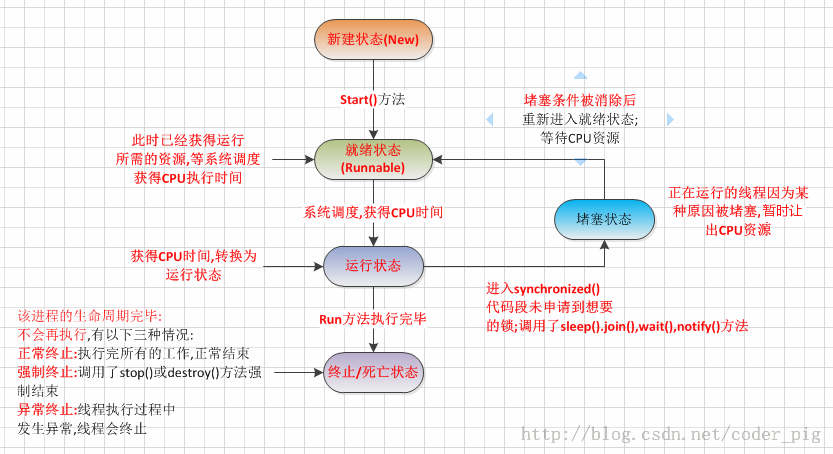
3) Three ways to create threads:
- Inherit the Thread class
- Implement the Runnable interface
- Implement the Callable interfaceIf: using the thread created in 2, you can start it directly like this:
new Thread(myThread).start();More often, we like to use anonymous classes, i.e., the following style:new Thread(new Runnable(){ public void run(); }).start();
2. Differences between Service and Thread
Actually, there is not much relationship between them, but many friends often confuse the two! Thread is a thread, the smallest unit of program execution, and the basic unit for CPU allocation! Service, on the other hand, is a component provided by Android that allows long-term residency in the background. The most common use is to do polling operations! Or if you want to do something in the background, such as background download updates! Remember not to confuse these two concepts!
3. Lifecycle diagram of Service
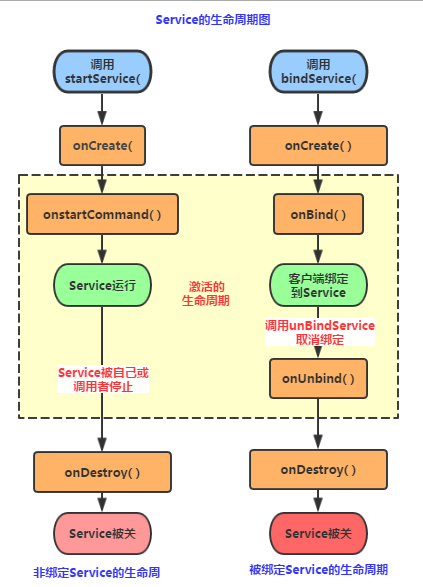
4. Lifecycle analysis
Okay, from the lifecycle diagram above, we can know that there are two ways to use Service in Android:
1)StartService() to start Service
2)BindService() to start Service
PS: There is another way, which is to bind Service after starting it!
1) Detailed explanation of related methods:
- onCreate()onCreate(): When the Service is first created, this method is called back immediately; this method will only be called once in the entire lifecycle!
- onDestory()onDestroy(): When the Service is closed, this method is called back; this method will only be called back once!
- onStartCommand(intent,flag,startId)onStartCommand(): In earlier versions, it was onStart(intent, startId). When a client calls the startService(Intent) method, it will be called back. The StartService method can be called multiple times, but no new Service object will be created; instead, the previously created Service object is reused, but the onStartCommand() method will continue to be called back!
- IBinder onOnbind(intent)onBind(): This method is a method that all Services must implement. This method returns an IBinder object, through which the app communicates with the Service component!
- onUnbind(intent)onUnbind(): This method is called back when all clients bound to the Service are disconnected!
2) StartService to start Service
①When first started, a Service instance will be created, and the onCreate() and onStartCommand() methods will be called in sequence. At this point, the Service enters the running state. If StartService is called again to start the Service, no new Service object will be created. The system will directly reuse the previously created Service object and call its onStartCommand() method!
②But such a Service has no necessary connection with its caller. That is, when the caller ends its own lifecycle, as long as stopService is not called, the Service will continue to run!
③No matter how many times the Service has been started, you only need to call StopService once to stop the Service.
3) BindService to start Service
①When a Service is bound with bindService for the first time, the system will instantiate a Service instance and call its onCreate() and onBind() methods. Then the caller can interact with the Service through IBinder. Thereafter, if bindService is used again to bind the Service, the system will not create a new Service instance, nor will it call the onBind() method again; it will simply pass the IBinder object directly to other subsequently added clients!
②If we want to unbind from the service, we just need to call unbindService(). At this time, the onUnbind and onDestroy methods will be called! This is the case for one client. If multiple clients bind to the same Service, the situation is as follows: After a client completes its interaction with the service, it calls the unbindService() method to unbind. When all clients have unbound from the service, the system will destroy the service. (Unless the service was also started by the startService() method.)
③In addition, different from the above situation, the Service in bindService mode is interrelated with the caller. It can be understood as "grasshoppers tied to the same rope" — if one dies, all die together. After bindService, once the caller is destroyed, the Service will also terminate immediately!
Analysis of Context.bindService() when invoking Service through BindServicebindService(Intent Service,ServiceConnection conn,int flags)
service: The Service to be started is specified through this intent.
conn: ServiceConnection object, used to monitor the connection between the visitor and the Service. On successful connection, the onServiceConnected(ComponentName, IBinder) method in this object is called back; if the host where the Service resides terminates due to abnormal termination or other reasons, causing the connection between the Service and the visitor to be disconnected, callonServiceDisconnected(ComponentName) method, actively throughunBindService()disconnecting via the method will not call the above method!
flags:Specifies whether to automatically create the Service when binding (if the Service has not been created). The parameter can be 0 (do not auto-create) or BIND_AUTO_CREATE (auto-create).4) Binding via bindService after starting Service with StartService
4) Binding via bindService after starting Service with StartService
The prerequisite is: the onUnbind() method returns true!!!
onCreate( )->onStartCommand( )->onBind( )->onUnbind( )->onRebind( )
PS:Here some readers may be confused. After calling unbindService, shouldn't the Service call the onDestroy() method? Actually, this is because this Service was started by our StartService, so if you call the onUnbind() method to unbind, the Service will not terminate either!
Conclusion:If we use bindService to bind a started Service, note that it is an already started Service!!! The system only passes the Service's internal IBinder object to the Activity, and does not bind the Service's lifecycle to the Activity. Therefore, when calling unBindService() to unbind, the Service will not be destroyed!
5. Lifecycle verification
Next, let's write code to verify the lifecycle:
1) Verify the call order of starting Service with StartService
First, we define a custom Service, override the relevant methods, and print the verification in logcat:
TestService1.java
public class TestService1 extends Service {
    private final String TAG = "TestService1";
    //必须要实现的方法
    @Override
    public IBinder onBind(Intent intent) {
        Log.i(TAG, "onBind方法被调用!");
        return null;
    }

    //Service被创建时调用
    @Override
    public void onCreate() {
        Log.i(TAG, "onCreate方法被调用!");
        super.onCreate();
    }

    //Service被启动时调用
    @Override
    public int onStartCommand(Intent intent, int flags, int startId) {
        Log.i(TAG, "onStartCommand方法被调用!");
        return super.onStartCommand(intent, flags, startId);
    }

    //Service被关闭之前回调
    @Override
    public void onDestroy() {
        Log.i(TAG, "onDestory方法被调用!");
        super.onDestroy();
    }
}
Complete Service registration in AndroidManifest.xml
<!-- 配置Service组件,同时配置一个action -->
<service android:name=".TestService1">
            <intent-filter>
                <action android:name="com.jay.example.service.TEST_SERVICE1"/>
            </intent-filter>
</service>
Next is a simple layout file with two buttons, and finally the MainActivity. In the button click events, call startService() and stopService() respectively!
public class MainActivity extends Activity {

    private Button start;
    private Button stop;

    @Override
    protected void onCreate(Bundle savedInstanceState) {
        super.onCreate(savedInstanceState);
        setContentView(R.layout.activity_main);

        start = (Button) findViewById(R.id.btnstart);
        stop = (Button) findViewById(R.id.btnstop);
        //创建启动Service的Intent,以及Intent属性
        final Intent intent = new Intent();
        intent.setAction("com.jay.example.service.TEST_SERVICE1");
        //为两个按钮设置点击事件,分别是启动与停止service
        start.setOnClickListener(new OnClickListener() {
            @Override
            public void onClick(View v) {
                startService(intent);
            }
        });

        stop.setOnClickListener(new OnClickListener() {
            @Override
            public void onClick(View v) {
                stopService(intent);

            }
        });
    }
}
Screenshot of running:
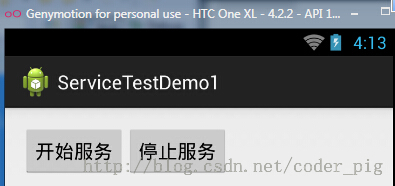
Click to start the service:

Having nothing better to do, click a few more times:

Finally, click to stop the service:

Result analysis:
From the running results above, we can verify what was explained in our lifecycle diagram: We find that the onBind() method is not called. Additionally, clicking to start the Service multiple times will only repeatedly call the onStartCommand method! No matter how many times we start the Service, one stopService will stop the Service!
2) Verify the order of starting Service with BindService:
Before we start writing code, we need to understand a few things first: First is the bindService method of Context given below the first big diagram:
- ServiceConnection object: monitors the connection between the visitor and the Service. If the connection is successful, onServiceConnected() is called back. If the connection is terminated abnormally or for other reasons, causing the Service to disconnect from the visitor, the onServiceDisconnected method is called back. Calling unBindService() will not call this method!
- In the onServiceConnected method, there is an IBinder object, which can be used to communicate with the bound Service! When we develop a Service class, we need to implement the IBinder onBind() method by default. The IBinder object returned by this method is passed to the parameter of onServiceConnected in the ServiceConnection object. Here we can communicate with the Service through this IBinder!
Summary:
Step 1:In the custom Service, inherit Binder to implement your own IBinder object.
Step 2:Return your own IBinder object via the onBind() method.
Step 3:In the class binding the Service, define a ServiceConnection object and override two methods, onServiceConnected and onDisconnected! Then just directly read the parameters passed by the IBinder!
Alright, next is writing code to verify. Here we define a Service for timing, and then demonstrate the usage of BindService and the method call flow! The code is relatively simple, so we won't explain it!
TestService2.java:
public class TestService2 extends Service {
    private final String TAG = "TestService2";
    private int count;
    private boolean quit;

    //定义onBinder方法所返回的对象
    private MyBinder binder = new MyBinder();
    public class MyBinder extends Binder
    {
        public int getCount()
        {
            return count;
        }
    }

    //必须实现的方法,绑定改Service时回调该方法
    @Override
    public IBinder onBind(Intent intent) {
        Log.i(TAG, "onBind方法被调用!");
        return binder;
    }

    //Service被创建时回调
    @Override
    public void onCreate() {
        super.onCreate();
        Log.i(TAG, "onCreate方法被调用!");
        //创建一个线程动态地修改count的值
        new Thread()
        {
            public void run()
            {
                while(!quit)
                {
                    try
                    {
                        Thread.sleep(1000);
                    }catch(InterruptedException e){e.printStackTrace();}
                    count++;
                }
            };
        }.start();

    }

    //Service断开连接时回调
    @Override
    public boolean onUnbind(Intent intent) {
        Log.i(TAG, "onUnbind方法被调用!");
        return true;
    }

    //Service被关闭前回调
    @Override
    public void onDestroy() {
        super.onDestroy();
        this.quit = true;
        Log.i(TAG, "onDestroyed方法被调用!");
    }

    @Override
    public void onRebind(Intent intent) {
        Log.i(TAG, "onRebind方法被调用!");
        super.onRebind(intent);
    }
}
Register the Service component in AndroidManifest.xml:
<service android:name=".TestService2" android:exported="false">
        <intent-filter>
            <action android:name="com.jay.example.service.TEST_SERVICE2"/>
        </intent-filter>
</service>
MainActivity.java:
public class MainActivity extends Activity {

    private Button btnbind;
    private Button btncancel;
    private Button btnstatus;

    //保持所启动的Service的IBinder对象,同时定义一个ServiceConnection对象
    TestService2.MyBinder binder;
    private ServiceConnection conn = new ServiceConnection() {

        //Activity与Service断开连接时回调该方法
        @Override
        public void onServiceDisconnected(ComponentName name) {
            System.out.println("------Service DisConnected-------");
        }

        //Activity与Service连接成功时回调该方法
        @Override
        public void onServiceConnected(ComponentName name, IBinder service) {
            System.out.println("------Service Connected-------");
            binder = (TestService2.MyBinder) service;
        }
    };

    @Override
    protected void onCreate(Bundle savedInstanceState) {
        super.onCreate(savedInstanceState);
        setContentView(R.layout.activity_main);
        btnbind = (Button) findViewById(R.id.btnbind);
        btncancel = (Button) findViewById(R.id.btncancel);
        btnstatus  = (Button) findViewById(R.id.btnstatus);
        final Intent intent = new Intent();
        intent.setAction("com.jay.example.service.TEST_SERVICE2");
        btnbind.setOnClickListener(new OnClickListener() {
            @Override
            public void onClick(View v) {
                //绑定service
                bindService(intent, conn, Service.BIND_AUTO_CREATE);
            }
        });

        btncancel.setOnClickListener(new OnClickListener() {
            @Override
            public void onClick(View v) {
                //解除service绑定
                unbindService(conn);
            }
        });

        btnstatus.setOnClickListener(new OnClickListener() {
            @Override
            public void onClick(View v) {
                Toast.makeText(getApplicationContext(), "Service的count的值为:"
                        + binder.getCount(), Toast.LENGTH_SHORT).show();
            }
        });
    }
}
Screenshot of running:

Click to bind Service:
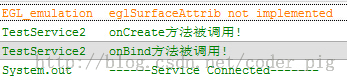
Continue clicking bind: no change.
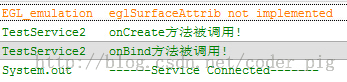
Get the current Service status:

Unbind:
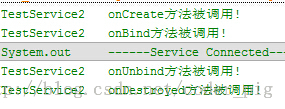
If we directly close the Activity after binding, it will report an error, and then automatically call the onUnbind and onDestroy methods!
 。。。
。。。

From the running results above, it verifies the following in the lifecycle diagram:
Using BindService to bind a Service, call onCreate() and onBind() methods in order. We can return a custom IBinder object in the onBind() method. Next, the onServiceConnected() method of ServiceConnection is called, in which the IBinder object can be obtained for related operations. When the Service is unbound, the onUnbind and onDestroy methods are automatically called. Of course, in the case of multiple clients bound, it is necessary to unbind all of them before the onDestroy method is called for destruction!