Introduction to this section:
Chapter 9 brings you multimedia development in Android. Rather than multimedia development, it is more about the use of multimedia-related APIs. Let's talk about a few things we do in actual development that are somewhat related to multimedia: taking photos, recording audio, playing music, playing videos...
Well, okay, it seems that's all, right? For example, to play music, we just call MediaPlayer, find the music file, and then call the play method to play it... Of course, real multimedia development is another field, such as audio and video encoding/decoding. We ordinary mortals can only look up to it for now. It's enough for us to know how to call these APIs! By the way, let's popularize some common knowledge about the Android multimedia framework:
On Android, the preset multimedia framework isOpenCore. The advantage of OpenCore is that it takes into account cross-platform portability and has been verified by many parties, so it is relatively stable; however, its disadvantage is that it is too large and complex, requiring considerable time to maintain. Starting from Android 2.0, Google introduced a slightly more concise architecture,Stagefright, of course without completely abandoning OpenCore, mainly by creating an OMX layer that merely references the omx-component part of OpenCore. It originally had a trend of gradually replacing OpenCORE, but in August this year a Stagefright vulnerability was discovered that allows remote code execution by sending a specially crafted MMS message.
This vulnerability affects Android 2.2 and later versions, with a relatively weaker impact on 4.1 and later versions.
Unclear but impressive(I don't even know what the hell it's talking about). Well, okay, popular science is over... Just know these things!
By the way, this multimedia framework is in the third layer of the Android architecture (Libraries)Media Framework! In addition, if you want to know what types of audio/video data this Android multimedia framework supports, see the official documentation:
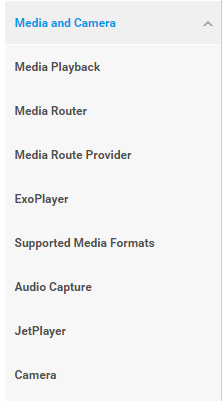
You can click directly hereMedia and CameraThen look at the documentation below:
Well, too much rambling at the beginning, I almost forgot the protagonist today isSoundPool. As the title says, SoundPool is generally used to play dense, rapid, and short sound effects, such as the stunt sound effect: Duang~. It is used more in games. You can also add this sound effect to your APP. For example, when Kugou Music opens, it plays "Hello, Kugou". Actually, this idea is quite good, indirectly letting users know the current player's volume. Otherwise, when a user starts playing a song, suddenly "Little Apple" comes on, causing nearby aunties to start dancing - that would be bad, right? Besides adding it to music players, you can also add it to ordinary APPs. For example, when receiving push notifications or new chat messages, play a prompt sound. For instance, the new version of Super Timetable added this, and when receiving push notifications it plays a short "biao biao" sound! A SoundPool object can be viewed as a sample collection that can import resources from an APK or load files from the file system. It uses the MediaPlayer service to decode audio into a raw 16-bit PCM stream. This feature allows applications to stream compressed audio without having to endure the decompression caused byCPU load and delay.. SoundPool uses thesound effect poolconcept to manage multipleplayback streams. If the maximum number of streams is exceeded, SoundPool will automatically stop previously played streams based on priority. In addition, SoundPool also supports setting parameters such as sound quality, volume, and playback rate. Alright, enough talk, let's start the content of this section:SoundPool
1. Introduction to related methods:
1) Constructor methods:
SoundPool1) Constructor methods:
- (int maxStreams, int streamType, int srcQuality) The parameters are in order:
- ① Specifies how many sounds are supported, the maximum number of streams allowed to exist simultaneously in the SoundPool object.STREAM_VOICE_CALL, STREAM_SYSTEM, STREAM_RING,STREAM_MUSICandSTREAM_ALARM② Specifies the sound type. Stream types can be divided into
- four types. Defined in AudioManager.
③ Specifies sound quality (sample rate conversion quality), usually simply set to 0!
SoundPool.Builder spb = new SoundPool.Builder();
spb.setMaxStreams(10);
spb.setAudioAttributes(null);    //转换音频格式
SoundPool sp = spb.build();      //创建SoundPool对象
In lower versions, the above constructor can be used, but after API 21 (Android 5.0) this constructor is deprecated! Instead, there is a SoundPool.Builder. To instantiate SoundPool, we just need to call:

2) Introduction to common methods:
①2) Introduction to common methods::
- load(Context context, int resId, int priority)
- load(String path, int priority)
- load(FileDescriptor fd, long offset, long length, int priority)
- loadLoading sound resources
(AssetFileDescriptor afd, int priority) The above methods all return a sound ID, through which we can later play the specified sound:
- Parameter introduction
- context: Context
- resId: resource id
- priority: a parameter that is not very useful; it is recommended to set it to 1 to maintain compatibility with the future
- path: file path
- FileDescriptor: seems like a stream, I don't know eitherAssetFileDescriptor descriptor = assetManager.openFd("biaobiao.mp3");
②AssetFileDescriptor: reads a resource file from the asset directory. Usage::
play(int soundID, float leftVolume, float rightVolume, int priority, int loop, float rate)
Playback control
- The parameters are in order:
- soundID: the sound ID returned by Load()
- leftVolume: left channel volume setting
- rightVolume: right channel volume setting
- priority: specifies the priority of the playing sound; the higher the value, the higher the priority.
- loop: specifies whether to loop: -1 means infinite loop, 0 means no loop, other values mean the number of times to repeat playback
③rate: specifies the playback rate: a playback rate of 1.0 makes the sound play at its original frequency, while a playback rate of 2.0 makes the sound play at twice its original frequency. If the playback rate is 0.5, the playback rate is half of the original frequency. The playback rate range is 0.5 to 2.0.:
Resource releaserelease()You can call
3. Code example:
3. Code example::
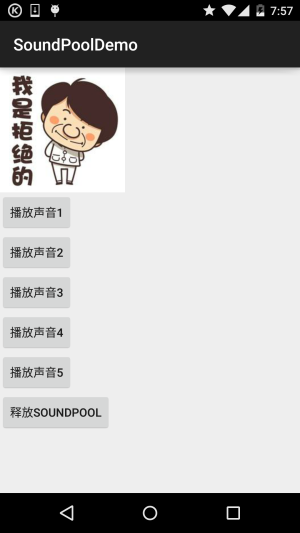
Running effect screenshot
When clicking the button, it will "Duang" once. Here two load methods are demonstrated, namely raw and assets!:
MainActivity.java:
public class MainActivity extends AppCompatActivity implements View.OnClickListener{

    private Button btn_play1;
    private Button btn_play2;
    private Button btn_play3;
    private Button btn_play4;
    private Button btn_play5;
    private Button btn_release;
    private AssetManager aManager;
    private SoundPool mSoundPool = null;
    private HashMap<Integer, Integer> soundID = new HashMap<Integer, Integer>();

    @Override
    protected void onCreate(Bundle savedInstanceState) {
        super.onCreate(savedInstanceState);
        setContentView(R.layout.activity_main);
        aManager = getAssets();
        try {
            initSP();
        } catch (Exception e) {
            e.printStackTrace();
        }
        bindViews();
    }

    private void bindViews() {
        btn_play1 = (Button) findViewById(R.id.btn_play1);
        btn_play2 = (Button) findViewById(R.id.btn_play2);
        btn_play3 = (Button) findViewById(R.id.btn_play3);
        btn_play4 = (Button) findViewById(R.id.btn_play4);
        btn_play5 = (Button) findViewById(R.id.btn_play5);
        btn_release = (Button) findViewById(R.id.btn_release);

        btn_play1.setOnClickListener(this);
        btn_play2.setOnClickListener(this);
        btn_play3.setOnClickListener(this);
        btn_play4.setOnClickListener(this);
        btn_play5.setOnClickListener(this);
        btn_release.setOnClickListener(this);

    }

    private void initSP() throws Exception{
        //设置最多可容纳5个音频流,音频的品质为5
        mSoundPool = new SoundPool(5, AudioManager.STREAM_SYSTEM, 5);
        soundID.put(1, mSoundPool.load(this, R.raw.duang, 1));
        soundID.put(2 , mSoundPool.load(getAssets().openFd("biaobiao.mp3") , 1));  //需要捕获IO异常
        soundID.put(3, mSoundPool.load(this, R.raw.duang, 1));
        soundID.put(4, mSoundPool.load(this, R.raw.duang, 1));
        soundID.put(5, mSoundPool.load(this, R.raw.duang, 1));
    }

    @Override
    public void onClick(View v) {
        switch (v.getId()){
            case R.id.btn_play1:
                mSoundPool.play(soundID.get(1), 1, 1, 0, 0, 1);
                break;
            case R.id.btn_play2:
                mSoundPool.play(soundID.get(2), 1, 1, 0, 0, 1);
                break;
            case R.id.btn_play3:
                mSoundPool.play(soundID.get(3), 1, 1, 0, 0, 1);
                break;
            case R.id.btn_play4:
                mSoundPool.play(soundID.get(4), 1, 1, 0, 0, 1);
                break;
            case R.id.btn_play5:
                mSoundPool.play(soundID.get(5), 1, 1, 0, 0, 1);
                break;
            case R.id.btn_release:
                mSoundPool.release();   //回收SoundPool资源
                break;
        }
    }
}
Key code
4. OnLoadCompleteListener: Listening for whether the sound file has finished loading
4. OnLoadCompleteListener: Listening for whether the sound file has finished loading
mSoundPool.setOnLoadCompleteListener(new SoundPool.OnLoadCompleteListener() {
    @Override
    public void onLoadComplete(SoundPool soundPool, int sampleId, int status) {
        Toast.makeText(MainActivity.this,"加特技准备完毕~",Toast.LENGTH_SHORT).show();
    }
});
5. Sample code download:
SoundPoolDemo.zip
Summary of this section:
Summary of this section:
Alright, in this section we popularized some common knowledge about Android multimedia, and taught everyone how to add sound effects to their own APP. It can be achieved simply with SoundPool. What are you waiting for? Add this thing to your app and make your app go Duang~
