Introduction to this section:
This chapter is the last chapter of the Android Basic Beginner Tutorial. It mainly explains some scattered knowledge points and supplements to omitted knowledge points. These scattered knowledge points include the use of various system services, such as the phone manager, SMS manager, vibrator, alarm clock, wallpaper, etc., as well as sensors and other things! There is all kinds of stuff! Okay, in this section we are going to learn about TelephonyManager. As the name implies: it is used to manage phone call status, obtain phone information (device information, SIM card information, and network information), listen to phone status (call status, service status, signal strength status, etc.), and it can also call the phone dialer to make calls! Without further ado, let's start the content of this section~
Official API:TelephonyManager
1. Obtain the TelephonyManager service object
TelephonyManager tManager = (TelephonyManager)getSystemService(Context.TELEPHONY_SERVICE);
2. Usage examples
1) Call the dialer to dial a phone number
Uri uri=Uri.parse("tel:"+电话号码);
Intent intent=new Intent(Intent.ACTION_DIAL,uri);
startActivity(intent);
2) Get SIM card information and network information
Screenshot of the running effect:
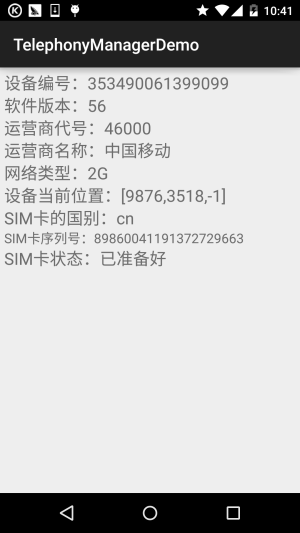
Implementation code:
Layout file:activity_main.xml:
<LinearLayout xmlns:android="http://schemas.android.com/apk/res/android"
    xmlns:tools="http://schemas.android.com/tools"
    android:layout_width="match_parent"
    android:layout_height="match_parent"
    android:orientation="vertical"
    android:padding="5dp"
    tools:context=".MainActivity">

    <TextView
        android:id="@+id/tv_phone1"
        android:layout_width="match_parent"
        android:layout_height="wrap_content"
        android:textSize="20sp" />

    <TextView
        android:id="@+id/tv_phone2"
        android:layout_width="match_parent"
        android:layout_height="wrap_content"
        android:textSize="20sp" />

    <TextView
        android:id="@+id/tv_phone3"
        android:layout_width="match_parent"
        android:layout_height="wrap_content"
        android:textSize="20sp" />

    <TextView
        android:id="@+id/tv_phone4"
        android:layout_width="match_parent"
        android:layout_height="wrap_content"
        android:textSize="20sp" />

    <TextView
        android:id="@+id/tv_phone5"
        android:layout_width="match_parent"
        android:layout_height="wrap_content"
        android:textSize="20sp" />

    <TextView
        android:id="@+id/tv_phone6"
        android:layout_width="match_parent"
        android:layout_height="wrap_content"
        android:textSize="20sp" />

    <TextView
        android:id="@+id/tv_phone7"
        android:layout_width="match_parent"
        android:layout_height="wrap_content"
        android:textSize="20sp" />

    <TextView
        android:id="@+id/tv_phone8"
        android:layout_width="match_parent"
        android:layout_height="wrap_content"
        android:textSize="16sp" />

    <TextView
        android:id="@+id/tv_phone9"
        android:layout_width="match_parent"
        android:layout_height="wrap_content"
        android:textSize="20sp" />

</LinearLayout>
MainActivity.java:
public class MainActivity extends AppCompatActivity {

    private TextView tv_phone1;
    private TextView tv_phone2;
    private TextView tv_phone3;
    private TextView tv_phone4;
    private TextView tv_phone5;
    private TextView tv_phone6;
    private TextView tv_phone7;
    private TextView tv_phone8;
    private TextView tv_phone9;
    private TelephonyManager tManager;
    private String[] phoneType = {"未知","2G","3G","4G"};
    private String[] simState = {"状态未知","无SIM卡","被PIN加锁","被PUK加锁",
            "被NetWork PIN加锁","已准备好"};

    @Override
    protected void onCreate(Bundle savedInstanceState) {
        super.onCreate(savedInstanceState);
        setContentView(R.layout.activity_main);
        //①获得系统提供的TelphonyManager对象的实例
        tManager = (TelephonyManager) getSystemService(Context.TELEPHONY_SERVICE);
        bindViews();
    }

    private void bindViews() {
        tv_phone1 = (TextView) findViewById(R.id.tv_phone1);
        tv_phone2 = (TextView) findViewById(R.id.tv_phone2);
        tv_phone3 = (TextView) findViewById(R.id.tv_phone3);
        tv_phone4 = (TextView) findViewById(R.id.tv_phone4);
        tv_phone5 = (TextView) findViewById(R.id.tv_phone5);
        tv_phone6 = (TextView) findViewById(R.id.tv_phone6);
        tv_phone7 = (TextView) findViewById(R.id.tv_phone7);
        tv_phone8 = (TextView) findViewById(R.id.tv_phone8);
        tv_phone9 = (TextView) findViewById(R.id.tv_phone9);

        tv_phone1.setText("设备编号:" + tManager.getDeviceId());
        tv_phone2.setText("软件版本:" + (tManager.getDeviceSoftwareVersion()!= null?
                tManager.getDeviceSoftwareVersion():"未知"));
        tv_phone3.setText("运营商代号:" + tManager.getNetworkOperator());
        tv_phone4.setText("运营商名称:" + tManager.getNetworkOperatorName());
        tv_phone5.setText("网络类型:" + phoneType[tManager.getPhoneType()]);
        tv_phone6.setText("设备当前位置:" + (tManager.getCellLocation() != null ? tManager
                .getCellLocation().toString() : "未知位置"));
        tv_phone7.setText("SIM卡的国别:" + tManager.getSimCountryIso());
        tv_phone8.setText("SIM卡序列号:" + tManager.getSimSerialNumber());
        tv_phone9.setText("SIM卡状态:" + simState[tManager.getSimState()]);
    }
}
By the way, don't forget to add permissions in AndroidManifest.xml!
<!-- 添加访问手机位置的权限 -->
<uses-permission android:name="android.permission.ACCESS_COARSE_LOCATION"/>
<!-- 添加访问手机状态的权限 -->
<uses-permission android:name="android.permission.READ_PHONE_STATE"/>
By the way, you might want to get the network type, rather than just 2G, 3G, 4G. In fact, we can look into the source code of the TelephonyManager class:

We can determine different network standards based on the value of this networkType. For example, if networkType == 1, that is the GPRS standard. And the value of this networkType can be obtained through

namely, the getNetworkType() method! Okay, it's that simple. You can create an array as above and then display different values according to different subscripts! By the way, there are also SIM card statuses. The values in the string array can all be seen in the source code:
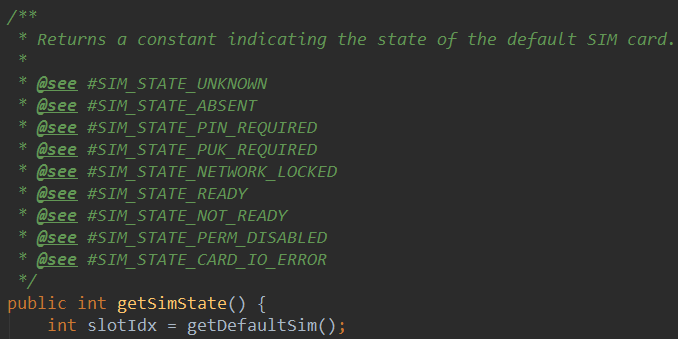
You can explore the rest by yourself~
3) Get the phone's signal strength
The unit of network signal strength is dBm (decibel-milliwatts), generally represented by negative numbers. The normal range for mobile phone signals is from -110dBm (poor) to -50dBm (good). If your value is less than -50dBm, it means you are standing near the base station. For example, my N5 shows a signal strength of -51dBm, sometimes -59dBm, because next door is the Nanruan Building, and there is a base station on top of it...
In addition, the way to obtain signal strength for 2G, 3G, and 4G is to override the onSignalStrengthsChanged() method of PhoneStateListener. When the signal strength changes, this event will be triggered, and we can obtain the signal strength in this event!
Example code for obtaining phone signal strength:
dBm =-113+2*asuThis is a fixed formula, asu (independent signal unit)
Screenshot of the running effect:
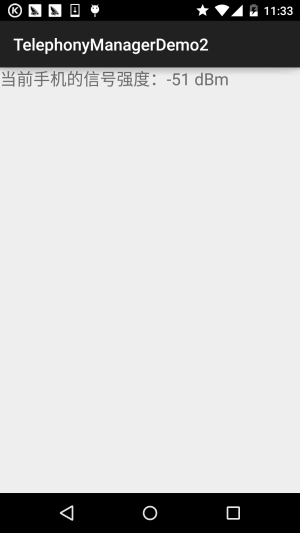
Implementation code:
MainActivity.java:
public class MainActivity extends AppCompatActivity {

    private TextView tv_rssi;
    private MyPhoneStateListener mpsListener;
    private TelephonyManager tManager;


    @Override
    protected void onCreate(Bundle savedInstanceState) {
        super.onCreate(savedInstanceState);
        setContentView(R.layout.activity_main);
        tManager = ((TelephonyManager)getSystemService(Context.TELEPHONY_SERVICE));
        tv_rssi = (TextView) findViewById(R.id.tv_rssi);
        mpsListener  = new MyPhoneStateListener();
        tManager.listen(mpsListener,290);
    }

    private class MyPhoneStateListener extends PhoneStateListener {
        private int asu = 0,lastSignal = 0;
        @Override
        public void onSignalStrengthsChanged(SignalStrength signalStrength) {
            asu = signalStrength.getGsmSignalStrength();
            lastSignal = -113 + 2 * asu;
            tv_rssi.setText("当前手机的信号强度:" + lastSignal + " dBm" );
            super.onSignalStrengthsChanged(signalStrength);
        }
    }
}
In addition, because the author's cards are all China Mobile cards, I don't know about China Unicom and China Telecom, but I saw these few APIs in the source code:
- getEvdoDbm(): China Telecom 3G
- getCdmaDbm(): China Unicom 3G
- getLteDbm():4G
These should be able to directly obtain the dBm signal strength. If you have the conditions, you can try them~
Also, don't forget to add permissions!
<!-- 添加访问手机状态的权限 -->
 <uses-permission android:name="android.permission.READ_PHONE_STATE"/>
4) Monitor all incoming calls on the phone
For the call records that are monitored, you can obtain them in different ways. Here, the call records are written to a file, but you can also send them to yourself via SMS, or upload them to a platform. Of course, if there aren't many call records, you can use SMS; if there are too many, it would be easy for others to discover! In addition, an Activity is used here instead of a Service. That is to say, you need to open this Activity to start monitoring. Usually our requirements are to secretly run in the background. Due to time constraints, we won't write a Service. If needed, you can modify it yourself to let the Service start with the device boot!
Code analysis:
Very simple. In fact, it just overrides a call status listener of TelephonyManagerPhoneStateListenerThen call the TelephonyManager.listen() method for monitoring. When a call comes in, the program will record the incoming phone number to a file!
Implementation code:
MainActivity.java:
public class MainActivity extends Activity
{
    TelephonyManager tManager;

    @Override
    public void onCreate(Bundle savedInstanceState)
    {
        super.onCreate(savedInstanceState);
        setContentView(R.layout.main);
        // 取得TelephonyManager对象
        tManager = (TelephonyManager)
            getSystemService(Context.TELEPHONY_SERVICE);
        // 创建一个通话状态监听器
        PhoneStateListener listener = new PhoneStateListener()
        {
            @Override
            public void onCallStateChanged(int state, String number)
            {
                switch (state)
                {
                // 无任何状态
                    case TelephonyManager.CALL_STATE_IDLE:
                        break;
                    case TelephonyManager.CALL_STATE_OFFHOOK:
                        break;
                    // 来电铃响时
                    case TelephonyManager.CALL_STATE_RINGING:
                        OutputStream os = null;
                        try
                        {
                            os = openFileOutput("phoneList", MODE_APPEND);
                        }
                        catch (FileNotFoundException e)
                        {
                            e.printStackTrace();
                        }
                        PrintStream ps = new PrintStream(os);
                        // 将来电号码记录到文件中
                        ps.println(new Date() + " 来电:" + number);
                        ps.close();
                        break;
                    default:
                        break;
                }
                super.onCallStateChanged(state, number);
            }
        };
        // 监听电话通话状态的改变
        tManager.listen(listener, PhoneStateListener.LISTEN_CALL_STATE);
    }
}
Running result:
Note! Make sure this program is in the foreground! Use another phone to call this phone. Then you can see the phoneList file under the files directory of the corresponding package name in DDMS's File Explorer. We can export it to the computer and open it. The approximate content of the file is as follows:
THR Oct 30 12:05:48 GMT 2014 Incoming call: 137xxxxxxx
By the way, don't forget the permission!
<!-- 授予该应用读取通话状态的权限 -->
<uses-permission android:name="android.permission.READ_PHONE_STATE"/>
5) Automatically hang up blacklisted calls
The so-called blacklist is to add some phone numbers to a collection, and when the phone receives these calls, it hangs up directly! But Android does not provide us with an API to hang up calls, so we need to use AIDL to call the API in the service to hang up calls!
So the first step is to copy the following two files from the Android source code to the corresponding locations under src. They are: under the com.android.internal.telephony packageITelephony.aidl;
under the android.telephony packageNeighboringCellInfo.aidl;
You need to create the corresponding packages! That is, put the aidl files under the above packages!!! Then you only need to call ITelephony's endCall to hang up the phone!
Here we provide a simple interception for a single number. After entering a number and clicking the block button, if a blocked call comes in at this time, it will hang up directly. The code is relatively simple, so I'll paste it below. Because the emulator used is Genymotion, I won't show a screenshot of the program running!
MainActivity.java:
public class MainActivity extends Activity {

    private TelephonyManager tManager;
    private PhoneStateListener pListener;
    private String number;
    private EditText locknum;
    private Button btnlock;

    public class PhonecallListener extends PhoneStateListener
    {
        @Override
        public void onCallStateChanged(int state, String incomingNumber) {
            switch(state)
            {
            case TelephonyManager.CALL_STATE_IDLE:break;
            case TelephonyManager.CALL_STATE_OFFHOOK:break;
            //当有电话拨入时
            case TelephonyManager.CALL_STATE_RINGING:
                if(isBlock(incomingNumber))
                {
                    try
                    {
                        Method method = Class.forName("android.os.ServiceManager")
                                .getMethod("getService", String.class);
                        // 获取远程TELEPHONY_SERVICE的IBinder对象的代理
                        IBinder binder = (IBinder) method.invoke(null,
                            new Object[] { TELEPHONY_SERVICE });
                        // 将IBinder对象的代理转换为ITelephony对象
                        ITelephony telephony = ITelephony.Stub.asInterface(binder);
                        // 挂断电话
                        telephony.endCall();
                    }catch(Exception e){e.printStackTrace();}
                }
                break;
            }
            super.onCallStateChanged(state, incomingNumber);
        }
    }


    @Override
    protected void onCreate(Bundle savedInstanceState) {
        super.onCreate(savedInstanceState);
        setContentView(R.layout.activity_main);

        locknum = (EditText) findViewById(R.id.locknum);
        btnlock = (Button) findViewById(R.id.btnlock);

        //获取系统的TelephonyManager管理器
        tManager = (TelephonyManager) getSystemService(TELEPHONY_SERVICE);
        pListener = new PhoneStateListener();
        tManager.listen(pListener, PhoneStateListener.LISTEN_CALL_STATE);

        btnlock.setOnClickListener(new OnClickListener() {

            @Override
            public void onClick(View v) {
                number = locknum.getText().toString();
            }
        });

    }

    public boolean isBlock(String phone)
    {
        if(phone.equals(number))return true;
        return false;
    }
}
Permission, permission, permission:
<!-- 授予该应用控制通话的权限 -->
<uses-permission android:name="android.permission.CALL_PHONE" />
<!-- 授予该应用读取通话状态的权限 -->
<uses-permission android:name="android.permission.READ_PHONE_STATE" />
In addition, for the Chinese version of related properties and methods, see:Android phone information related APIs
3. Download sample code for this section
TelephonyManagerDemo.zip
TelephonyManagerDemo2.zip
Blacklist Interception Demo.zip
Summary of this section:
Okay, that's it for this section on TelephonyManager (Phone Manager). It should cover most development needs. If there is anything missing, feel free to point it out~
Thanks~
