Troubleshooting Common Issues
Machine learning projects moving from a lab prototype to a production environment often encounter a series of unexpected challenges.
A model performs well on the training set but performs poorly or even completely fails after actual deployment. This is a dilemma experienced by many machine learning engineers and beginners.
This article systematically sorts out the most common types of problems in machine learning model optimization and engineering, and provides clear troubleshooting ideas and solutions to help you build more robust and reliable machine learning systems.
I. Model Performance Issues: Good in Training, Poor in Production
This is the classic and most troublesome problem. Your model reaches 95% accuracy in Jupyter Notebook, but once deployed online, its performance drops dramatically.
1. Inconsistent Data Distribution
This is the "number one killer" of performance degradation. There is a difference in statistical distribution between training data and real-time online data.
Common scenarios and troubleshooting points:
Inconsistent feature engineering: The code for offline feature processing (e.g., normalization, bucketing, missing value imputation) is not exactly the same as the code in the online service.
- Troubleshooting: Compare the sample data after offline preprocessing and online preprocessing. Ensure that the Scaler used (e.g.,
StandardScaler) online uses the parameters fitted offline (scaler.mean_,scaler.scale_), rather than refitting.
Data collection time bias: The training data is from the past three months, while the online data comes from the present. User behavior and market conditions may have changed (concept drift).
- Troubleshooting: Monitor the distribution of model input features over time. You can periodically compute the mean, variance, and quantiles of features and compare them with the training set.
Sample selection bias: The training data cannot represent all users. For example, training a recommendation model only with active user data will make it fail for new users or silent users.
- Troubleshooting: Analyze the user profile distribution of the training set and online requests (e.g., new vs. old user ratio, geographic distribution, etc.).
Solution:Establish a comprehensivedata monitoringandmodel monitoringsystem. Not only monitor the model output (e.g., AUC, accuracy), but also monitor the distribution of input features. Once drift is found, trigger alerts and consider updating training data or retraining the model.
Example
import numpy as np
import pandas as pd
# Assume this is the value of feature 'feature_a' received in real time online
online_feature_values = [0.1, 0.5, 1.2, 0.8, 1.5, 2.0, 2.5]
training_mean = 0.5 # Mean of 'feature_a' on the training set
training_std = 0.3 # Standard deviation of 'feature_a' on the training set
current_online_mean = np.mean(online_feature_values[-100:]) # Mean of the last 100 points
# Calculate Z-score to simply determine whether significant drift occurs
z_score = (current_online_mean - training_mean) / training_std
print(f"Current online feature mean: {current_online_mean:.3f}")
print(f"Z-score of online mean vs. training set mean: {z_score:.3f}")
if abs(z_score) > 3: # Threshold, e.g., 3 standard deviations
print("Warning: Feature 'feature_a' may have undergone distribution drift!")
2. Data Leakage
During training, the model "peeks" at information that should only be known at prediction time, causing inflated evaluation results.
Common scenarios:
- Before splitting the training/test setbeforeglobal normalization or missing value imputation was performed (using information from the test set).
- In time-series problems, future data is used to predict the past.
- Features contain "future information" strongly related to the target variable (e.g., using "whether a complaint was received today" to predict "whether the order will be cancelled today").
Troubleshooting and resolution:Strictly follow the machine learning workflow.Any operation that learns parameters from data (such as fitting a Scaler, imputing missing values, feature selection) must be performed on the training set, and then only these parameters are used to transform the validation and test sets.UsingsklearnofPipelinecan effectively avoid this problem.
Example
from sklearn.preprocessing import StandardScaler
from sklearn.model_selection import train_test_split
# X, y are the original data and labels
scaler = StandardScaler()
X_scaled = scaler.fit_transform(X) # Wrong! Here all data is used to fit the scaler
X_train, X_test, y_train, y_test = train_test_split(X_scaled, y, test_size=0.2)
# At this point, the information in X_test has "leaked" to the scaler, thereby affecting the transformation of X_train
# Correct example: split first, then process separately
X_train_raw, X_test_raw, y_train, y_test = train_test_split(X, y, test_size=0.2)
scaler = StandardScaler()
X_train = scaler.fit_transform(X_train_raw) # Fit using only the training set
X_test = scaler.transform(X_test_raw) # Use the parameters fitted on the training set to transform the test set
II. Engineering and Deployment Issues
Turning a model from a file into a highly available API that can be served stably is full of pitfalls.
1. Environment Dependencies and Version Conflicts
"It works on my machine!" — a classic problem. The Python version and library versions in the training environment are inconsistent with those in the online inference environment.
Troubleshooting checklist:
- Python major version (3.7 vs 3.9)
- Core library versions (
tensorflow==2.8vstensorflow==2.12) - System dependencies (e.g., some libraries depend on specific C++ runtime libraries)
- Model serialization format (using
picklesaved model, if the Python version span is large, may fail to load)
Solution:
- Containerization: Use Docker to package the model and all its dependencies into one image. This is the golden standard for ensuring environment consistency.
- Dependency management: Use
requirements.txtorenvironment.ymlto precisely record all packages and their versions. - Model format: Consider using a cross-language, cross-environment model format, such asONNXorPMML, or a framework-native safe format (e.g.,
TensorFlow SavedModel,PyTorch TorchScript)。
2. Poor Online Inference Performance
The API response time is too long, and the throughput (TPS) cannot keep up, failing to meet business requirements.
Common bottlenecks and optimizations:
- High cost per single prediction: The model itself is complex (e.g., a large deep learning model).
- Optimization: Model pruning, quantization, knowledge distillation, or rewriting with a more efficient model architecture.
- Frequent I/O or network calls: Each prediction requires fetching features from a database or remote service.
- Optimization: Implement feature caching, precomputation, or feature serving to reduce latency.
- Not utilizing hardware acceleration: Running a model suited for GPU on CPU.
- Optimization: Choose the correct inference hardware (CPU/GPU/dedicated AI chips) and inference framework (e.g.,
TensorRT,OpenVINO)。
- Optimization: Choose the correct inference hardware (CPU/GPU/dedicated AI chips) and inference framework (e.g.,
- Low efficiency of the serving framework: Using Flask to directly load the model has weak concurrency handling capability.
- Optimization: Use a high-performance ML serving framework, such asTensorFlow Serving, TorchServe, orTriton Inference Server. They support advanced features such as model hot reloading, dynamic batching, and multi-model hosting.
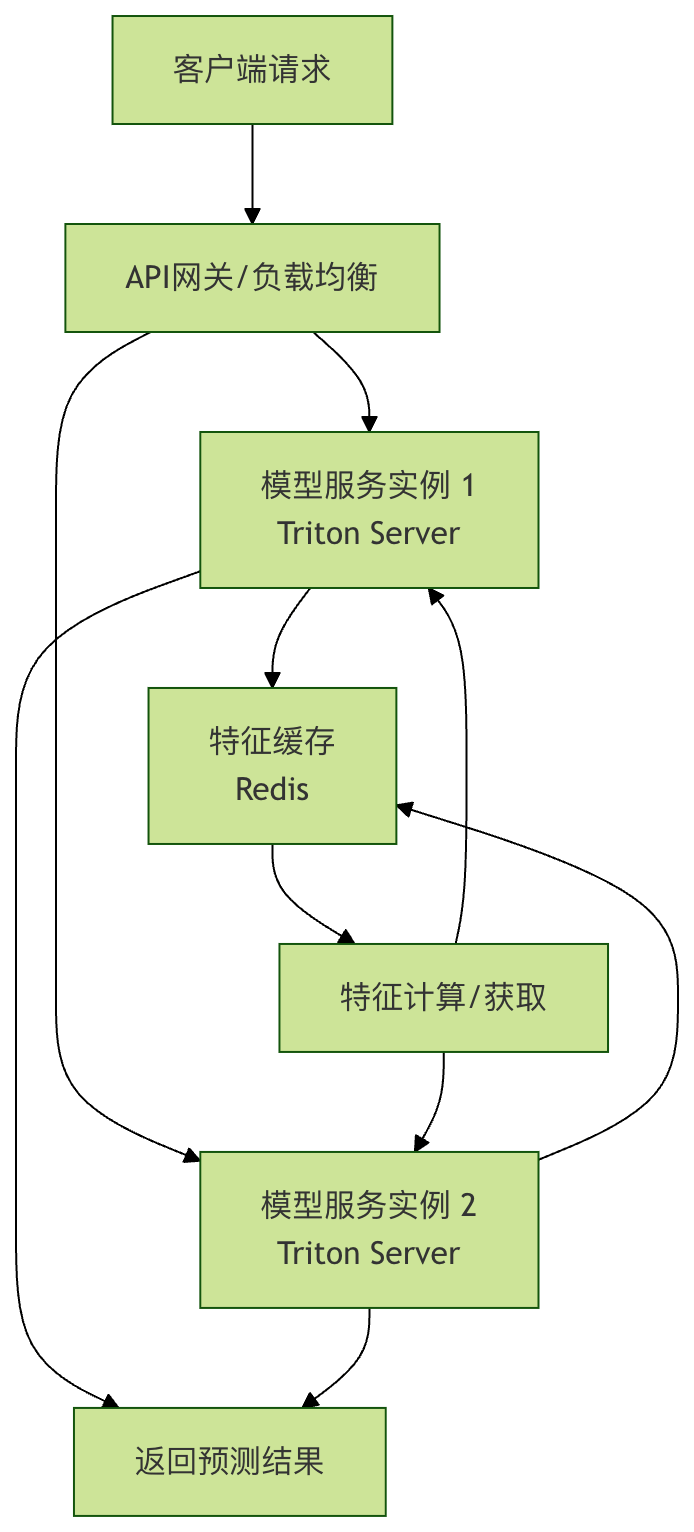
Figure: An example of a high-performance model serving architecture, including load balancing, feature caching, and a dedicated model server.
3. Improper Resource Management
The model service has memory leaks, or memory usage keeps increasing over time, eventually causing the service to crash.
Troubleshooting:
- Model loading approach: Is the model reloaded on every request? The correct approach is to load it into memory once at service startup and share it for subsequent requests.
- Global variable accumulation: Is there a global List or Dict in the service code that keeps accumulating data without being cleaned up?
- Large prediction results: Do the returned prediction results (e.g., images, large text) occupy a large amount of memory and fail to be released in time?
Solution:
- Using
gunicorn、uvicornmulti-process/asynchronous servers, understand their Worker model. - Regularly restart the service process (through a process management tool such as
systemdorsupervisor)。 - Use professional memory analysis tools (e.g.,
memory_profiler) to locate the leak point.
III. Model and Algorithm Problems
1. Overfitting and Underfitting
This is a fundamental issue of model capability.
| Problem | Symptom | Possible Causes | Solution |
|---|---|---|---|
| Underfitting | Training set and validation set performanceBoth are poor | The model is too simple (low complexity), insufficient features, not enough training epochs | Increase model complexity, add more effective features, increase training epochs |
| Overfitting | Training set performanceVery good, validation set performanceVery poor | The model is too complex, too little training data, too much noise | Increase training data, use regularization (L1/L2/Dropout), reduce model complexity, early stopping |
Troubleshooting:Drawing learning curves is the best way to judge the fitting situation.
2. Vanishing/Exploding Gradients
Common when training deep neural networks, causing the model to fail to converge or training to be unstable.
Symptoms:
- Model loss becomes
NaN。 - Weight values become extremely large or extremely small.
- Early in training, the loss value no longer changes.
Solutions:
- Weight initialization: Use
He初始化(ReLU activation function) orXavier初始化(Tanh/Sigmoid)。 - Gradient clipping: Set a threshold, and clip the gradient when it exceeds it.
- Batch normalization: Add a
BatchNormlayer before the activation function, which can stabilize training and allow the use of a higher learning rate. - Adjust the network architecture: Use structures such as residual connections in ResNet.
IV. Establish a Systematic Troubleshooting Process
When problems occur with an online model, a systematic troubleshooting process can help you quickly locate the issue.
- Confirm the problem: Are all predictions wrong, or is it specific to certain groups/scenarios? What is the error rate?
- Check the input: Obtain a batch of request data that failed online, check whether the input features are complete, the format is correct, and whether the values are within a reasonable range (such as the appearance of
NaN,Infor extreme values). - Reproduce locally: Use the input data that failed online, and in the local development environment usethe same model and codeto make predictions, and see whether the problem can be reproduced.
- Compare data: Compare the data distribution of online requests with the training data distribution, and check whether drift exists.
- Check code and configuration: Verify whether the code version, model file version, and configuration file of the online service are consistent with the environment that passed testing.
- Check logs and monitoring: Check whether the service logs have abnormal errors, and whether the CPU, memory, and response time metrics in the monitoring system are abnormal.
- Simplify and locate: If possible, try using a minimalist model or rule-based system to process the erroneous input, and determine whether it is a data problem or a model problem.