Node.jsTutorial
Simply put, Node.js is JavaScript running on the server side.
Node.js is a platform built on Chrome's JavaScript runtime.
Node.js is an event-driven I/O server-side JavaScript environment based on Google's V8 engine. The V8 engine executes JavaScript very quickly and has excellent performance.
Who is this tutorial for?
If you are a front-end programmer who doesn't know dynamic programming languages like PHP, Python, or Ruby, and you want to create your own services, then Node.js is a very good choice.
Node.js is JavaScript running on the server side. If you are familiar with JavaScript, you will find it easy to learn Node.js.
Of course, if you are a back-end programmer and want to deploy high-performance services, learning Node.js is also a very good choice.
What you need to know before learning this tutorial
Before continuing with this tutorial, you should understand some basic computer programming terminology. If you have learned programming languages such as JavaScript, PHP, Java, etc., it will help you understand Node.js programming faster.
Node.js Features
- Single-threaded and event-driven architecture: Node.js uses a single thread to handle requests, but through its event-driven and non-blocking I/O features, it can efficiently handle a large number of concurrent connections without blocking the thread.
- Asynchronous and non-blocking I/O: This enables Node.js to handle high-concurrency requests, making it very suitable for I/O-intensive applications such as file reading, database operations, and network requests.
- Cross-platform support: Node.js can run on multiple operating systems such as Windows, Linux, and macOS.
- Vast ecosystem: Node.js has an ecosystem called npm (Node Package Manager), which contains a rich collection of third-party libraries and modules that can be used to extend functionality and accelerate development.
Application scenarios of Node.js
- Web server: Due to its ability to efficiently handle concurrent requests, Node.js is often used to build fast, scalable web servers.
- Real-time applications: For example, chat applications, real-time collaboration tools, etc.
- API services: Node.js is well-suited for developing RESTful APIs and GraphQL services.
- Command-line tools: Node.js can also be used to build CLI tools, leveraging its easy-to-use libraries and package manager for rapid development.
Version used
We can use the following command to view the current Node version:
$ node -v
v4.4.3
Note:There may be differences between different versions.
First Node.js program: Hello World!
Script mode
The following is our first Node.js program:
Example
Run example »
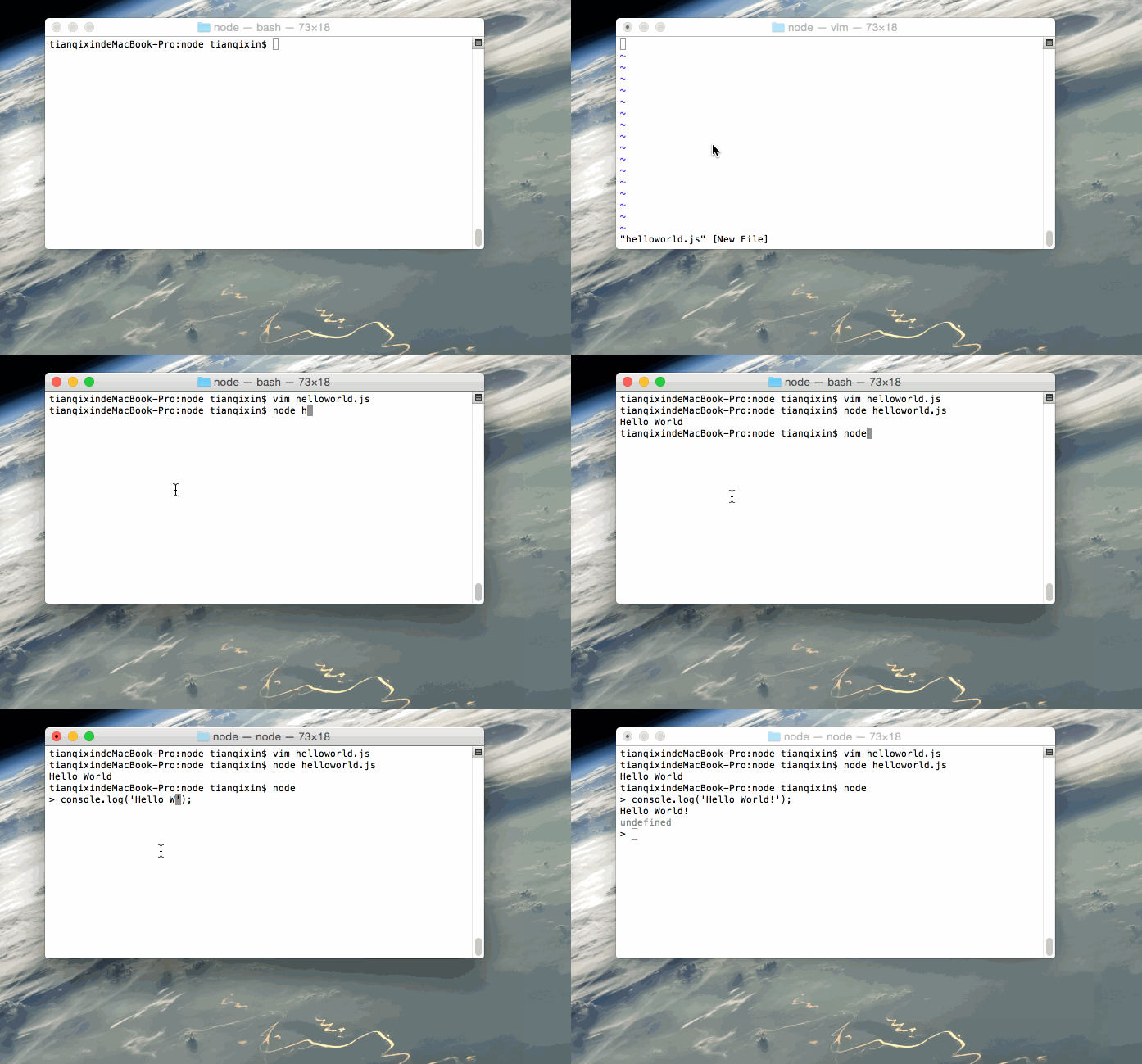
Save the file as helloworld.js, and run it with the node command:
node helloworld.js
After the program runs, if everything is normal, it will output Hello World in the terminal.
Interactive mode
Open the terminal, type node to enter interactive command mode. You can enter a code statement, and it will execute immediately and display the result, for example:
$ node
> console.log('Hello World!');
Hello World!
GIF example demonstration
Next, we will demonstrate the example operations using a GIF image:
 Other extensions