npx Getting Started Tutorial
If you're just starting to learn JavaScript or Node.js, you've likely already encountered
npmto install various tools and libraries. Sometimes we may just want to quickly run a tool to see its effect without installing it globally, right?There's also another situation: different projects need different versions of command-line tools, and global installation always causes conflicts?
npxIt is a powerful tool born to solve these problems.
npxIt is a command-line tool introduced in npm 5.2.0 that lets you execute npm packages without global installation.
Simply put,npx is a convenient tool for executing Node.js packages,and its core design philosophy is:Use temporarily without permanent installation。
A Vivid Metaphor
Imagine your home toolbox:
- npm... is like yourtool warehouse manager. When you
npm install -g some-tool, it's equivalent to telling the manager: buy this tool and put it in our garage (global environment) forever. - npx... is like anon-demand errand service. When you
npx some-tool, it's equivalent to telling the errand boy: go find me asome-toolto use, and return it after use, don't put it in my home.
Usingnpx, you can run any package from the npm registry without having to install it on your computer first.
| Traditional pain points | npx's solution |
|---|---|
| Must install globally | Run directly |
| Version conflicts | Use a specified version each time |
| Environment pollution | Clean up after use |
| Local commands hard to find | Auto-locate |
Why Use npx?
1. Solve global package pollution and version conflicts
InnpxBefore npx appeared, if you wanted to use command-line tools likecreate-react-app、vue-cliscaffolding tools, you had to install them globally first:npm install -g create-react-app。
This brings two problems:
- Polluting the global environment: the installed package will occupy your disk space for a long time, even if you haven't used it for a while.
- Version conflicts: if you are developing two projects, one requires
create-react-app@3, another requirescreate-react-app@5, global installation can only keep one version, which will cause one of the projects to fail to work normally.
npxIt allows you to directly specify a version to run, and leave after use, perfectly avoiding these problems.
2. Easily run packages installed locally in a project
In the project directory, younpm install some-cli-toolinstalled packages (will appear innode_modules/.bin/directory), usually can only be invoked through complex paths or npm scripts. Andnpxit can intelligently prioritize using the local version in the current project, making invocation very simple.
3. Try new tools safely and conveniently
Want to test a newly released command-line tool? Just usenpx new-cool-toolto try it! If it's not suitable, it won't leave any trace on your computer.
How npx Works
When you executenpx <command>, it will find and execute the command according to the following logic:
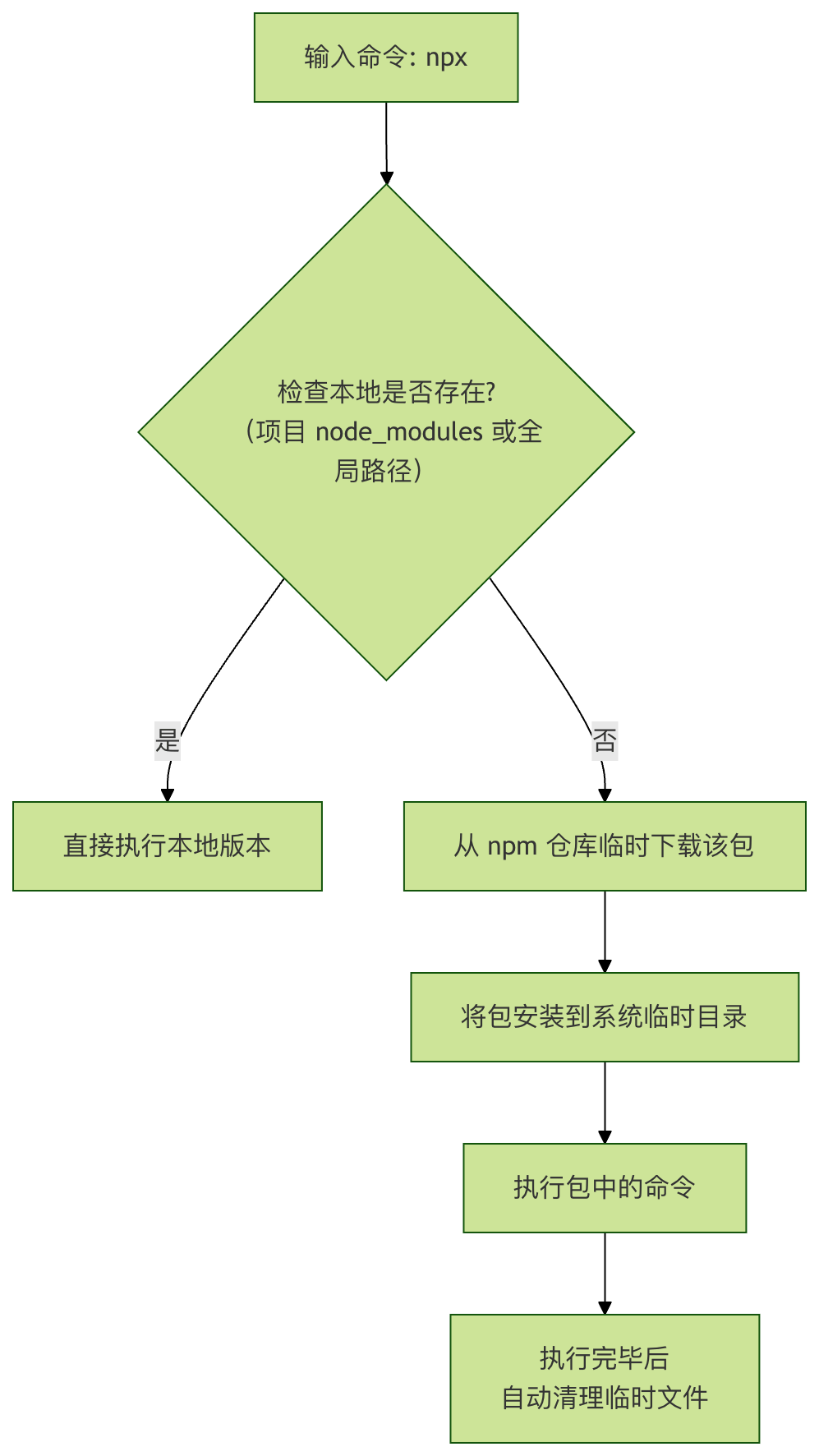
This process is completely transparent to the user; you just need to enjoy the convenience it brings.
How to Use npx?
Environment Preparation
Make sure your Node.js version >= 5.2.0. You can check with the following command:
node --version
npm --version
# 如果 npm 版本 >= 5.2.0,npx 就已经可用了
npx --version
Basic Syntax
npx [选项] <命令>[@版本] [命令的参数...]
Common Option Parameter Descriptions
| Option | Full name | Description |
|---|---|---|
--no-install |
Force npx to only use locally existing packages. If not available locally, report an error and do not download. | |
--ignore-existing |
Ignore locally existing packages and force download the latest version from remote. | |
-p, --package <包名> |
Specify the packages to install. This is very useful when you need to use multiple packages at the same time. | |
-c <命令字符串> |
When using-pWhen specifying multiple packages, use-cto tell npx the specific command to execute. |
|
--yes |
Automatically answer "yes" when it is known that a prompt would be triggered (e.g., create-react-app asks whether to continue). |
Practical Application Examples
Let's look at a few specific examples to see hownpxit can demonstrate its power.
Example 1: Run a one-off command (most common scenario)
You want to usecowsaythis fun little tool to make a cow talk in the terminal, but you don't want to install it.
Step 1: Run directly with npx
npx cowsay hello
Code explanation:npxIt will check if the localcowsayexists. If not, it automatically downloads from npm and cleans up automatically after the command is executed.
Expected output:
npx cowsay hello

Need to install the following packages:
cowsay@1.6.0
Ok to proceed? (y) y
 _______
< hello >
 -------
        \   ^__^
         \  (oo)\_______
            (__)\       )\/\
                ||----w |
                ||     ||
Step 2: Run with a specific versionIf you want to use a specific version:
npx cowsay@1.4.0 hello1.4.0
Output:
 ____________
< hello1.4.0 >
 ------------
        \   ^__^
         \  (oo)\_______
            (__)\       )\/\
                ||----w |
                ||     ||
Example 2: Use a scaffold to create a project
Take creating a React project as an example:
Traditional way (not recommended anymore):
npm install -g create-react-app  # 全局安装
create-react-app my-app          # 使用
Problems with this installation method:
- Globally installs a bunch of tools
- Version confusion
- Computer becomes increasingly bloated
Modern way (using npx):
npx create-react-app my-app
Code explanation:npxIt will temporarily fetch the latest version ofcreate-react-app, use it to build the project skeleton, and after completion it will not leavecreate-react-appin your global environment. The next time you create a project, it will still fetch the latest version.
Example 3: Run project-local tools
Suppose you installedwebpackas a development dependency (npm install webpack --save-dev)。
Traditional invocation (troublesome):
# 需要输入冗长的路径
./node_modules/.bin/webpack --version

# 或者在 package.json 中配置 scripts
# "scripts": { "build": "webpack" }
# 然后运行
npm run build
Using npx (very concise):
npx webpack --version
# 或直接运行构建
npx webpack
Code explanation:npxIt will intelligently prioritize finding the project'snode_modulesunderwebpackto execute.
Example 4: Execute a script from GitHub
npxYou can even run code from GitHub gists or repositories.
npx https://gist.github.com/username/abcdefg
Please note that running unknown code from the internet has security risks; make sure the source is trustworthy.
npx's three core capabilities
1. Run any npm package directly
General format:
npx 包名
Example:
npx cowsay hello
It will directly run a command-line little cow 🐮
2. Run project-local dependencies
Many tools are only installed in the project:
npm install vite
Previously you had to:
./node_modules/.bin/vite
Now:
npx vite
Automatically finds local executable files for you
3. Execute with the latest version (doesn't pollute the system)
npx create-next-app@latest my-app
Always use the latest version of scaffolding
No need to upgrade global tools
Most common npx scenarios
Creating projects
npx create-react-app my-app
npx create-next-app
npx vue-cli create my-vue
npx degit user/repo
Temporary tools
npx eslint .
npx prettier --write .
npx serve .
Running a development server
npx vite
npx nodemon app.js
Advanced Tips and Considerations
1. Combine multiple packages
Sometimes a command needs to depend on multiple packages. For example, you want to start a simple HTTP server in a directory and at the same time usebrowser-syncto implement live reload. Although not common,npxit can be done:
npx -p http-server -p browser-sync -c 'http-server & browser-sync start --proxy "localhost:8080" --files "**/*"'
Code explanation:
-pSpecify the packages to prepare.-cSpecify the complete command string to run.
2. Considerations
- Network connection: The first time you run a package, it needs to be downloaded from the network, and the speed depends on your network.
- Security:
npxIt will automatically download and execute code.Only run sources and packages you trust.。 - Temporary directory: The downloaded packages are stored in the operating system's temporary directory and may be periodically cleaned up by the system.