Node.js Event Loop
The event loop is the core mechanism by which Node.js handles non-blocking I/O operations, allowing a single thread to efficiently handle multiple concurrent requests.
Node.js is a single-threaded JavaScript runtime that uses the event loop to handle asynchronous operations such as file reads, network requests, and database queries.
The event loop enables Node.js to run code non-blockingly, handle multiple connections, and perform asynchronous I/O operations.
The event loop allows Node.js to handle a large number of concurrent I/O operations without causing thread blocking; this is the key to Node.js efficiently handling concurrent requests.
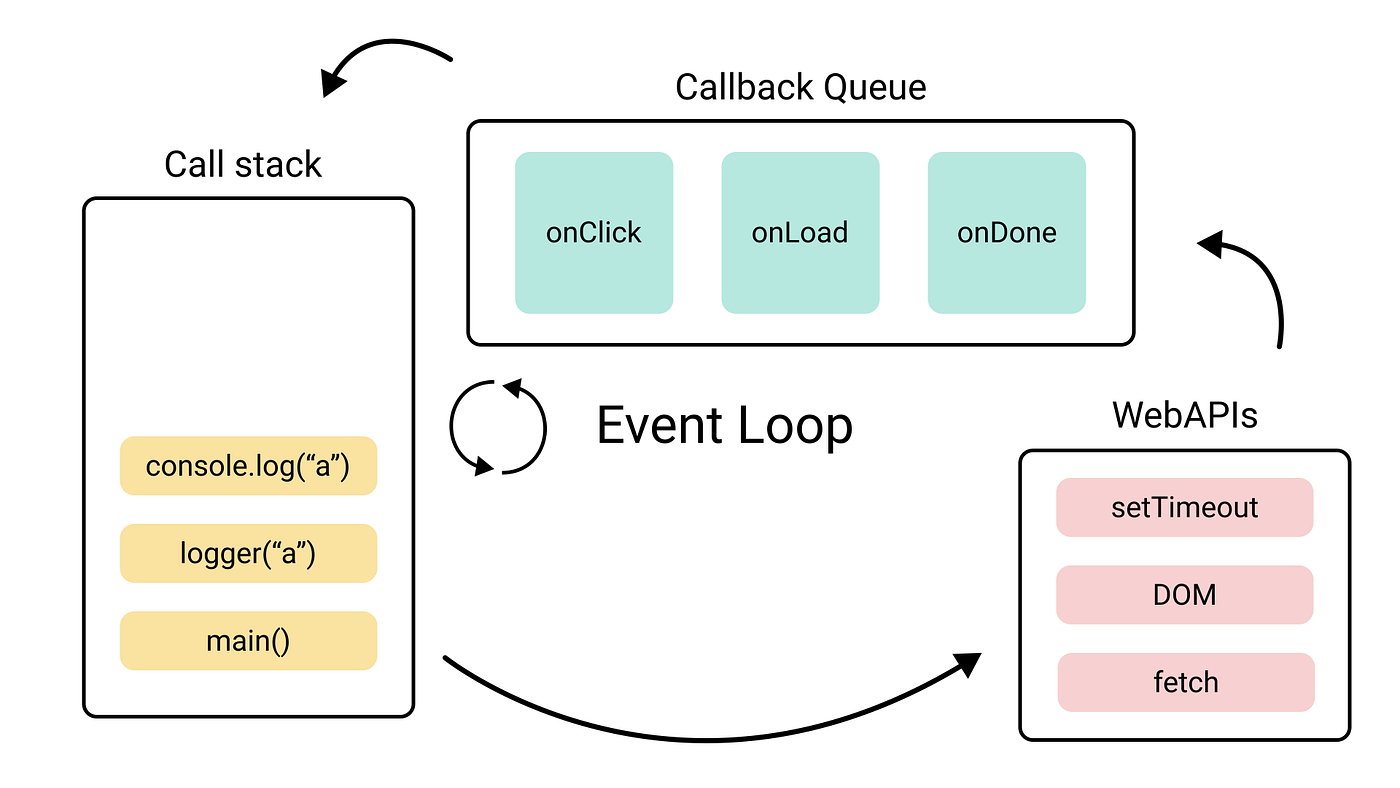
Phases of the Event Loop
The event loop is divided into multiple phases, each handling specific tasks. The key phases are as follows:
- Timers: Execute
setTimeout()andsetInterval()callbacks. - I/O Callbacks: Handle some delayed I/O callbacks.
- Idle, prepare: Used internally, not common.
- Poll: Retrieve new I/O events and execute I/O-related callbacks.
- Check: Execute
setImmediate()callbacks. - Close Callbacks: Handle close callbacks, such as
socket.on('close', ...)。
Flow of the Event Loop
- Tasks enter the event loop queue。
- The event loop processes in order of phases, and each phase has its own callback queue.
- The event loop will be in the
pollphase waiting for new events to arrive; if there are no events, it will check callbacks in other phases. - If
setImmediate()andsetTimeout()both exist,setImmediate()Incheckthe phase executes first, whilesetTimeout()Intimersthe phase executes.
Example
console.log('Timeout callback');
}, 0);
setImmediate(() => {
console.log('Immediate callback');
});
console.log('Main thread execution');
Output order:
Main thread executionPrints first.setImmediate()andsetTimeout()The execution order depends on the current event loop state; generallysetImmediate()will execute first.
Macrotasks and Microtasks
- Macrotasks:
setTimeout、setInterval、setImmediate, I/O operations, etc. - Microtasks:
process.nextTick、Promise.then。
Execution order:Microtasks have higher priority than macrotasks and will be executed immediately after the callbacks of the current phase finish.
Example
console.log('Timeout callback');
}, 0);
Promise.resolve().then(() => {
console.log('Promise callback');
});
console.log('Main thread execution');
Execution output result:
Main thread execution
Promise callback
Timeout callback
process.nextTick()
process.nextTick() executes microtasks after the current operation ends and before the next phase begins, with higher priority than Promise.
Example
console.log('Next tick callback');
});
console.log('Main thread execution');
Output:
Main thread execution
Next tick callback
Event-Driven Program
In Node.js, event-driven programming is mainly implemented through the EventEmitter class.
EventEmitter is a built-in class located in the events module. By extending EventEmitter, you can create your own event emitter and register and trigger events.
Through this mechanism, Node.js can efficiently handle asynchronous tasks and achieve concurrent processing even in a single-threaded environment.
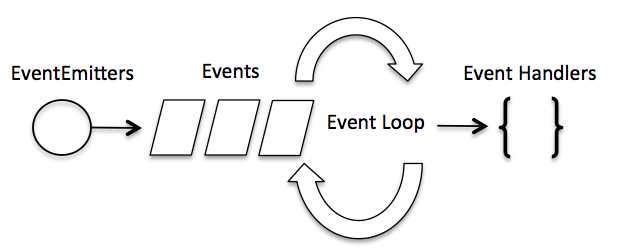
The entire event-driven flow is implemented in exactly this way; it is very concise. It is somewhat similar to the observer pattern: an event is equivalent to a subject (Subject), and all handler functions registered to this event are equivalent to observers (Observer).
Basic concepts:
- Event: An action or state change that occurs in a program, such as a file read completing or an HTTP request arriving.
- EventEmitter:
EventEmitteris a built-in module of Node.js, used to emit and listen to events. - Event handler: A callback function associated with an event, called when the event occurs.
Event-driven flow:
- Register event: In the program, through
EventEmitteran instance registers events and corresponding handlers. - Trigger event: When the specified event occurs,
EventEmitterit will trigger the event. - Handle event: The event loop schedules the corresponding callback function to execute the task.
Node.js has multiple built-in events. We can bind and listen to events by importing the events module and instantiating the EventEmitter class, as in the following example:
// 引入 events 模块
var events = require('events');
// 创建 eventEmitter 对象
var eventEmitter = new events.EventEmitter();
The following program binds event handlers:
// 绑定事件及事件的处理程序
eventEmitter.on('eventName', eventHandler);
We can trigger events through the program:
// 触发事件
eventEmitter.emit('eventName');
Example
Create a hello.js file, the code is as follows:
Example 1
const myEmitter = new EventEmitter();
// Register event handler
myEmitter.on('greet', () => {
console.log('Hello, world!');
});
// Trigger event
myEmitter.emit('greet');
Output:
Hello, world!
Create a main.js file, the code is as follows:
Example 2
Next, let's execute the above code:
$ node main.js
连接成功。
数据接收成功。
程序执行完毕。
How Does a Node Application Work?
In Node applications, functions that perform asynchronous operations take a callback function as the last parameter, and the callback function receives an error object as the first parameter.
Next, let's review the previous example. Create an input.txt file with the following content:
Example官网地址:www.example.com
Create a main.js file with the following code:
var fs = require("fs");

fs.readFile('input.txt', function (err, data) {
   if (err){
      console.log(err.stack);
      return;
   }
   console.log(data.toString());
});
console.log("程序执行完毕");
In the above program, fs.readFile() is an asynchronous function used to read files. If an error occurs during the file reading process, the error object err will output the error message.
If no error occurs, readFile skips the output of the err object, and the file content is output through the callback function.
Execute the above code, the execution result is as follows:
程序执行完毕
Example官网地址:www.example.com
Next, we delete the input.txt file, and the execution result is as follows:
程序执行完毕
Error: ENOENT, open 'input.txt'
Because the file input.txt does not exist, an error message is output.
Other extensions