Node.js Promise
Promise is one of the core concepts for handling asynchronous operations in Node.js.
Promise provides a more elegant way to manage asynchronous code, avoiding the traditional callback hell problem.
This article will detail the concept, usage, and common patterns of Promise.
What is Promise?
A Promise is an object representing the eventual completion or failure of an asynchronous operation. It has three states:
- Pending (waiting): Initial state, neither successful nor failed
- Fulfilled (successful): The operation completed successfully
- Rejected (failed): The operation failed
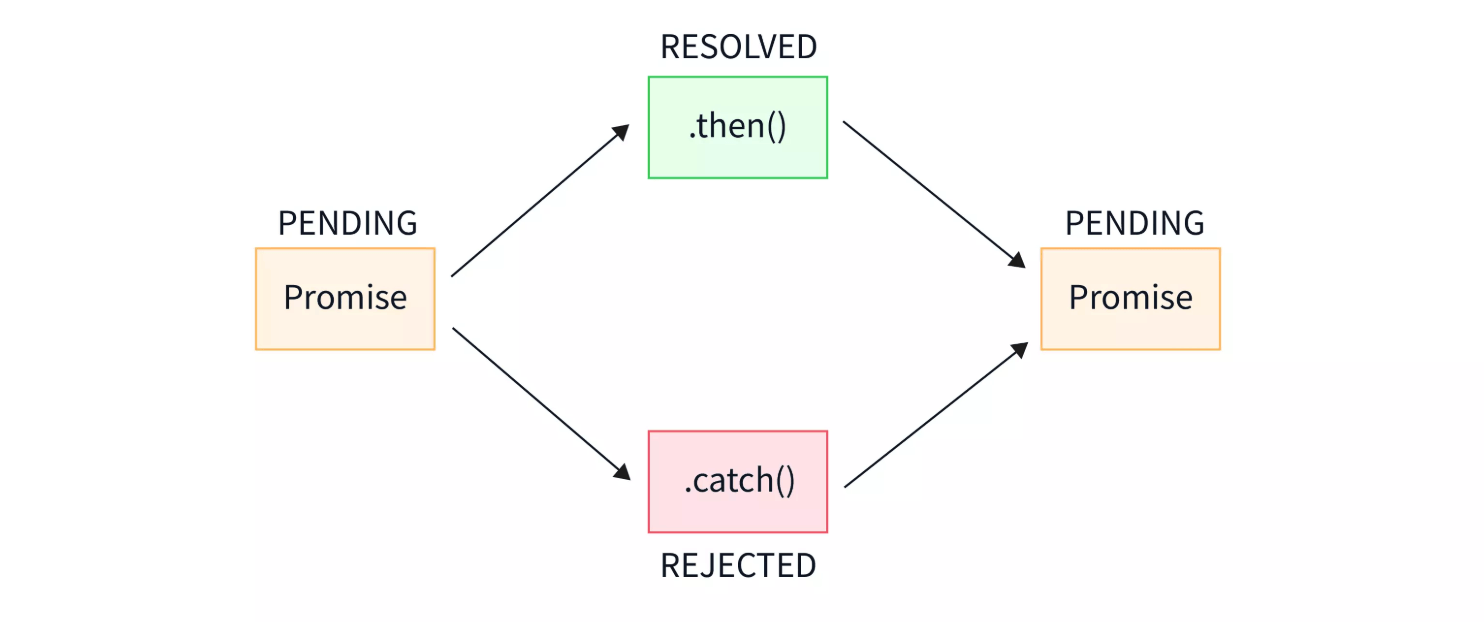
Once a Promise's state changes (from pending to fulfilled or rejected), it will not change again.
Creating a Promise
In Node.js, you can use thePromiseconstructor to create a new Promise object:
Example
// Asynchronous operation
const success = true; // Suppose this is the result of the asynchronous operation
if (success) {
resolve('Operation succeeded!'); // State becomes fulfilled
} else {
reject('Operation failed!'); // State becomes rejected
}
});
Using Promise
Promise provides the.then()and.catch()method to handle success and failure cases:
Example
.then((result) => {
console.log(result); // Output: "Operation succeeded!"
})
.catch((error) => {
console.error(error); // Output: "Operation failed!"
});
Promise Chaining
The power of Promise lies in its ability to chain multiple asynchronous operations:
Example
return new Promise((resolve) => {
setTimeout(() => resolve('First step completed'), 1000);
});
}
function asyncOperation2(data) {
return new Promise((resolve) => {
setTimeout(() => resolve(`${data},Second step completed`), 1000);
});
}
asyncOperation1()
.then((result) => asyncOperation2(result))
.then((finalResult) => {
console.log(finalResult); // Output: "First step completed, Second step completed"
})
.catch((error) => {
console.error('Error in chain:', error);
});
Static Methods of Promise
Promise provides some useful static methods:
Promise.all()
Waits for all Promises to complete, or any one Promise to fail:
Example
const promise2 = Promise.resolve('second');
Promise.all([promise1, promise2])
.then((results) => {
console.log(results); // Output: ['first', 'second']
});
Promise.race()
Returns the Promise that settles first (fulfills or rejects):
Example
const promise2 = new Promise((resolve) => setTimeout(resolve, 100, 'second'));
Promise.race([promise1, promise2])
.then((result) => {
console.log(result); // Output: "second"
});
Error Handling
Promise error handling can be done through.catch()or.then()the second parameter of .then:
Example
.then(
(result) => { /* Handle success */ },
(error) => { /* Handle failure */ }
);
// Or
someAsyncFunction()
.then((result) => { /* Handle success */ })
.catch((error) => { /* Handle all errors */ });
async/await Syntax
ES2017 introduced the async/await syntax, making the use of Promise more intuitive:
Example
try {
const result1 = await asyncOperation1();
const result2 = await asyncOperation2(result1);
console.log(result2);
} catch (error) {
console.error(error);
}
}
runOperations();
Best Practices
- Always handle errors: Don't ignore
.catch()or try-catch - Avoid nesting: Use chaining or async/await to keep code flat
- Name Promises: Give meaningful names to Promise variables
- Return Promises: Return Promises from functions to enable chaining