Node.js Callback Functions
Node.js is a JavaScript runtime environment based on the Chrome V8 engine. It enables JavaScript to run on the server side independently of the browser.
One of Node.js's core features is its non-blocking I/O (input/output) model, which makes Node.js very suitable for handling high-concurrency network applications.
Callbacks are the direct embodiment of Node.js asynchronous programming.
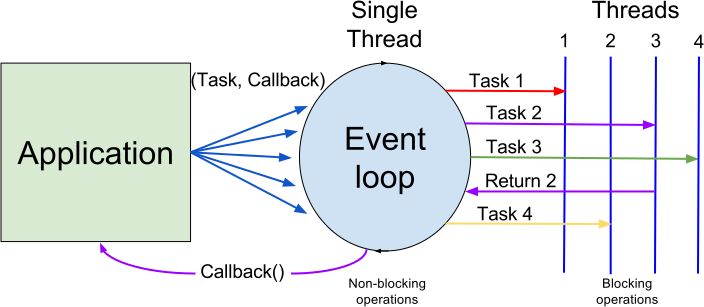
In Node.js, a callback function is an asynchronous programming pattern used to handle I/O operations such as file reading and writing, database interactions, and network requests. These operations usually take a long time; if handled synchronously, they would block the entire program's execution until the operation completes.
With callback functions, Node.js can continue executing other code while an I/O operation is in progress, and then execute the callback once the I/O operation completes.
Node.js is single-threaded, but it achieves asynchronous operations through an event-driven and callback mechanism.
Use Cases
- I/O operations such as reading files and writing files.
- Handling network requests.
- Database queries.
For example, we can read a file and execute other commands at the same time. When the file read is complete, we return the file content as parameters of the callback function. In this way, there is no blocking or waiting for file I/O operations when executing code. This greatly improves Node.js performance and allows it to handle a large number of concurrent requests.
Callback functions generally appear as the last parameter of a function:
function foo1(name, age, callback) { }
function foo2(value, callback1, callback2) { }
Example
Blocking Code Example
Create a file input.txt with the following content:
Example官网地址:www.example.com
Create a main.js file with the following code:
Example
var data = fs.readFileSync('input.txt');
console.log(data.toString());
console.log("Program execution ended!");
The execution result of the above code is as follows:
$ node main.js
Example官网地址:www.example.com

程序执行结束!
Non-blocking Code Example
Create a file input.txt with the following content:
Example官网地址:www.example.com
Create a main.js file with the following code:
Example
fs.readFile('input.txt', function (err, data) {
if (err) return console.error(err);
console.log(data.toString());
});
console.log("Program execution ended!");
Parameter Explanation:
errIt is the error object, and it will have a value if reading fails.dataIt is the file content that was read.
The execution result of the above code is as follows:
$ node main.js
程序执行结束!
Example官网地址:www.example.com
From the above two examples, we can understand the difference between blocking and non-blocking calls:
The first example executes the program only after the file read is complete.
In the second example, we do not need to wait for the file read to complete, so we can execute subsequent code while reading the file, greatly improving program performance.
Therefore, blocking executes sequentially, while non-blocking does not require sequential order. So if you need to process the callback function's parameters, you need to write it inside the callback function.
Callback Hell
When multiple asynchronous operations need to be executed sequentially, callback functions lead to nested code, making the code difficult to read and maintain.
Example
if (err) {
console.error('Error reading file1:', err);
return;
}
fs.readFile('file2.txt', 'utf8', (err, data2) => {
if (err) {
console.error('Error reading file2:', err);
return;
}
fs.readFile('file3.txt', 'utf8', (err, data3) => {
if (err) {
console.error('Error reading file3:', err);
return;
}
console.log('Data from all files:', data1, data2, data3);
});
});
});
To improve code readability and maintainability, you can use the following methods:
- Promises: Promises are a new asynchronous programming pattern that allows you to handle asynchronous operations in a chainable manner, avoiding callback hell.
- async/await: Based on Promises,
async/awaitIt provides an asynchronous programming style that is closer to synchronous code, making asynchronous code easier to understand and maintain. - Event-Driven Programming: Node.js also supports event-driven programming, handling asynchronous operations by listening to and emitting events.
1. Use async/await
async/await is syntactic sugar introduced in ES2017 that allows you to handle asynchronous operations more conveniently and avoid callback hell.
Example
async function readFiles() {
try {
const data1 = await fs.readFile('file1.txt', 'utf8');
const data2 = await fs.readFile('file2.txt', 'utf8');
const data3 = await fs.readFile('file3.txt', 'utf8');
console.log('Data from all files:', data1, data2, data3);
} catch (err) {
console.error('Error reading files:', err);
}
}
readFiles();
2. Use Promises
Promises are another way to handle asynchronous operations. You can chain calls to the then method to avoid nested callbacks.
Example
fs.readFile('file1.txt', 'utf8')
.then(data1 => {
console.log('Data from file1:', data1);
return fs.readFile('file2.txt', 'utf8');
})
.then(data2 => {
console.log('Data from file2:', data2);
return fs.readFile('file3.txt', 'utf8');
})
.then(data3 => {
console.log('Data from file3:', data3);
})
.catch(err => {
console.error('Error reading files:', err);
});
Callback functions are a basic way to handle asynchronous operations in Node.js, but as application complexity increases, the callback hell problem becomes increasingly apparent. By using async/await or Promises, the readability and maintainability of code can be significantly improved.
Other Extensions