Node.js GET/POST Requests
In many scenarios, our server needs to interact with the user's browser, such as form submission.
Form submissions to the server generally use GET/POST requests.
In this chapter, we will introduce Node.js GET/POST requests.
Getting GET Request Content
Since GET requests are directly embedded in the path, the URL is the complete request path, including the?part after `?`, so you can manually parse the content after it as GET request parameters.
In node.js, you can use the URL constructor to parse the request URL.
The URL object is a standard tool in Node.js for parsing and manipulating URLs. It provides a convenient interface to access and modify various components of a URL, such as protocol, hostname, path, query parameters, etc.
Example
Visit in the browserhttp://localhost:3000/user?name=Example&url=www.example.comThen view the returned result:

Getting URL Parameters
We can use the url.parse method to parse the parameters in the URL. The code is as follows:
Example
Visit in the browserhttp://localhost:3000/user?name=Example&url=www.example.comThen view the returned result:
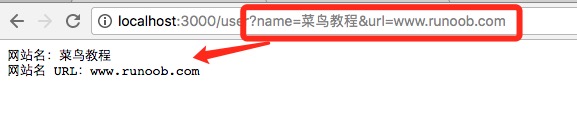
URL Object
The following are the properties and methods of the URL object:
| Property/Method | Description | Example Output |
|---|---|---|
| href | The complete URL string | "http://example.com:8080/path?foo=bar#section" |
| origin | The origin of the URL, including the protocol, hostname, and port number (if present) | "http://example.com:8080" |
| protocol | The protocol part of the URL, followed by: | "http:" |
| host | hostname and port number | "example.com:8080" |
| hostname | Hostname, excluding the port number | "example.com" |
| port | Port number (if specified) | "8080" |
| pathname | The pathname part | "/path" |
| search | The query string part, including the leading? | "?foo=bar&hello=world" |
| searchParams | URLSearchParamsAn object for manipulating query parameters | { foo: 'bar', hello: 'world' } |
| hash | The anchor part, including the# | "#section" |
| Method | Description | Example Code | Example Output |
|---|---|---|---|
| get(name) | Get the value of the query parameter with the specified name | myUrl.searchParams.get("foo") | "bar" |
| append(name, value) | Append a new parameter to the query string | myUrl.searchParams.append("newKey", "newValue") | ?foo=bar&newKey=newValue |
| set(name, value) | Set the parameter with the specified name in the query string (update if it already exists) | myUrl.searchParams.set("foo", "newBar") | ?foo=newBar |
| delete(name) | Delete the query parameter with the specified name | myUrl.searchParams.delete("foo") | ?hello=world |
| has(name) | Determine whether a parameter with the specified name exists in the query string | myUrl.searchParams.has("foo") | trueorfalse |
| forEach(callback) | Iterate over the key-value pairs of the query parameters and execute a callback function | myUrl.searchParams.forEach((v, k) => console.log(k, v)) | Key-value pair output |
| toString() | Convert the query parameters to a string form, suitable for rebuilding a URL | myUrl.searchParams.toString() | "foo=bar&hello=world" |
Example
console.log(myUrl.pathname); // Output: /path
console.log(myUrl.searchParams.get("foo")); // Output: bar
myUrl.searchParams.append("newKey", "newValue");
console.log(myUrl.href); // Output: http://example.com/path?foo=bar&hello=world&newKey=newValue
Getting POST Request Content
In Node.js, handling POST requests usually requires receiving data from the request body through the http module. Unlike GET requests, POST request data is not included in the URL but is sent as the request body. Therefore, when receiving POST data in Node.js, you need to listen to and handle therequestrequest object'sdataandendevent.
- Listen to the
dataevent: When a data chunk arrives at the server,dataThe event is triggered, and the data chunk is passed as a parameter to the callback. - Listen to the
endevent: When the entire request body has been received,endThe event is triggered, and at this point you can process the complete POST data.
Example
// Create HTTP server
http.createServer((req, res) => {
// Check whether the request method is POST
if (req.method === 'POST') {
let body = '';
// Listen to the data event, receive data in chunks
req.on('data', (chunk) => {
body += chunk; // Accumulate the received data chunks
});
// Listen to the end event, data reception is complete
req.on('end', () => {
// Output the received POST data
console.log('Received POST data:', body);
// Set response headers and content
res.writeHead(200, { 'Content-Type': 'text/plain' });
res.end('POST data received successfully!');
});
} else {
// Handling non-POST requests
res.writeHead(405, { 'Content-Type': 'text/plain' });
res.end('Only POST requests are supported.');
}
}).listen(3000, () => {
console.log('Server is running at http://localhost:3000');
});
Code explanation:
- Detect request method: Use
req.method === 'POST'to determine whether the request type is POST. - Receive data: In
req.on('data')the event, accumulate data chunks to form the complete data body. - Complete receiving: In
req.on('end')the event, process the complete POST data. - Respond to the client: After completing data reception and processing, send a response to the client.
You can use the curl command to test POST requests:
curl -X POST -d "name=example&age=25" http://localhost:3000
Handling JSON Data
If the POST request sends JSON data, you canreq.on('end')parse the received data into an object:
req.on('end', () => {
    const parsedData = JSON.parse(body); // 将 JSON 字符串解析为对象
    console.log('Received JSON data:', parsedData);
    res.end('JSON data received successfully!');
});
querystring Module
The querystring module is used to handle URL query strings and POST request data.
For POST request data encoded as application/x-www-form-urlencoded, the querystring module can help parse the request body and convert it into a JavaScript object for easy access and manipulation.
Suppose the POST request data sent by the client is in the formatapplication/x-www-form-urlencoded(e.g., form submission), and the data is similar toname=example&age=25After receiving the data, you can usequerystring.parsemethod to parse the data into an object.
Basic Syntax Structure Explanation
The following example form submits via POST and outputs data:
Example
Execution result GIF demo:
