Git Tutorial

Git is an open-source distributed version control system used to handle any small or large projects agilely and efficiently.
Git is an open-source version control software developed by Linus Torvalds to help manage Linux kernel development.
Git is different from common version control tools like CVS, Subversion, etc. It uses a distributed repository approach and does not require server-side software support.
Differences between Git and SVN
Git is not just a version control system; it is also a content management system (CMS), work management system, and more.
If you have a background in using SVN, you need to undergo a certain mental shift to adapt to some of the concepts and features that Git provides.
Differences between Git and SVN:
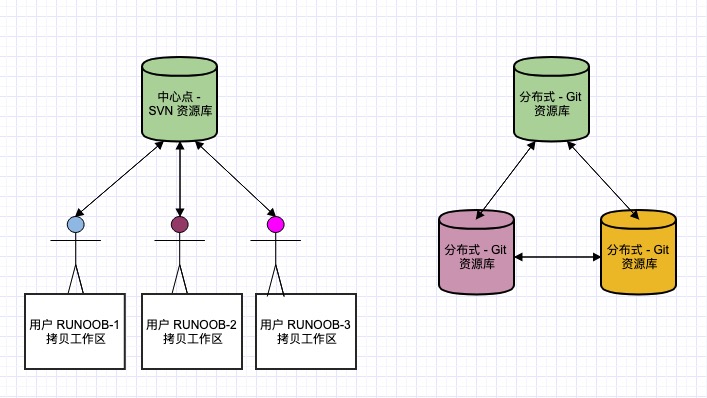
1. Git is distributed; SVN is not.This is the core difference between Git and other non-distributed version control systems, such as SVN, CVS, etc.
2. Git stores content in the form of metadata, while SVN stores by file:All version control systems hide file metadata in a folder similar to .svn, .cvs, etc.
3. Git branches are different from SVN branches:Branches are not special in SVN at all; they are just another directory in the repository.
4. Git does not have a global version number, but SVN does:So far, this is the biggest feature that Git lacks compared to SVN.
5. Git's content integrity is superior to SVN:Git uses the SHA-1 hash algorithm for content storage. This ensures the integrity of code content and reduces damage to the repository in the event of disk failures and network issues.
Git Quick Start
This site also provides a Git quick start guide; you can clickGit Concise GuideView.
After getting started, it is recommended to study the Git tutorial in detail through this site.
Git complete command manual address:http://git-scm.com/docs
PDF version command manual:github-git-cheat-sheet.pdf
Related Article Recommendations
- 1、Git five-minute tutorial
- 2、Git GUI Usage
- 3、GitHub Concise Tutorial <li>4、<a href="../manual/progit.html" target="_blank" rel="noopener noreferrer">Git ChineseManual</a></li>
- 5、The Future of Internet Organizations: Analyzing the Source of GitHub Employees' Capriciousness