Node.js Web Module
What is a Web server?
A web server generally refers to a website server, which is a program residing on a certain type of computer on the Internet. The basic function of a web server is to provide web information browsing services. It only needs to support the HTTP protocol, HTML document format, and URLs, and work with the client's web browser.
Most web servers support server-side scripting languages (PHP, Python, Ruby), etc., and use scripting languages to fetch data from the database and return the results to the client browser.
Currently, the three most mainstream web servers are Apache, Nginx, and IIS.
Web application architecture
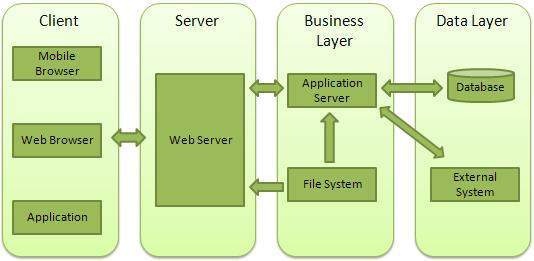
Client- Client, generally refers to the browser. The browser can request data from the server via the HTTP protocol.
Server- Server, generally refers to the web server. It can receive client requests and send response data to the client.
Business- Business layer: processes applications through the web server, such as interacting with the database, performing logical operations, calling external programs, etc.
Data- Data layer, generally consists of a database.
Create a web server with Node
Node.js provides the http module. The http module is mainly used to build HTTP servers and clients. To use HTTP server or client features, you must call the http module. The code is as follows:
var http = require('http');
The following demonstrates a basic HTTP server architecture (using port 8080). Create a server.js file with the following code:
Example
Next, we create an index.html file in this directory. The code is as follows:
index.html file
Execute the server.js file:
$ node server.js
Server running at http://127.0.0.1:8080/
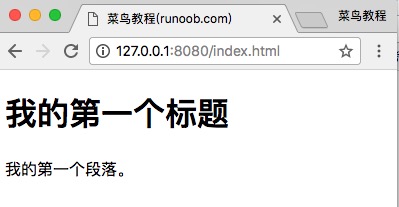
Then we open the address in the browser:http://127.0.0.1:8080/index.html, and it is displayed as shown in the figure below:
The console output information after executing server.js is as follows:
Server running at http://127.0.0.1:8080/
Request for /index.html received.     #  客户端请求信息
Create a web client with Node
To create a web client with Node, you need to import the http module. Create a client.js file with the following code:
Example
Open a new terminal, run the client.js file, and the output result is as follows:
$ node  client.js
<!DOCTYPE html>
<html>
<head>
<meta charset="utf-8">
<title>Example(example.com)</title>
</head>
<body>
    <h1>我的第一个标题</h1>
    <p>我的第一个段落。</p>
</body>
</html>
The console output information after executing server.js is as follows:
Server running at http://127.0.0.1:8080/
Request for /index.html received.   # 客户端请求信息
Other extensions