jQuery EasyUI Data Grid and Tree Plugin –Tree
 jQuery EasyUI Plugin
Override the default defaults with $.fn.tree.defaults.
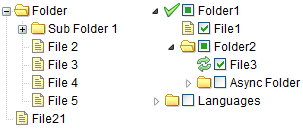
The tree displays hierarchical data as a tree structure on a webpage. It provides users with expand, collapse, drag-and-drop, edit, and asynchronous loading functionality.
Dependencies
- draggable
- droppable
Usage
The tree is defined in a <ul> element. This tag can define leaf nodes and child nodes. The nodes will be <li> elements inside the ul list. The following demonstrates the elements used to create tree nodes nested inside a ul element.
<ul id="tt" class="easyui-tree">
    <li>
        <span>Folder</span>
        <ul>
            <li>
                <span>Sub Folder 1</span>
                <ul>
                    <li><span><a href="../index.html">File 11</a></span></li>
                    <li><span>File 12</span></li>
                    <li><span>File 13</span></li>
                </ul>
            </li>
            <li><span>File 2</span></li>
            <li><span>File 3</span></li>
        </ul>
    </li>
    <li><span>File21</span></li>
</ul>
A tree can also be defined in an empty <ul> element, and data can be loaded using JavaScript.
<ul id="tt"></ul>
$('#tt').tree({
    url:'tree_data.json'
});
Use loadFilter to process JSON data from an ASP.NET web service.
$('#tt').tree({
    url: ...,
    loadFilter: function(data){
        if (data.d){
            return data.d;
        } else {
            return data;
        }
    }
});
Tree Data Format
Each node can contain the following properties:
- id: The id of the node, which is important for loading remote data.
- text: The node text to be displayed.
- state: The node state, 'open' or 'closed', default is 'open'. When set to 'closed', the node has child nodes, and they will be loaded from the remote site.
- checked: Indicates whether the node is checked.
- attributes: Custom attributes added to a node.
- children: An array of nodes that defines some child nodes.
Example:
[{
    "id":1,
    "text":"Folder1",
    "iconCls":"icon-save",
    "children":[{
        "text":"File1",
        "checked":true
    },{
        "text":"Books",
        "state":"open",
        "attributes":{
            "url":"/demo/book/abc",
            "price":100
        },
        "children":[{
            "text":"PhotoShop",
            "checked":true
        },{
            "id": 8,
            "text":"Sub Bookds",
            "state":"closed"
        }]
    }]
},{
    "text":"Languages",
    "state":"closed",
    "children":[{
        "text":"Java"
    },{
        "text":"C#"
    }]
}]
Asynchronous Tree
The tree supports a built-in asynchronous loading mode, so users can create an empty tree and then specify a server-side that dynamically returns JSON data to populate the tree asynchronously as needed. The following is an example:
<ul class="easyui-tree" data-options="url:'get_data.php'"></ul>
The tree is loaded via the URL 'get_data.php'. Child nodes are loaded depending on the state of the parent node. When a closed node is expanded, if no child nodes have been loaded for it, it sends the node's id value to the server through the URL defined above as an HTTP request parameter named 'id' to retrieve child nodes.
Look at the data returned from the server:
[{
    "id": 1,
    "text": "Node 1",
    "state": "closed",
    "children": [{
        "id": 11,
        "text": "Node 11"
    },{
        "id": 12,
        "text": "Node 12"
    }]
},{
    "id": 2,
    "text": "Node 2",
    "state": "closed"
}]
Node 1 and Node 2 are closed. When Node 1 is expanded, its child nodes will be displayed directly. When Node 2 is expanded, value(2) will be sent to the server to retrieve child nodes.
In this tutorial,Creating an Asynchronous Treedemonstrates how to write server code to return tree data on demand.
Properties
| Name | Type | Description | Default Value |
|---|---|---|---|
| url | string | The URL for retrieving remote data. | null |
| method | string | The HTTP method used to retrieve data. | post |
| animate | boolean | Defines whether to show animation effects when a node expands or collapses. | false |
| checkbox | boolean | Defines whether to display a checkbox before each node. | false |
| cascadeCheck | boolean | Defines whether to enable cascading checks. | true |
| onlyLeafCheck | boolean | Defines whether to display checkboxes only before leaf nodes. | false |
| lines | boolean | Defines whether to show tree lines. | false |
| dnd | boolean | Defines whether to enable drag and drop. | false |
| data | array | The node data to be loaded.
$('#tt').tree({
    data: [{
        text: 'Item1',
        state: 'closed',
        children: [{
            text: 'Item11'
        },{
            text: 'Item12'
        }]
    },{
        text: 'Item2'
    }]
});
|
null |
| formatter | function(node) | Defines how to render the node text. Code example:
$('#tt').tree({
    formatter:function(node){
        return node.text;
    }
});
|
|
| loader | function(param,success,error) | Defines how to load data from a remote server. Return false to cancel this action. This function has the following parameters: param: The parameter object to be passed to the remote server. success(data): A callback function called when data retrieval succeeds. error(): A callback function called when data retrieval fails. |
json loader |
| loadFilter | function(data,parent) | Returns the filtered data to be displayed. The data is returned in standard tree format. This function has the following parameters: data: The raw data to be loaded. parent: A DOM object representing the parent node. |
Events
Many event callback functions require a 'node' parameter, which includes the following properties:
- id: The identifier value bound to the node.
- text: The text to be displayed.
- iconCls: The CSS class used to display the icon.
- checked: Whether the node is checked.
- state: The node state, 'open' or 'closed'.
- attributes: Custom properties bound to the node.
- target: The target DOM object.
| Name | Parameters | Description |
|---|---|---|
| onClick | node | Triggered when a user clicks a node. Code example:
$('#tt').tree({
    onClick: function(node){
        alert(node.text);  // alert node text property when clicked
    }
});
|
| onDblClick | node | Triggered when a user double-clicks a node. |
| onBeforeLoad | node, param | Triggered before a data loading request is sent; return false to cancel the loading action. |
| onLoadSuccess | node, data | Triggered when data loading succeeds. |
| onLoadError | arguments | Triggered when data loading fails; the arguments parameter is the same as jQuery.ajax's 'error' function. |
| onBeforeExpand | node | Triggered before a node expands; return false to cancel the expand action. |
| onExpand | node | Triggered when a node expands. |
| onBeforeCollapse | node | Triggered before a node collapses; return false to cancel the collapse action. |
| onCollapse | node | Triggered when a node collapses. |
| onBeforeCheck | node, checked | Triggered before a user clicks a checkbox; return false to cancel the checking action. This event is available since version 1.3.1. |
| onCheck | node, checked | Triggered when a user clicks a checkbox. |
| onBeforeSelect | node | Triggered before a node is selected; return false to cancel the selection action. |
| onSelect | node | Triggered when a node is selected. |
| onContextMenu | e, node | Triggered when a node is right-clicked. Code example:
// right click node and then display the context menu
$('#tt').tree({
    onContextMenu: function(e, node){
        e.preventDefault();
        // select the node
        $('#tt').tree('select', node.target);
        // display context menu
        $('#mm').menu('show', {
            left: e.pageX,
            top: e.pageY
        });
    }
});

// the context menu is defined as below:
<div id="mm" class="easyui-menu" style="width:120px;">
    <div onclick="append()" data-options="iconCls:'icon-add'">Append</div>
    <div onclick="remove()" data-options="iconCls:'icon-remove'">Remove</div>
</div>
|
| onBeforeDrag | node | Triggered when dragging of a node starts; return false to forbid dragging. This event is available since version 1.3.2. |
| onStartDrag | node | Triggered when a node starts being dragged. This event is available since version 1.3.2. |
| onStopDrag | node | Triggered when dragging of a node stops. This event is available since version 1.3.2. |
| onDragEnter | target, source | Triggered when a node is dragged over an allowed drop target node; return false to forbid dropping. target: The target node element where it is being dropped. source: The source node being dragged. This event is available since version 1.3.2. |
| onDragOver | target, source | Triggered when a node is dragged onto an allowed drop target node; return false to forbid dropping. target: The target node element where it is being dropped. source: The source node being dragged. This event is available since version 1.3.2. |
| onDragLeave | target, source | Triggered when a node is dragged away from an allowed drop target node. target: The target node element where it is being dropped. source: The source node being dragged. This event is available since version 1.3.2. |
| onBeforeDrop | target,source,point | Triggered before a node is dropped; return false to forbid dropping. target: DOM object, the target node for dropping. source: The source node. point: Indicates the drop operation. Possible values are: 'append', 'top', or 'bottom'. This event is available since version 1.3.2. |
| onDrop | target,source,point | Triggered when a node is dropped.
target: DOM object, the target node for dropping. source: The source node. point: Indicates the drop operation. Possible values are: 'append', 'top', or 'bottom'. |
| onBeforeEdit | node | Triggered before a node is edited. |
| onAfterEdit | node | Triggered after a node is edited. |
| onCancelEdit | node | Triggered when the edit action is canceled. |
Methods
| Name | Parameters | Description |
|---|---|---|
| options | none | Returns the options of the tree. |
| loadData | data | Loads the tree data. |
| getNode | target | Gets the specified node object. |
| getData | target | Gets the specified node data, including its child nodes. |
| reload | target | Reloads the tree data. |
| getRoot | none | Gets the root node and returns the node object. |
| getRoots | none | Get the root nodes and return an array of nodes. |
| getParent | target | Get the parent node. The target parameter represents the DOM object of the node. |
| getChildren | target | Get child nodes. The target parameter represents the DOM object of the node. |
| getChecked | state | Get the selected nodes. Available state values: 'checked', 'unchecked', 'indeterminate'. If the state is not assigned, returns 'checked' nodes. Code example:
var nodes = $('#tt').tree('getChecked');    // get checked nodes
var nodes = $('#tt').tree('getChecked', 'unchecked');    // get unchecked nodes
var nodes = $('#tt').tree('getChecked', 'indeterminate');    // get indeterminate nodes
var nodes = $('#tt').tree('getChecked', ['checked','indeterminate']);    // get checked and indeterminate nodes
|
| getSelected | none | Get the selected node and return it. If no node is selected, return null. |
| isLeaf | target | Define the specified node as a leaf node. The target parameter represents the DOM object of the node. |
| find | id | Find the specified node and return that node object. Code example:
// find a node and then select it
var node = $('#tt').tree('find', 12);
$('#tt').tree('select', node.target);
|
| select | target | Select a node. The target parameter represents the DOM object of the node. |
| check | target | Set the specified node as checked. |
| uncheck | target | Set the specified node as unchecked. |
| collapse | target | Collapse a node. The target parameter represents the DOM object of the node. |
| expand | target | Expand a node. The target parameter represents the DOM object of the node. When the node is closed and has no child nodes, the node's id value (the parameter named 'id') will be sent to the server to request child node data. |
| collapseAll | target | Collapse all nodes. |
| expandAll | target | Expand all nodes. |
| expandTo | target | Expand a specified node from the root. |
| scrollTo | target | Scroll to the specified node. This method is available since version 1.3.4. |
| append | param | Append some child nodes to a parent node. The param parameter has two properties: parent: DOM object, the parent node to append to. If not assigned, appends as a root node. data: array, the node data. Code example:
// append some nodes to the selected node
var selected = $('#tt').tree('getSelected');
$('#tt').tree('append', {
    parent: selected.target,
    data: [{
        id: 23,
        text: 'node23'
    },{
        text: 'node24',
        state: 'closed',
        children: [{
            text: 'node241'
        },{
            text: 'node242'
        }]
    }]
});
|
| toggle | target | Toggle the expand/collapse state of a node. The target parameter represents the DOM object of the node. |
| insert | param | Insert a node before or after the specified node. The param parameter includes the following properties: before: DOM object, the node before which to insert. after: DOM object, the node after which to insert. data: object, the node data. The following code demonstrates how to insert a new node before the selected node:
var node = $('#tt').tree('getSelected');
if (node){
    $('#tt').tree('insert', {
        before: node.target,
        data: {
            id: 21,
            text: 'node text'
        }
    });
}
|
| remove | target | Remove a node and its child nodes. The target parameter represents the DOM object of the node. |
| pop | target | Pop out a node and its child nodes. This method is the same as remove, but returns the removed node data. |
| update | param | Update the specified node. The 'param' parameter has the following properties: target (DOM object, the node to be updated), id, text, iconCls, checked, etc. Code example:
// update the selected node text
var node = $('#tt').tree('getSelected');
if (node){
    $('#tt').tree('update', {
        target: node.target,
        text: 'new text'
    });
}
|
| enableDnd | none | Enable drag-and-drop functionality. |
| disableDnd | none | Disable drag-and-drop functionality. |
| beginEdit | target | Start editing the node. |
| endEdit | target | End editing the node. |
| cancelEdit | target | Cancel editing the node. |
jQuery EasyUI Plugin Other Extensions