jQuery EasyUI Data Grid -Adding Checkboxes
This example demonstrates how to place a checkbox column into the data grid (DataGrid). Through the checkboxes, users can select/deselect grid row data.
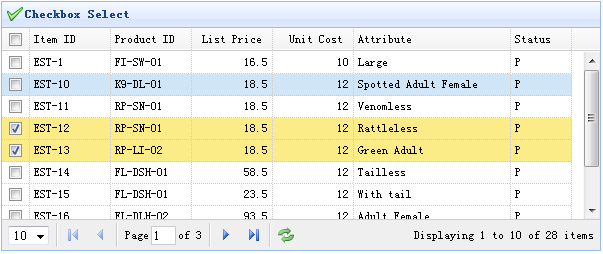
To add a checkbox column, we only need to add a checkbox attribute to a column and set it to true. The code is as follows:
    <table id="tt" title="Checkbox Select" class="easyui-datagrid" style="width:550px;height:250px"
            url="data/datagrid_data.json"
            idField="itemid" pagination="true"
            iconCls="icon-save">
        <thead>
            <tr>
                <th field="ck" checkbox="true"></th>
                <th field="itemid" width="80">Item ID</th>
                <th field="productid" width="80">Product ID</th>
                <th field="listprice" width="80" align="right">List Price</th>
                <th field="unitcost" width="80" align="right">Unit Cost</th>
                <th field="attr1" width="100">Attribute</th>
                <th field="status" width="60" align="center">Status</th>
            </tr>
        </thead>
    </table>
The above code adds a column with a checkbox attribute, so it becomes a checkbox column. If the idField property is set, the DataGrid's selection set will be maintained across different pages.
Download jQuery EasyUI Examples
jeasyui-datagrid-datagrid10.zip
Other Extensions