jQuery EasyUI DataGrid -Conditionally Setting Row Background Color
This tutorial will show you how to change the row style of the DataGrid (datagrid) component based on some conditions. When the listprice value is greater than 50, we will set a different color for that row.
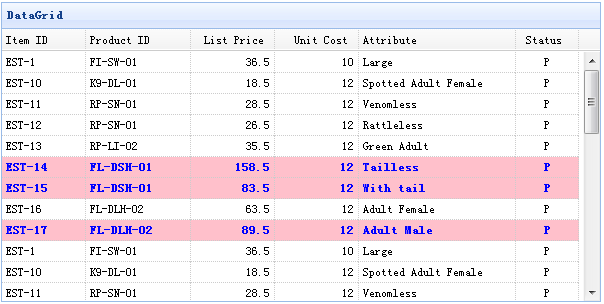
The rowStyler function of the DataGrid is designed to allow you to customize row styles. The following code demonstrates how to change the row style:
    <table id="tt" title="DataGrid" style="width:600px;height:250px"
            url="data/datagrid_data.json"
            singleSelect="true" fitColumns="true">
        <thead>
            <tr>
                <th field="itemid" width="80">Item ID</th>
                <th field="productid" width="80">Product ID</th>
                <th field="listprice" width="80" align="right">List Price</th>
                <th field="unitcost" width="80" align="right">Unit Cost</th>
                <th field="attr1" width="150">Attribute</th>
                <th field="status" width="60" align="center">Stauts</th>
            </tr>
        </thead>
    </table>
    $('#tt').datagrid({
        rowStyler:function(index,row){
            if (row.listprice>50){
                return 'background-color:pink;color:blue;font-weight:bold;';
            }
        }
    });
As you can see, we set the background-color to pink and the text color to blue based on some conditions.
Download jQuery EasyUI Examples
jeasyui-datagrid-datagrid18.zip
Other Extensions