jQuery EasyUI Data Grid -Create Property Grid
The property grid has a built-in expand/collapse button, which can easily group rows. You can easily create a hierarchical list of editable properties.
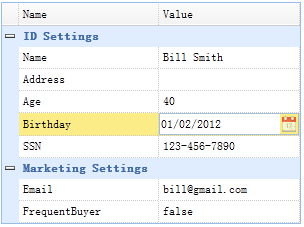
Setup HTML
    <table id="tt" class="easyui-propertygrid" style="width:300px"
            url="propertygrid_data.json"
            showGroup="true" scrollbarSize="0"
    ></table>
Prepare json data
    [
        {"name":"Name","value":"Bill Smith","group":"ID Settings","editor":"text"},
        {"name":"Address","value":"","group":"ID Settings","editor":"text"},
        {"name":"Age","value":"40","group":"ID Settings","editor":"numberbox"},
        {"name":"Birthday","value":"01/02/2012","group":"ID Settings","editor":"datebox"},
        {"name":"SSN","value":"123-456-7890","group":"ID Settings","editor":"text"},
        {"name":"Email","value":"bill@gmail.com","group":"Marketing Settings","editor":{
            "type":"validatebox",
            "options":{
                "validType":"email"
            }
        }},
        {"name":"FrequentBuyer","value":"false","group":"Marketing Settings","editor":{
            "type":"checkbox",
            "options":{
                "on":true,
                "off":false
            }
        }}
    ]
As you can see, creating a property grid does not require any JavaScript code. You can simply inherit and extend the editor type.
Download jQuery EasyUI Examples
jeasyui-datagrid-datagrid20.zip
Other Extensions