jQuery EasyUI Layout -Dynamically Adding Tabs
By using jQuery EasyUI, you can easily add Tabs. You just need to call the 'add' method.
In this tutorial, we will use iframe to dynamically add Tabs displayed on one page. When the add button is clicked, a new tab will be added. If the tab already exists, it will be activated.
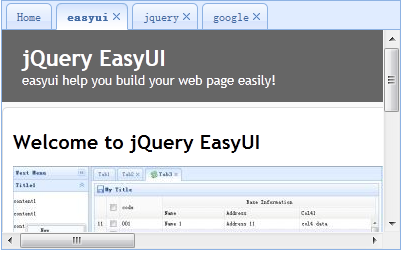
Step 1: Create Tabs
    <div style="margin-bottom:10px">
        <a href="../index.html" class="easyui-linkbutton" onclick="addTab('google','http://www.google.com')">google</a>
        <a href="../index.html" class="easyui-linkbutton" onclick="addTab('jquery','http://jquery.com/')">jquery</a>
        <a href="../index.html" class="easyui-linkbutton" onclick="addTab('easyui','http://jeasyui.com/')">easyui</a>
    </div>
    <div id="tt" class="easyui-tabs" style="width:400px;height:250px;">
        <div title="Home">
        </div>
    </div>
This html code is very simple. We created Tabs with a tab panel named 'Home'. Please note that we don't need to write any js code.
Step 2: Implement the 'addTab' function
    function addTab(title, url){
        if ($('#tt').tabs('exists', title)){
            $('#tt').tabs('select', title);
        } else {
            var content = '<iframe scrolling="auto" frameborder="0"  src="'+url+'" style="width:100%;height:100%;"></iframe>';
            $('#tt').tabs('add',{
                title:title,
                content:content,
                closable:true
            });
        }
    }
We use the 'exists' method to determine whether the tab already exists. If it exists, activate the tab. If it does not exist, call the 'add' method to add a new tab panel.
Download jQuery EasyUI Examples
jeasyui-layout-tabs2.zip
Other Extensions