jQuery EasyUI Tree Menu -Lazy Loading Nodes in the Tree Grid
Sometimes we already have fully hierarchical data for a TreeGrid. We also want the TreeGrid to lazily load nodes by hierarchy. First, only the top-level nodes are loaded. Then click the expand icon of a node to load its child nodes. This tutorial demonstrates how to create a TreeGrid with lazy loading features.
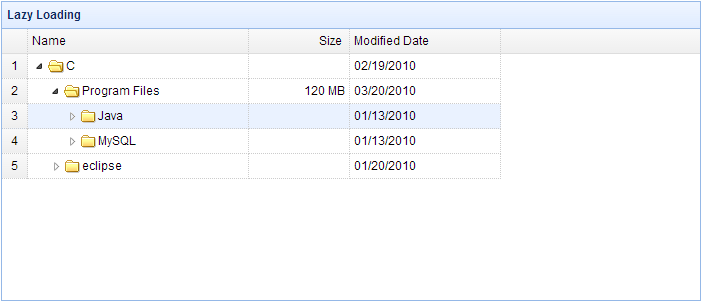
Creating the TreeGrid
    <table id="test" title="Folder Browser" class="easyui-treegrid" style="width:700px;height:300px"
            data-options="
                url: 'data/treegrid_data.json',
                method: 'get',
                rownumbers: true,
                idField: 'id',
                treeField: 'name',
                loadFilter: myLoadFilter
            ">
        <thead>
            <tr>
                <th field="name" width="220">Name</th>
                <th field="size" width="100" align="right">Size</th>
                <th field="date" width="150">Modified Date</th>
            </tr>
        </thead>
    </table>
In order to load child nodes, we need to rename the 'children' attribute for each node. As shown in the code below, the 'children' attribute is renamed to 'children1'. When a node is expanded, we call the 'append' method to load its child node data.
The 'loadFilter' Code
    function myLoadFilter(data,parentId){
        function setData(){
            var todo = [];
            for(var i=0; i<data.length; i++){
                todo.push(data[i]);
            }
            while(todo.length){
                var node = todo.shift();
                if (node.children){
                    node.state = 'closed';
                    node.children1 = node.children;
                    node.children = undefined;
                    todo = todo.concat(node.children1);
                }
            }
        }

        setData(data);
        var tg = $(this);
        var opts = tg.treegrid('options');
        opts.onBeforeExpand = function(row){
            if (row.children1){
                tg.treegrid('append',{
                    parent: row[opts.idField],
                    data: row.children1
                });
                row.children1 = undefined;
                tg.treegrid('expand', row[opts.idField]);
            }
            return row.children1 == undefined;
        };
        return data;
    }
Download jQuery EasyUI Examples
jeasyui-tree-treegrid5.zip
Other Extensions