jQuery EasyUI Form -Formatting ComboBox
This tutorial shows you how to create a simple combobox that displays image items in the dropdown. You can use the formatter function on the combobox to tell it how to format each item.
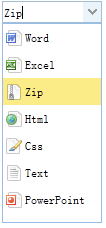
Create Image Combobox
    <input id="cc" style="width:100px"
            url="data/combobox_data.json"
            valueField="id" textField="text">
    </input>
    $('#cc').combobox({
        formatter:function(row){
            var imageFile = 'images/' + row.icon;
            return '<img class="item-img" src="'+imageFile+'"/><span class="item-text">'+row.text+'</span>';
        }
    });
Download jQuery EasyUI Examples
jeasyui-form-form4.zip
Other Extensions