jQuery EasyUI Data Grid -Get Selected Row Data
This example demonstrates how to get selected row data.
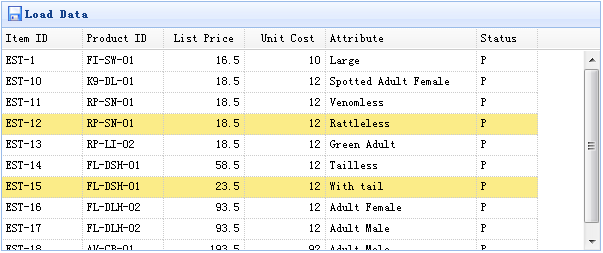
The Data Grid (datagrid) component includes two methods to retrieve selected row data:
- getSelected: Gets the first selected row data. If there is no selected row, returns null; otherwise returns the record.
- getSelections: Gets all selected row data and returns an array of record elements.
Creating a Data Grid (DataGrid)
    <table id="tt" class="easyui-datagrid" style="width:600px;height:250px"
            url="data/datagrid_data.json"
            title="Load Data" iconCls="icon-save">
        <thead>
            <tr>
                <th field="itemid" width="80">Item ID</th>
                <th field="productid" width="80">Product ID</th>
                <th field="listprice" width="80" align="right">List Price</th>
                <th field="unitcost" width="80" align="right">Unit Cost</th>
                <th field="attr1" width="150">Attribute</th>
                <th field="status" width="60" align="center">Stauts</th>
            </tr>
        </thead>
    </table>
Usage Demonstration
Get selected row data:
    var row = $('#tt').datagrid('getSelected');
    if (row){
        alert('Item ID:'+row.itemid+"\nPrice:"+row.listprice);
    }
Get the itemid of all selected rows:
    var ids = [];
    var rows = $('#tt').datagrid('getSelections');
    for(var i=0; i<rows.length; i++){
        ids.push(rows[i].itemid);
    }
    alert(ids.join('\n'));
Download jQuery EasyUI Examples
jeasyui-datagrid-datagrid3.zip
Other Extensions