jQuery EasyUI Data Grid -Displaying Massive Data Using Virtual Scroll View
The virtual scrolling feature of the datagrid can be used to display a large number of records without the need for pagination. When the vertical scrollbar is scrolled, the datagrid executes ajax requests to load and refresh existing records. The entire refresh process is smooth and flicker-free. In this tutorial, we will create a datagrid and use the virtual scrolling feature to load data from the server.
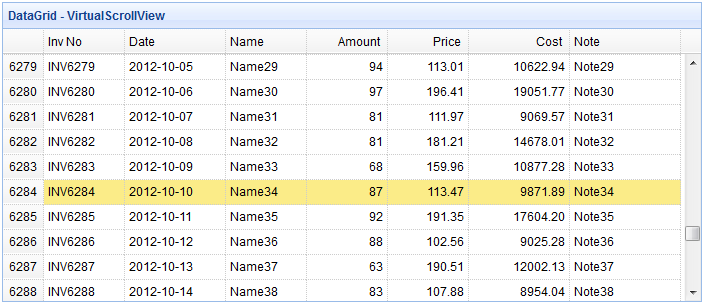
Creating a Data Grid (DataGrid)
To apply the virtual scrolling feature to the datagrid, the 'view' attribute should be set to 'scrollview'. Users should download scrollview from the datagrid extension and reference the scrollview file in the page head.
<script type="text/javascript" src="../try/jeasyui/datagrid-detailview.js"></script>
<table id="tt" class="easyui-datagrid" style="width:700px;height:300px"
        title="DataGrid - VirtualScrollView"
        data-options="view:scrollview,rownumbers:true,singleSelect:true,
            url:'datagrid27_getdata.php',autoRowHeight:false,pageSize:50">
    <thead>
        <tr>
            <th field="inv" width="80">Inv No</th>
            <th field="date" width="100">Date</th>
            <th field="name" width="80">Name</th>
            <th field="amount" width="80" align="right">Amount</th>
            <th field="price" width="80" align="right">Price</th>
            <th field="cost" width="100" align="right">Cost</th>
            <th field="note" width="110">Note</th>
        </tr>
    </thead>
</table>
Please note that we do not need to use the pagination attribute here, but the pageSize attribute is required so that when performing ajax requests, the datagrid will fetch the specified number of records from the server.
Server-side Code
datagrid27_getdata.php
$page = isset($_POST['page']) ? intval($_POST['page']) : 1;
$rows = isset($_POST['rows']) ? intval($_POST['rows']) : 50;

$items = array();
date_default_timezone_set('UTC');
for($i=1; $i<=$rows; $i++){
    $index = $i+($page-1)*$rows;
    $amount = rand(50,100);
    $price = rand(10000,20000)/100;
    $items[] = array(
        'inv' => sprintf("INV%04d",$index),
        'date' => date('Y-m-d',time()+24*3600*$i),
        'name' => 'Name' . $index,
        'note' => 'Note' . $index,
        'amount' => $amount,
        'price' => sprintf('%01.2f',$price),
        'cost' => sprintf('%01.2f',$amount*$price)
    );
}
$result = array();
$result['total'] = 8000;
$result['rows'] = $items;
echo json_encode($result);
Download jQuery EasyUI Examples
jeasyui-datagrid-datagrid27.zip
Other Extensions