jQuery EasyUI Form -Filter ComboGrid
The commonality between the ComboGrid component and the ComboBox component is that, besides both having a drop-down panel, they are both based on the DataGrid. The ComboGrid component can filter, paginate, and has some other DataGrid features. This tutorial shows you how to filter data records in a ComboGrid component.
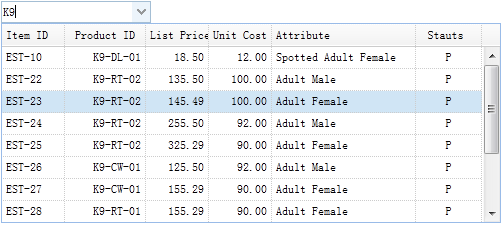
Create ComboGrid
<input id="cg" style="width:150px">
$('#cg').combogrid({
    panelWidth:500,
    url: 'form5_getdata.php',
    idField:'itemid',
    textField:'productid',
    mode:'remote',
    fitColumns:true,
    columns:[[
        {field:'itemid',title:'Item ID',width:60},
        {field:'productid',title:'Product ID',align:'right',width:80},
        {field:'listprice',title:'List Price',align:'right',width:60},
        {field:'unitcost',title:'Unit Cost',align:'right',width:60},
        {field:'attr1',title:'Attribute',width:150},
        {field:'status',title:'Stauts',align:'center',width:60}
    ]]
});
The ComboGrid component should define the 'idField' and 'textField' properties. The 'idField' property stores the component value, and the 'textField' property displays the text message in the input text box. The ComboGrid component can filter records in 'local' or 'remote' mode. In remote mode, when the user inputs characters into the input text box, the ComboGrid will send the 'q' parameter to the remote server.
Server-side Code
$q = isset($_POST['q']) ? strval($_POST['q']) : '';

include 'conn.php';

$rs = mysql_query("select * from item where itemid like '%$q%' or productid like '%$q%'");
$rows = array();
while($row = mysql_fetch_assoc($rs)){
    $rows[] = $row;
}
echo json_encode($rows);
Download jQuery EasyUI Examples
jeasyui-form-form5.zip
Other Extensions