jQuery EasyUI Drag and Drop -Basic Drag and Drop
This tutorial shows you how to make HTML elements draggable. In this example, we will create three DIV elements and then enable their dragging and dropping.
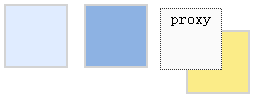
First, we create three <div> elements:
    <div id="dd1" class="dd-demo"></div>
    <div id="dd2" class="dd-demo"></div>
    <div id="dd3" class="dd-demo"></div>
For the first <div> element, we make it draggable using the default values.
$('#dd1').draggable();
For the second <div> element, we make it draggable by creating a proxy that clones the original element.
    $('#dd2').draggable({
        proxy:'clone'
    });
For the third <div> element, we make it draggable by creating a custom proxy.
    $('#dd3').draggable({
        proxy:function(source){
            var p = $('<div class="proxy">proxy</div>');
            p.appendTo('body');
            return p;
        }
    });
Download jQuery EasyUI Examples
jeasyui-dd-basic.zip
Other Extensions