jQuery EasyUI Form -Creating an Asynchronous Form Submission
This tutorial shows you how to submit a form (Form) through easyui. We create a form with name, email, and phone fields. By using the easyui form plugin, the form is changed into an AJAX form. The form submits all fields to the backend server. The server processes and sends some data back to the front-end page. We receive the returned data and display it.
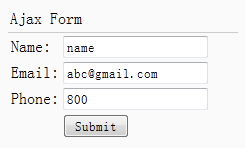
Create Form (Form)
    <div style="padding:3px 2px;border-bottom:1px solid #ccc">Ajax Form</div>
    <form id="ff" action="form1_proc.php" method="post">
        <table>
            <tr>
                <td>Name:</td>
                <td><input name="name" type="text"></input></td>
            </tr>
            <tr>
                <td>Email:</td>
                <td><input name="email" type="text"></input></td>
            </tr>
            <tr>
                <td>Phone:</td>
                <td><input name="phone" type="text"></input></td>
            </tr>
            <tr>
                <td></td>
                <td><input type="submit" value="Submit"></input></td>
            </tr>
        </table>
    </form>
Change to AJAX Form
    $('#ff').form({
        success:function(data){
            $.messager.alert('Info', data, 'info');
        }
    });
Server-side Code
form1_proc.php
    $name = $_POST['name'];
    $email = $_POST['email'];
    $phone = $_POST['phone'];

    echo "Your Name: $name <br/> Your Email: $email <br/> Your Phone: $phone";
Download jQuery EasyUI Examples
jeasyui-form-form1.zip
Other Extensions