jQuery EasyUI Data Grid -Custom Sorting
If the default sorting behavior does not meet your needs, you can customize the sorting behavior of the data grid (datagrid).
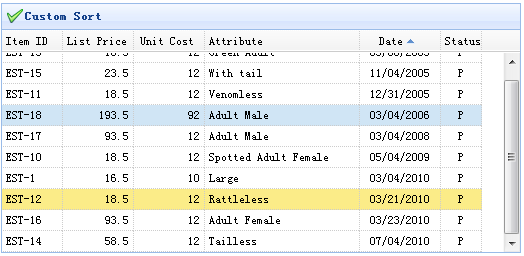
At the most basic level, users can define a sorting function on a column, with the function name sorter. This function will accept two values, and the return values are as follows:
valueA > valueB => return 1
valueA < valueB => return -1
Custom Sorting Code
<table id="tt"></table>
    $('#tt').datagrid({
        title:'Custom Sort',
        iconCls:'icon-ok',
        width:520,
        height:250,
        singleSelect:true,
        remoteSort:false,
        columns:[[
            {field:'itemid',title:'Item ID',width:60,sortable:true},
            {field:'listprice',title:'List Price',width:70,align:'right',sortable:true},
            {field:'unitcost',title:'Unit Cost',width:70,align:'right',sortable:true},
            {field:'attr1',title:'Attribute',width:120,sortable:true},
            {field:'date',title:'Date',width:80,sortable:true,align:'center',
                sorter:function(a,b){
                    a = a.split('/');
                    b = b.split('/');
                    if (a[2] == b[2]){
                        if (a[0] == b[0]){
                            return (a[1]>b[1]?1:-1);
                        } else {
                            return (a[0]>b[0]?1:-1);
                        }
                    } else {
                        return (a[2]>b[2]?1:-1);
                    }
                }
            },
            {field:'status',title:'Status',width:40,align:'center'}
        ]]
    }).datagrid('loadData', data);
You can see from this code that we created a custom sorter for the date column. The date format is 'dd/mm/yyyy', which can easily be sorted by year, month, and day.
Download jQuery EasyUI Examples
jeasyui-datagrid-datagrid14.zip
Other Extensions