jQuery EasyUI DataGrid -Adding Pagination Component
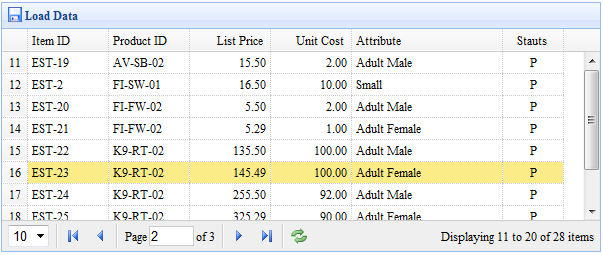
This example demonstrates how to load data from the server side, and how to add a pagination component to the DataGrid.
Creating the DataGrid
To load data from a remote server, you should set the 'url' property, and your server side should return data in JSON format. See the DataGrid documentation for more information about its data format.
    <table id="tt" class="easyui-datagrid" style="width:600px;height:250px"
            url="datagrid2_getdata.php"
            title="Load Data" iconCls="icon-save"
            rownumbers="true" pagination="true">
        <thead>
            <tr>
                <th field="itemid" width="80">Item ID</th>
                <th field="productid" width="80">Product ID</th>
                <th field="listprice" width="80" align="right">List Price</th>
                <th field="unitcost" width="80" align="right">Unit Cost</th>
                <th field="attr1" width="150">Attribute</th>
                <th field="status" width="60" align="center">Stauts</th>
            </tr>
        </thead>
    </table>
We define the DataGrid columns and set the 'pagination' property to true, which will generate a pagination toolbar at the bottom of the DataGrid. Pagination will send two parameters to the server:
- page: page number, starting at 1.
- rows: number of rows displayed per page.
Server-side Code
    $page = isset($_POST['page']) ? intval($_POST['page']) : 1;
    $rows = isset($_POST['rows']) ? intval($_POST['rows']) : 10;
    // ...
    $rs = mysql_query("select count(*) from item");
    $row = mysql_fetch_row($rs);
    $result["total"] = $row[0];

    $rs = mysql_query("select * from item limit $offset,$rows");

    $items = array();
    while($row = mysql_fetch_object($rs)){
        array_push($items, $row);
    }
    $result["rows"] = $items;

    echo json_encode($result);
Download jQuery EasyUI Examples
jeasyui-datagrid-datagrid2.zip
Other Extensions