jQuery EasyUI Form -Form Validation
This tutorial will show you how to validate a form. The EasyUI framework provides a validatebox plugin to validate a form. In this tutorial, we will create a contact form and apply the validatebox plugin to validate the form. You can then adjust this form according to your needs.
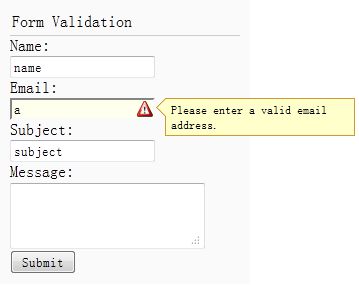
Create the Form (form)
Let's create a simple contact form with name, email, subject, and message fields:
<div style="padding:3px 2px;border-bottom:1px solid #ccc">Form Validation</div> <form id="ff" method="post"> <div> <label for="name">Name:</label> <input class="easyui-validatebox" type="text" name="name" required="true"></input> </div> <div> <label for="email">Email:</label> <input class="easyui-validatebox" type="text" name="email" required="true" validType="email"></input> </div> <div> <label for="subject">Subject:</label> <input class="easyui-validatebox" type="text" name="subject" required="true"></input> </div> <div> <label for="message">Message:</label> <textarea name="message" style="height:60px;"></textarea> </div> <div> <input type="submit" value="Submit"> </div> </form>
We add a class named easyui-validatebox to the input tag, so the input tag will apply validation based on the validType attribute.
Prevent form submission when the form is invalid
When the user clicks the submit button of the form, if the form is invalid, we should prevent the form from being submitted.
    $('#ff').form({
        url:'form3_proc.php',
        onSubmit:function(){
            return $(this).form('validate');
        },
        success:function(data){
            $.messager.alert('Info', data, 'info');
        }
    });
If the form is invalid, a prompt message will be displayed.
Download jQuery EasyUI Examples
jeasyui-form-form3.zip
Other Extensions