jQuery EasyUI DataGrid -Create Footer Summary
In this tutorial, we will show you how to display a summary information row in the footer of a DataGrid.
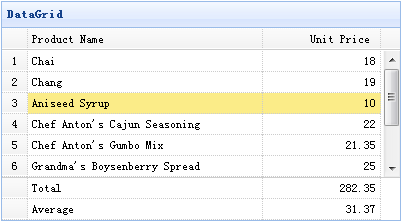
To display the footer row, you should set the showFooter property to true, and then prepare the footer rows defined in the DataGrid data. The following is example data:
{"total":1,"rows":[{"id":1,"name":"Chai","price":18.00}],"footer":[{"name":"Total","price":18.00}]}
Create DataGrid
    <table id="tt" title="DataGrid" class="easyui-datagrid" style="width:400px;height:250px"
            url="data/datagrid17_data.json"
            fitColumns="true" rownumbers="true" showFooter="true">
        <thead>
            <tr>
                <th field="name" width="80">Product Name</th>
                <th field="price" width="40" align="right">Unit Price</th>
            </tr>
        </thead>
    </table>
Footer rows are the same as data rows to display, so you can display more than one summary information in the footer.
Download jQuery EasyUI Examples
jeasyui-datagrid-datagrid17.zip
Other Extensions