jQuery EasyUI Layout -Creating Complex Layouts in Panels
The Panel allows you to create custom layouts for multiple purposes. In this example, we use the Panel and Layout plugins to create an MSN message box.
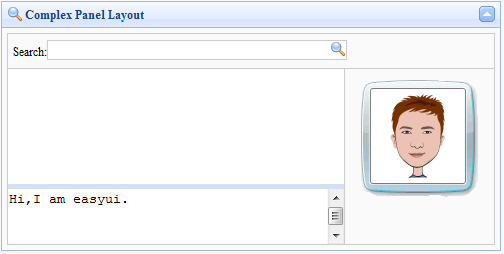
We use multiple layouts in the region panels. At the top of the message box we place a query input box, and on the right side we place a person image. In the middle region, we set the split property to true to split this part into two parts, allowing users to change the size of the region panels.
The following is all the code:
    <div class="easyui-panel" title="Complex Panel Layout" iconCls="icon-search" collapsible="true" style="padding:5px;width:500px;height:250px;">
        <div class="easyui-layout" fit="true">
            <div region="north" border="false" class="p-search">
                <label>Search:</label><input></input>
            </div>
            <div region="center" border="false">
                <div class="easyui-layout" fit="true">
                    <div region="east" border="false" class="p-right">
                        <img src="images/msn.gif.html"/>
                    </div>
                    <div region="center" border="false" style="border:1px solid #ccc;">
                        <div class="easyui-layout" fit="true">
                            <div region="south" split="true" border="false" style="height:60px;">
                                <textarea style="border:0;width:100%;height:100%;resize:none">Hi,I am easyui.</textarea>
                            </div>
                            <div region="center" border="false">
                            </div>
                        </div>
                    </div>
                </div>
            </div>
        </div>
    </div>
We don't need to write any JavaScript code; it has very powerful features for designing user interfaces.
Download jQuery EasyUI Examples
jeasyui-layout-panel.zip
Other Extensions