jQuery EasyUI Data Grid and Tree Plugin -Treegrid
 jQuery EasyUI Plugin
Extends from $.fn.datagrid.defaults. Override the default defaults via $.fn.treegrid.defaults.
The treegrid is used to display hierarchical data in grid format. It is based on the datagrid and combines the treeview and the editable grid. The treegrid allows you to create customizable, asynchronously expandable rows and display hierarchical data in multiple columns.
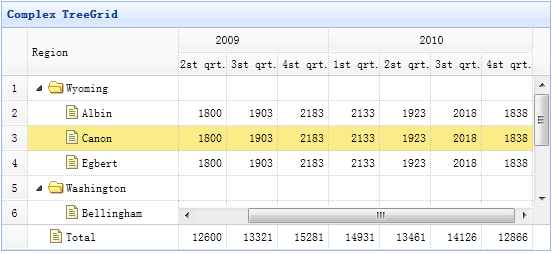
Dependencies
- datagrid
Usage
Create a treegrid from HTML markup. In most cases, the treegrid follows the same structure and format as the datagrid.
<table id="tt" class="easyui-treegrid" style="width:600px;height:400px"
    data-options="url:'get_data.php',idField:'id',treeField:'name'">
    <thead>
        <tr>
            <th data-options="field:'name',width:180">Task Name</th>
            <th data-options="field:'persons',width:60,align:'right'">Persons</th>
            <th data-options="field:'begin',width:80">Begin Date</th>
            <th data-options="field:'end',width:80">End Date</th>
        </tr>
    </thead>
</table>
Create a treegrid using JavaScript.
<table id="tt" style="width:600px;height:400px"></table>
$('#tt').treegrid({
    url:'get_data.php',
    idField:'id',
    treeField:'name',
    columns:[[
        {title:'Task Name',field:'name',width:180},
        {field:'persons',title:'Persons',width:60,align:'right'},
        {field:'begin',title:'Begin Date',width:80},
        {field:'end',title:'End Date',width:80}
    ]]
});
Properties
The properties extend from the datagrid. The following are the properties added for the treegrid.
| Name | Type | Description | Default Value |
|---|---|---|---|
| idField | string | Defines the key name field that identifies the tree node. Required. | null |
| treeField | string | Defines the field of the tree node. Required. | null |
| animate | boolean | Defines whether to show an animation effect when the node expands or collapses. | false |
| loader | function(param,success,error) | Defines how to load data from a remote server. Return false to cancel the action. This function has the following parameters: param: The parameter object to be passed to the remote server. success(data): The callback function called when the data is retrieved successfully. error(): The callback function called when the data retrieval fails. |
json loader |
| loadFilter | function(data,parentId) | Returns the filtered data to be displayed. |
Events
The events extend from the datagrid. The following are the events added for the treegrid.
| Name | Parameters | Description |
|---|---|---|
| onClickRow | row | Triggered when the user clicks a node. |
| onDblClickRow | row | Triggered when the user double-clicks a node. |
| onClickCell | field,row | Triggered when the user clicks a cell. |
| onDblClickCell | field,row | Triggered when the user double-clicks a cell. |
| onBeforeLoad | row, param | Triggered before a request to load data is sent. Return false to cancel the loading action. |
| onLoadSuccess | row, data | Triggered when data is loaded successfully. |
| onLoadError | arguments | Triggered when data loading fails. The arguments parameter is the same as the 'error' method of jQuery.ajax. |
| onBeforeExpand | row | Triggered before a node expands. Return false to cancel the expansion action. |
| onExpand | row | Triggered when a node is expanded. |
| onBeforeCollapse | row | Triggered before a node collapses. Return false to cancel the collapse action. |
| onCollapse | row | Triggered when a node is collapsed. |
| onContextMenu | e, row | Triggered when a node is right-clicked. |
| onBeforeEdit | row | Triggered when the user starts editing a node. |
| onAfterEdit | row,changes | Triggered when the user finishes editing. |
| onCancelEdit | row | Triggered when the user cancels editing a node. |
Methods
Many methods require a parameter named 'id', which represents the value of the tree node.
| Name | Parameters | Description |
|---|---|---|
| options | none | Returns the options of the treegrid. |
| resize | options | Sets the size of the treegrid. The options parameter contains two properties: width: The new width of the treegrid. height: The new height of the treegrid. |
| fixRowHeight | id | Fixes the height of the specified row. |
| loadData | data | Loads the data of the treegrid. |
| load | param | Loads and displays the first page. This method is available since version 1.3.4. Code example:
// load and send some request parameters
$('#tg').treegrid('load', {
    q: 'abc',
    name: 'name1'
});
|
| reload | id | Reloads the data of the treegrid. If the 'id' parameter is passed, it reloads the specified row of the tree; otherwise, it reloads all rows of the tree. Code example:
$('#tt').treegrid('reload', 2);    // reload the row which value is equals to 2
$('#tt').treegrid('reload');    // reload the all rows
$('#tt').treegrid('reload', {id:2, q:'abc'});  // reload the specified row with 'q' parameter passing to server
|
| reloadFooter | footer | Reloads the footer data. |
| getData | none | Gets the loaded data. |
| getFooterRows | none | Gets the footer data. |
| getRoot | none | Gets the root node and returns the node object. |
| getRoots | none | Gets the root nodes and returns an array of nodes. |
| getParent | id | Gets the parent node. |
| getChildren | id | Gets the child nodes. |
| getSelected | none | Gets the selected node and returns it. Returns null if no node is selected. |
| getSelections | none | Gets all selected nodes. |
| getLevel | id | Gets the level of the specified node. |
| find | id | Finds the specified node and returns the node data. |
| select | id | Selects a node. |
| unselect | id | Deselects a node. |
| selectAll | none | Selects all nodes. |
| unselectAll | none | Deselects all nodes. |
| collapse | id | Collapses a node. |
| expand | id | Expands a node. |
| collapseAll | id | Collapses all nodes. |
| expandAll | id | Expands all nodes. |
| expandTo | id | Expands a specified node from the root. |
| toggle | id | Toggles the expanded/collapsed state of a node. |
| append | param | Appends some child nodes to a parent node. The 'param' parameter includes the following properties: parent: The id of the parent node. If not assigned, it is appended as a root node. data: An array of node data. Code example:
// append some nodes to the selected row
var node = $('#tt').treegrid('getSelected');
$('#tt').treegrid('append',{
    parent: node.id,  // the node has a 'id' value that defined through 'idField' property
    data: [{
        id: '073',
        name: 'name73'
    }]
});
|
| insert | param | Inserts a node before or after the specified node. The 'param' parameter includes the following properties: before: The id value of the node to insert before. after: The id value of the node to insert after. data: The new node data. Code example:
// insert a new node before the selected node
var node = $('#tt').treegrid('getSelected');
if (node){
    $('#tt').treegrid('insert', {
        before: node.id,
        data: {
            id: 38,
            name: 'name38'
        }
    });
}
This method is available since version 1.3.1. |
| remove | id | Removes the node and its child nodes. |
| pop | id | Pops out a node and returns the node data including its child nodes after removing the node. This method is available since version 1.3.1. |
| refresh | id | Refreshes the specified node. |
| update | param | Updates the specified node. The 'param' parameter includes the following properties: id: The id of the node to be updated. row: The new row data. Code example:
$('#tt').treegrid('update',{
    id: 2,
    row: {
        name: 'new name',
        iconCls: 'icon-save'
    }
});
This method is available since version 1.3.1. |
| beginEdit | id | Starts editing a node. |
| endEdit | id | Ends editing a node. |
| cancelEdit | id | Cancels editing a node. |
| getEditors | id | Gets the editor of the specified row. Each editor has the following properties: actions: The actions the editor can perform. target: The jQuery object of the target editor. field: The field name. type: The type of the editor. |
| getEditor | param | Gets the specified editor. The param parameter contains two properties: id: The id of the row node. field: The field name. |
jQuery EasyUI Plugin Other Extensions