jQuery EasyUI Data Grid and Tree Plugin -Propertygrid Property Grid
 jQuery EasyUI Plugins
Extended from $.fn.datagrid.defaults. Override the default defaults via $.fn.propertygrid.defaults.
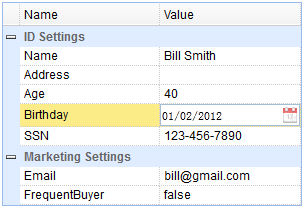
The propertygrid provides users with an interface for browsing and editing object properties. The propertygrid is an inline-editing data grid. It is quite easy to use. Users can easily create a hierarchical list of editable properties and items representing any data type. The propertygrid comes with built-in sorting and grouping features.
Dependencies
- datagrid
Usage
Create a propertygrid in markup. Note that the columns are built-in and do not need to be declared again.
<table id="pg" class="easyui-propertygrid" style="width:300px"
    data-options="url:'get_data.php',showGroup:true,scrollbarSize:0"></table>
Create a propertygrid using JavaScript.
<table id="pg" style="width:300px"></table>
$('#pg').propertygrid({
    url: 'get_data.php',
    showGroup: true,
    scrollbarSize: 0
});
Append a new row to the propertygrid.
var row = {
    name:'AddName',
    value:'',
    group:'Marketing Settings',
    editor:'text'
};
$('#pg').propertygrid('appendRow',row);
Row Data
The propertygrid extends from the datagrid. Its row data format is the same as the datagrid. As a property row, the following fields are required:
name: The field name.
value: The field value to be edited.
group: The group field value.
editor: The editor used to edit the property value.
Row data example:
{"total":4,"rows":[
    {"name":"Name","value":"Bill Smith","group":"ID Settings","editor":"text"},
    {"name":"Address","value":"","group":"ID Settings","editor":"text"},
    {"name":"SSN","value":"123-456-7890","group":"ID Settings","editor":"text"},
    {"name":"Email","value":"bill@gmail.com","group":"Marketing Settings","editor":{
        "type":"validatebox",
        "options":{
            "validType":"email"
        }
    }}
]}
Properties
These properties extend from the datagrid. The following are properties added for the propertygrid.
| Name | Type | Description | Default Value |
|---|---|---|---|
| showGroup | boolean | Defines whether to display property groups. | false |
| groupField | string | Defines the group field name. | group |
| groupFormatter | function(group,rows) | Defines how to format the group value. This function includes the following parameters: group: The group field name. rows: The rows belonging to the group. |
Methods
These methods extend from the datagrid. The following are methods added for the propertygrid.
| Name | Parameters | Description |
|---|---|---|
| expandGroup | groupIndex | Expand the specified group. If the 'groupIndex' parameter is not assigned, expand all groups. |
| collapseGroup | groupIndex | Collapse the specified group. If the 'groupIndex' parameter is not assigned, collapse all groups. |
jQuery EasyUI Plugins Other Extensions