jQuery EasyUI Window Plugin -Messager Message Box
 jQuery EasyUI Plugins
Override the default defaults via $.messager.defaults.
The message box (messager) provides different styles of message boxes, including alert, confirm, prompt, progress, and so on. All message boxes are asynchronous. Users can use callback functions to perform actions after interacting with the message box.
Dependencies
- window
- linkbutton
- progressbar
Usage
$.messager.alert('Warning','The warning message');
$.messager.confirm('Confirm','Are you sure you want to delete record?',function(r){
    if (r){
        alert('ok');
    }
});
Properties
| Name | Type | Description | Default Value |
|---|---|---|---|
| ok | string | The text of the OK button. | Ok |
| cancel | string | The text of the Cancel button. | Cancel |
Methods
| Name | Parameters | Description |
|---|---|---|
| $.messager.show | options | Displays a message window at the bottom right of the screen. The options parameter is a configuration object: showType: Defines how the message window is displayed. Available values are: null, slide, fade, show. Default is slide. showSpeed: Defines the time in milliseconds required for the message window to finish displaying. Default is 600. width: Defines the width of the message window. Default is 250. height: Defines the height of the message window. Default is 100. title: The title text displayed on the header panel. msg: The message text to be displayed. style: Defines the custom style of the message window. timeout: If set to 0, the message window will not close unless the user closes it. If set to a non-zero value, the message window will close automatically after the timeout. Default is 4 seconds. Code example:
$.messager.show({
    title:'My Title',
    msg:'Message will be closed after 5 seconds.',
    timeout:5000,
    showType:'slide'
});
// show message window on top center
$.messager.show({
    title:'My Title',
    msg:'Message will be closed after 4 seconds.',
    showType:'show',
    style:{
        right:'',
        top:document.body.scrollTop+document.documentElement.scrollTop,
        bottom:''
    }
});
|
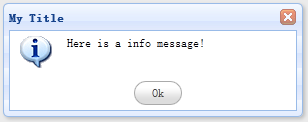
| $.messager.alert | title, msg, icon, fn | Displays an alert message window. Parameters: title: The title text displayed on the header panel. msg: The message text to be displayed. icon: The icon image to be displayed. Available values are: error, question, info, warning. fn: The callback function triggered when the window closes. Code example:
$.messager.alert('My Title','Here is a info message!','info');
|
| $.messager.confirm | title, msg, fn | Displays a confirmation message window with "OK" and "Cancel" buttons. Parameters: title: The title text displayed on the header panel. msg: The message text to be displayed. fn(b): A callback function that passes a true argument to the function when the user clicks the OK button, otherwise passes a false argument. Code example:
$.messager.confirm('Confirm', 'Are you sure to exit this system?', function(r){
    if (r){
        // exit action;
    }
});
|
| $.messager.prompt | title, msg, fn | Displays a message window with "OK" and "Cancel" buttons, prompting the user to enter some text. Parameters: title: The title text displayed on the header panel. msg: The message text to be displayed. fn(val): A callback function with the user input value as its parameter. Code example:
$.messager.prompt('Prompt', 'Please enter your name:', function(r){
    if (r){
        alert('Your name is:' + r);
    }
});
|
| $.messager.progress | options or method | Displays a progress message window. options are defined as follows: title: The title text displayed on the header panel, default value is ''. msg: The body text of the message box, default value is ''. text: The text displayed in the progress bar, default value is undefined. interval: The length of time in milliseconds between each progress update. Default is 300. The methods are defined as follows: bar: Gets the progress bar (progressbar) object. close: Closes the progress window. Code example: Displays a progress message window. $.messager.progress();Now close the message window.
$.messager.progress('close');
|
jQuery EasyUI Plugins Other Extensions