jQuery EasyUI Form Plugins -Combobox
 jQuery EasyUI Plugins
Extends from $.fn.combo.defaults. Override the defaults via $.fn.combobox.defaults.
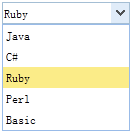
The combobox displays an editable textbox and a dropdown list, from which the user can select one or more values. Users can directly enter text at the top of the list, or select one or more existing values from the list.
Dependencies
- combo
Usage
Create a combobox from a <select> element with a predefined structure.
<select id="cc" class="easyui-combobox" name="dept" style="width:200px;">
    <option value="aa">aitem1</option>
    <option>bitem2</option>
    <option>bitem3</option>
    <option>ditem4</option>
    <option>eitem5</option>
</select>
Create a combobox from an <input> tag.
<input id="cc" class="easyui-combobox" name="dept"
    data-options="valueField:'id',textField:'text',url:'get_data.php'">
Create a combobox using JavaScript.
<input id="cc" name="dept" value="aa">
$('#cc').combobox({
    url:'combobox_data.json',
    valueField:'id',
    textField:'text'
});
Create two dependent comboboxes.
<input id="cc1" class="easyui-combobox" data-options="
    valueField: 'id',
    textField: 'text',
    url: 'get_data1.php',
    onSelect: function(rec){
    var url = 'get_data2.php?id='+rec.id;
    $('#cc2').combobox('reload', url);
    }">
<input id="cc2" class="easyui-combobox" data-options="valueField:'id',textField:'text'">
Example of JSON data format:
[{
    "id":1,
    "text":"text1"
},{
    "id":2,
    "text":"text2"
},{
    "id":3,
    "text":"text3",
    "selected":true
},{
    "id":4,
    "text":"text4"
},{
    "id":5,
    "text":"text5"
}]
Properties
These properties extend from combo. The following are the properties added for the combobox.
| Name | Type | Description | Default |
|---|---|---|---|
| valueField | string | The name of the underlying data field bound to the value of the ComboBox. | value |
| textField | string | The name of the underlying data field bound to the text of the ComboBox. | text |
| groupField | string | Indicates the field to be grouped by. This property is available since version 1.3.4. | null |
| groupFormatter | function(group) | Returns the group text to be displayed on the grouped items. This property is available since version 1.3.4. Code example:
$('#cc').combobox({
    groupFormatter: function(group){
        return '<span style="color:red">' + group + '</span>';
    }
});
|
|
| mode | string | Defines how to load list data when the text changes. Set to 'remote' if the combobox loads from the server. When set to 'remote' mode, the value entered by the user will be sent to the server as an HTTP request parameter named 'q' to fetch new data. | local |
| url | string | The URL to load the list data from the remote server. | null |
| method | string | The HTTP method used to retrieve data. | post |
| data | array | The loaded list data. Code example:
<input class="easyui-combobox" data-options="
        valueField: 'label',
        textField: 'value',
        data: [{
            label: 'java',
            value: 'Java'
        },{
            label: 'perl',
            value: 'Perl'
        },{
            label: 'ruby',
            value: 'Ruby'
        }]" />
|
null |
| filter | function | Defines how to filter local data when 'mode' is set to 'local'. The function has two parameters: q: The text entered by the user. row: The row data in the list. Return true to allow the row to be displayed. Code example:
$('#cc').combobox({
    filter: function(q, row){
        var opts = $(this).combobox('options');
        return row[opts.textField].indexOf(q) == 0;
    }
});
|
|
| formatter | function | Defines how to render a row. The function has one parameter: row. Code example:
$('#cc').combobox({
    formatter: function(row){
        var opts = $(this).combobox('options');
        return row[opts.textField];
    }
});
|
|
| loader | function(param,success,error) | Defines how to load data from the remote server. Return false to cancel the action. The function has the following parameters: param: The parameter object to be sent to the remote server. success(data): The callback function to be called when the data is fetched successfully. error(): The callback function to be called when data fetching fails. |
json loader |
| loadFilter | function(data) | Returns the filtered data to be displayed. This property is available since version 1.3.3. |
Events
These events extend from combo. The following are the events added for the combobox.
| Name | Parameters | Description |
|---|---|---|
| onBeforeLoad | param | Triggered before the request to load data. Return false to cancel the loading action. Code example:
// change the http request parameters before load data from server
$('#cc').combobox({
    onBeforeLoad: function(param){
        param.id = 2;
        param.language = 'js';
    }
});
|
| onLoadSuccess | none | Triggered when the remote data is loaded successfully. |
| onLoadError | none | Triggered when the remote data fails to load. |
| onSelect | record | Triggered when the user selects a list item. |
| onUnselect | record | Triggered when the user deselects a list item. |
Methods
These methods extend from combo. The following are the methods added or overridden for the combobox.
| Name | Parameters | Description |
|---|---|---|
| options | none | Returns the options object. |
| getData | none | Returns the loaded data. |
| loadData | data | Loads local list data. |
| reload | url | Requests remote list data. Pass the 'url' parameter to override the original URL value. Code example:
$('#cc').combobox('reload');  // reload list data using old URL
$('#cc').combobox('reload','get_data.php');  // reload list data using new URL
|
| setValues | values | Sets the array of values for the combobox. Code example:
$('#cc').combobox('setValues', ['001','002']);
|
| setValue | value | Sets the value of the combobox. Code example:
$('#cc').combobox('setValue', '001');
|
| clear | none | Clears the value of the combobox. |
| select | value | Selects the specified option. |
| unselect | value | Deselects the specified option. |
jQuery EasyUI Plugins Other Extensions