jQuery EasyUI Extension -Editable Tree
 jQuery EasyUI Extension
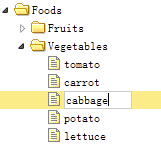
Usage
Create Tree
    <ul id="tt"></ul>
    $('#tt').etree({
        url: 'tree_data.json',
        createUrl: ...,
        updateUrl: ...,
        destroyUrl: ...,
        dndUrl: ...
    });
Set the url, createUrl, updateUrl, destroyUrl and dndUrl properties to automatically synchronize data between the client and server.
- url: Returns the tree data.
- createUrl: When creating a new node, the tree will pass a parameter named 'parentId' to the server, which indicates the id of the parent node.
The server should return the added node data. The following code demonstrates an example of adding node data:{"id":1,"text":"new node"} - updateUrl: When updating a node, the tree will pass the 'id' and 'text' parameters to the server.
The server performs the update operation and returns the updated node data. - destroyUrl: When destroying a node, the tree will pass the 'id' parameter to the server.
The server returns {"success":true} data. - dndUrl: When dragging and dropping a node, the tree will pass the following parameters to the server:
id - The id of the dragged node.
targetId - The node where it is placed.
point - Indicates the placement operation. Possible values: 'append', 'top' or 'bottom'.
The server performs some actions and returns {"success":true} data.
Methods
This method extends from the tree. The following are methods added for the editable tree (etree).
| Name | Parameter | Description |
|---|---|---|
| options | none | Returns the options object. |
| create | none | Create a new node. |
| edit | none | Edit the currently selected node. |
| destroy | none | Destroy the currently selected node. |
Download jQuery EasyUI Examples
jquery-easyui-etree.zip
jQuery EasyUI Extension Other Extensions