Core Business Development
Next, we will build the core task management logic in App.vue.
The entire logic is as follows:
- Data flow: Input content into the input box ->
v-modelupdatenewTaskTitle。 - Action trigger: Press Enter -> execute
addTask->tasksAdd an item to the array. - View update:
taskschanges -> triggerfilteredTasksautomatic recalculation -> Vue re-renderslithe list. - State flow: Click the filter button -> modify
currentFiltervalue -> trigger againfilteredTaskscomputation -> the page displays different categories of tasks.
Basic Layout and Reactive Data
Write in src/App.vue:
Example
<script setup>
import { ref, computed } from 'vue';
// 1. Task data model
const tasks = ref([
{ id: '1', title: 'Experience Tailwind v4 new features', isCompleted: false },
{ id: '2', title: 'Master Composition API', isCompleted: true }
]);
const newTaskTitle = ref('');
const currentFilter = ref('all');
// 2. Core methods
const addTask = () => {
const title = newTaskTitle.value.trim();
if (!title) return;
tasks.value.unshift({
id: crypto.randomUUID(),
title,
isCompleted: false
});
newTaskTitle.value = '';
};
const removeTask = (id) => {
tasks.value = tasks.value.filter(t => t.id !== id);
};
const toggleTask = (id) => {
const task = tasks.value.find(t => t.id === id);
if (task) task.isCompleted = !task.isCompleted;
};
// 3. Computed properties for filtering
const filteredTasks = computed(() => {
if (currentFilter.value === 'active') return tasks.value.filter(t => !t.isCompleted);
if (currentFilter.value === 'completed') return tasks.value.filter(t => t.isCompleted);
return tasks.value;
});
</script>
<template>
<div class="min-h-screen py-12 px-4">
<div class="max-w-md mx-auto bg-white rounded-3xl shadow-xl shadow-slate-200 border border-slate-100 overflow-hidden">
<header class="bg-linear-to-br from-blue-600 to-indigo-700 p-8 text-white">
<h1 class="text-3xl font-black tracking-tight">TaskHub</h1>
<p class="text-blue-100/80 text-sm">Vue 3 + Tailwind v4 in Practice</p>
</header>
<main class="p-6">
<div class="flex gap-2 mb-8">
<input
v-model="newTaskTitle"
@keyup.enter="addTask"
placeholder="What needs to be done today?"
class="flex-1 bg-slate-50 border-none rounded-2xl px-4 py-3 focus:ring-2 focus:ring-brand/50 outline-none transition-all"
/>
<button @click="addTask" class="bg-brand text-white px-6 rounded-2xl font-bold hover:scale-105 active:scale-95 transition-all">
+
</button>
</div>
<div class="flex p-1 bg-slate-100 rounded-xl mb-6">
<button
v-for="f in ['all', 'active', 'completed']"
:key="f"
@click="currentFilter = f"
:class="[
'flex-1 py-1.5 text-xs font-bold rounded-lg transition-all capitalize',
currentFilter === f ? 'bg-white text-brand shadow-sm' : 'text-slate-500'
]"
>
{{ f }}
</button>
</div>
<ul class="space-y-3">
<TransitionGroup name="list">
<li
v-for="task in filteredTasks"
:key="task.id"
class="group flex items-center justify-between p-4 bg-slate-50 rounded-2xl border border-transparent hover:border-slate-200 hover:bg-white transition-all"
>
<div class="flex items-center gap-3">
<input
type="checkbox"
:checked="task.isCompleted"
@change="toggleTask(task.id)"
class="w-5 h-5 accent-brand cursor-pointer"
/>
<span :class="['text-slate-700 font-medium', task.isCompleted ? 'line-through text-slate-400 opacity-50' : '']">
{{ task.title }}
</span>
</div>
<button @click="removeTask(task.id)" class="opacity-0 group-hover:opacity-100 text-slate-300 hover:text-red-500 transition-all p-1">
✕
</button>
</li>
</TransitionGroup>
</ul>
<div v-if="filteredTasks.length === 0" class="text-center py-12 text-slate-400 text-sm">
No related tasks for now...
</div>
</main>
</div>
</div>
</template>
<style scoped>
/* List transition animation */
.list-enter-active, .list-leave-active { transition: all 0.4s cubic-bezier(0.18, 0.89, 0.32, 1.28); }
.list-enter-from, .list-leave-to { opacity: 0; transform: translateX(30px); }
</style>
import { ref, computed } from 'vue';
// 1. Task data model
const tasks = ref([
{ id: '1', title: 'Experience Tailwind v4 new features', isCompleted: false },
{ id: '2', title: 'Master Composition API', isCompleted: true }
]);
const newTaskTitle = ref('');
const currentFilter = ref('all');
// 2. Core methods
const addTask = () => {
const title = newTaskTitle.value.trim();
if (!title) return;
tasks.value.unshift({
id: crypto.randomUUID(),
title,
isCompleted: false
});
newTaskTitle.value = '';
};
const removeTask = (id) => {
tasks.value = tasks.value.filter(t => t.id !== id);
};
const toggleTask = (id) => {
const task = tasks.value.find(t => t.id === id);
if (task) task.isCompleted = !task.isCompleted;
};
// 3. Computed properties for filtering
const filteredTasks = computed(() => {
if (currentFilter.value === 'active') return tasks.value.filter(t => !t.isCompleted);
if (currentFilter.value === 'completed') return tasks.value.filter(t => t.isCompleted);
return tasks.value;
});
</script>
<template>
<div class="min-h-screen py-12 px-4">
<div class="max-w-md mx-auto bg-white rounded-3xl shadow-xl shadow-slate-200 border border-slate-100 overflow-hidden">
<header class="bg-linear-to-br from-blue-600 to-indigo-700 p-8 text-white">
<h1 class="text-3xl font-black tracking-tight">TaskHub</h1>
<p class="text-blue-100/80 text-sm">Vue 3 + Tailwind v4 in Practice</p>
</header>
<main class="p-6">
<div class="flex gap-2 mb-8">
<input
v-model="newTaskTitle"
@keyup.enter="addTask"
placeholder="What needs to be done today?"
class="flex-1 bg-slate-50 border-none rounded-2xl px-4 py-3 focus:ring-2 focus:ring-brand/50 outline-none transition-all"
/>
<button @click="addTask" class="bg-brand text-white px-6 rounded-2xl font-bold hover:scale-105 active:scale-95 transition-all">
+
</button>
</div>
<div class="flex p-1 bg-slate-100 rounded-xl mb-6">
<button
v-for="f in ['all', 'active', 'completed']"
:key="f"
@click="currentFilter = f"
:class="[
'flex-1 py-1.5 text-xs font-bold rounded-lg transition-all capitalize',
currentFilter === f ? 'bg-white text-brand shadow-sm' : 'text-slate-500'
]"
>
{{ f }}
</button>
</div>
<ul class="space-y-3">
<TransitionGroup name="list">
<li
v-for="task in filteredTasks"
:key="task.id"
class="group flex items-center justify-between p-4 bg-slate-50 rounded-2xl border border-transparent hover:border-slate-200 hover:bg-white transition-all"
>
<div class="flex items-center gap-3">
<input
type="checkbox"
:checked="task.isCompleted"
@change="toggleTask(task.id)"
class="w-5 h-5 accent-brand cursor-pointer"
/>
<span :class="['text-slate-700 font-medium', task.isCompleted ? 'line-through text-slate-400 opacity-50' : '']">
{{ task.title }}
</span>
</div>
<button @click="removeTask(task.id)" class="opacity-0 group-hover:opacity-100 text-slate-300 hover:text-red-500 transition-all p-1">
✕
</button>
</li>
</TransitionGroup>
</ul>
<div v-if="filteredTasks.length === 0" class="text-center py-12 text-slate-400 text-sm">
No related tasks for now...
</div>
</main>
</div>
</div>
</template>
<style scoped>
/* List transition animation */
.list-enter-active, .list-leave-active { transition: all 0.4s cubic-bezier(0.18, 0.89, 0.32, 1.28); }
.list-enter-from, .list-leave-to { opacity: 0; transform: translateX(30px); }
</style>
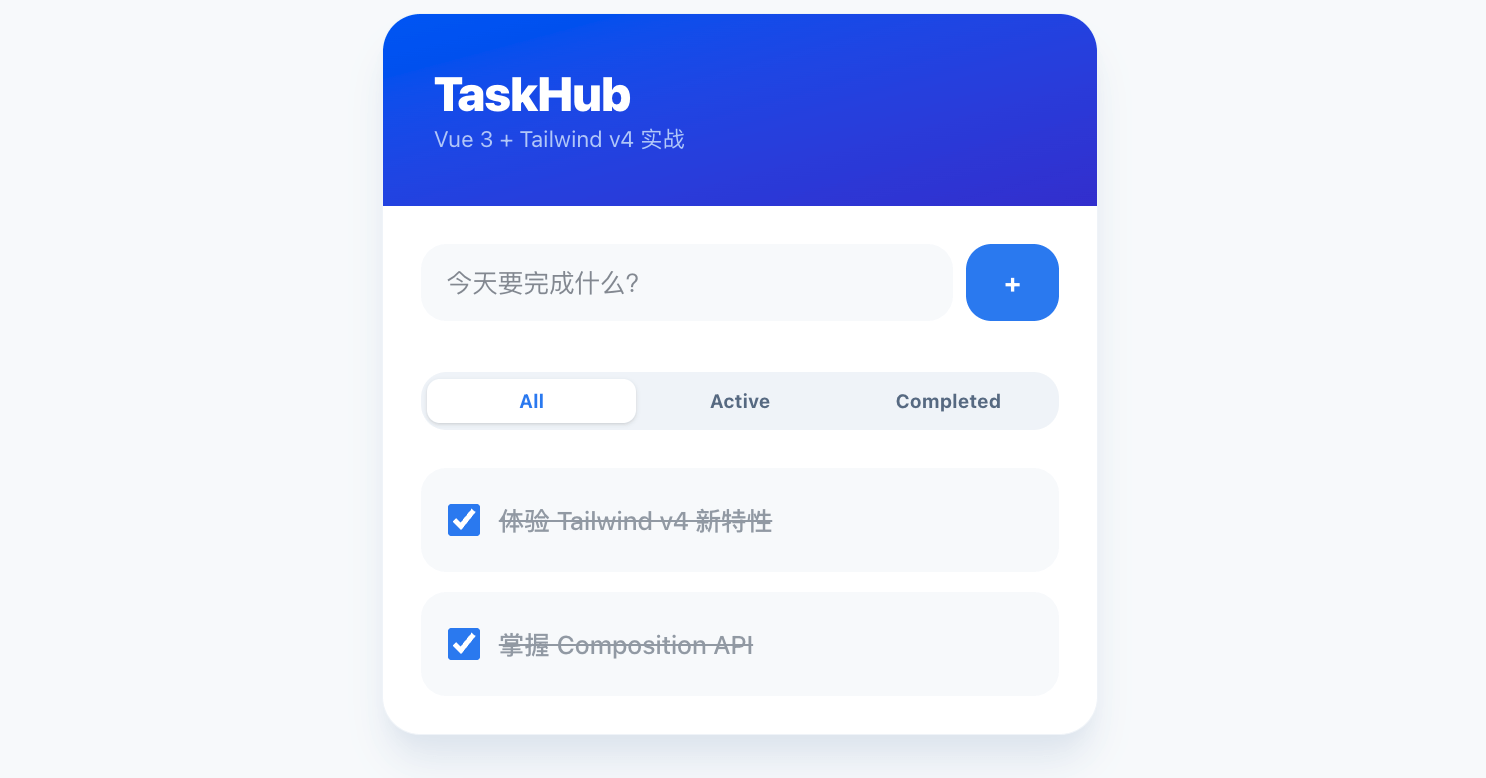
After running, the interface is as follows:
Core Knowledge Points
1. Composition API
The above code demonstrates the core logic organization of Vue 3:
ref(Reactive basics):tasks、newTaskTitleare reactive references. In<script>the context, modifying them must use.value(such astasks.value = ...), but in<template>the context you directly write the variable name. Vue automatically tracks changes to these values and updates the UI.computed(Computed properties):filteredTasksis a very classic application. It istasksandcurrentFilterderived from.- Advantages: It is reactive and hascaching capability. If
taskshas not changed, when the page is rendered multiple times, it will not re-execute the filtering logic.
2. List Rendering and Key Values
<li v-for="task in filteredTasks" :key="task.id">
:keyThe importance of: In Vue, list loops must providekey. Here we usecrypto.randomUUID()generated unique ID. This ensures that when the list order changes or an item is deleted, Vue can accurately identify the specific DOM node, avoiding rendering errors (especially for lists with animations or input states).
3. Event Handling and Modifiers
@keyup.enter: This is akey modifier. It makesaddTaskthe function trigger only when the user presses the Enter key, greatly improving the input experience.- Event parameter passing:
removeTask(task.id)demonstrates how to pass the current loop item's data to a function in the template.
4. Two-way Binding (v-model)
v-model="newTaskTitle"implements synchronization between the input box and the variable.- Principle: It is actually
:valueand@inputsyntactic sugar for.
5. Animation System (TransitionGroup)
- This is a built-in Vue component specifically used to handle list (
v-for) additions and removals. - It automatically switches CSS classes when elements enter or leave (such as
.list-enter-from). Combined with the code at the bottomstyle, it achieves the effect of list items smoothly sliding in and out.
Tailwind v4 Style Features Explanation
Compared with v3, Tailwind v4 places more emphasis onnative CSS capabilitiesandsimplicity.。
1. Brand-new Gradient Syntax
bg-linear-to-br: In v4, gradients no longer requirebg-gradient-to-brthis verbose syntax. Instead, directly uselinear-to-方位which is closer to native CSS'slinear-gradient。
2. Opacity Handling
text-blue-100/80:/80represents 80% opacity. v4's handling of color opacity is very intuitive, with no need to preset complex color configurations.
3. Theme Variable References
bg-brand: We, in the CSS@themedefine--color-brand. In v4, as long as a CSS variable is defined, Tailwind automatically generates the corresponding utility classes (such asbg-brand,text-brand,border-brand), no need to fiddle with the JS config file.
4. Powerful Interactive Pseudo-classes
groupand `group-hover:opacity-100`:- In
liset ongroup。 - Set on the delete button
group-hover:opacity-100。 - Effect: Achieves "the delete button is displayed only when the mouse hovers over this row". This kind ofparent-child state linkagedoes not require writing a single line of JS code.
active:scale-95: Use CSS pseudo-classes to quickly achieve button scale feedback on click.
5. Modern Borders and Ring Shadows
focus:ring-2 focus:ring-brand/50: When the input box is focused, useringproperty to create an outer glow border,brand/50ensures the glow has a sense of translucency rather than a rigid solid color.