Vue3 Routing (Vue Router)
In this chapter, we will introduce Vue routing.
Vue routing allows us to access different content through different URLs.
With Vue, we can implement multi-view single-page web applications (SPA).
Vue.js routing requires loading thevue-router library
Chinese documentation URL:vue-router documentation。
Vue Router is responsible for mapping URL paths to components in the application. When users navigate in the app, the URL updates but the page does not reload, providing a smooth user experience.
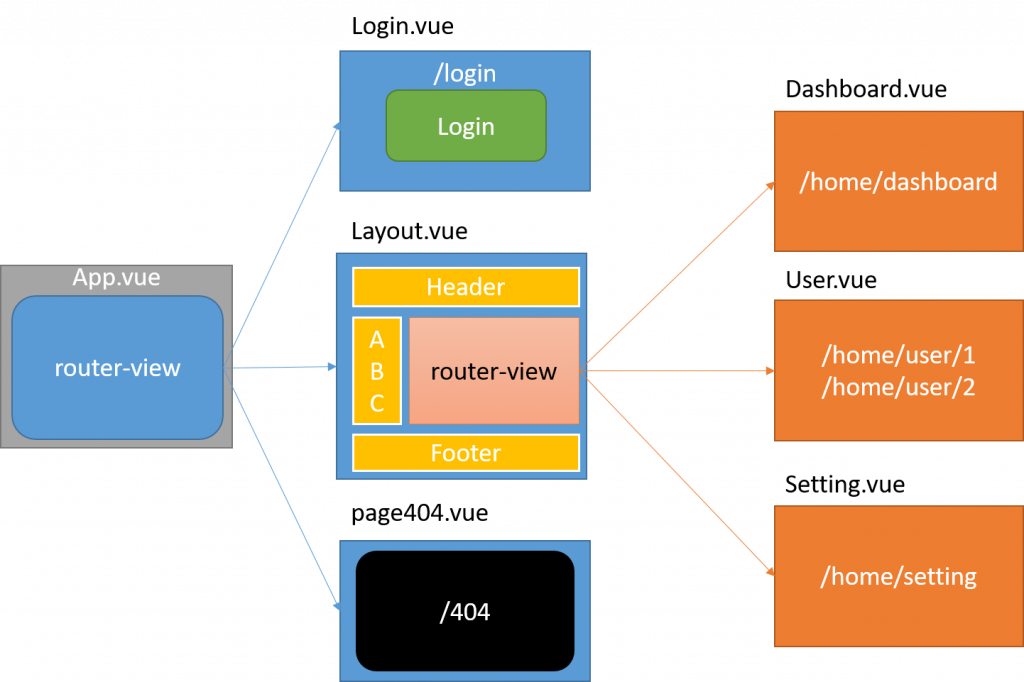
The figure above shows atwo-level nested route structure:
- top-level (
App.vueof<router-view>)responsible for renderingstandalone layouts(such asLogin.vue) ormain frame layout(Layout.vue)。 - main frame layout (
Layout.vue)internally contains a second<router-view>, used to renderchild components of the feature page(such asDashboard.vue、User.vue), thus achieving persistent display of the header, sidebar, and footer. - Unmatched paths will eventually lead to an independent
page404.vue。
Core Components
| Component | Description | Options API Access | Composition API Access |
|---|---|---|---|
routerInstance |
An instance of the entire routing system, used for global navigation, adding routes, etc. | this.$router |
useRouter() |
routeObject |
The currently active route state object, containing information such as the current URL, parameters, query, etc. | this.$route |
useRoute() |
<router-link> |
A component used for navigation in the application; it will be rendered as an<a>tag, but can prevent the default page reload. |
- | - |
<router-view> |
The component matched by the route will be rendered in this position. | - | - |
Installation
npm Installation
npm install vue-router
npm (China Mirror)
It is recommended to use the Taobao mirror:
npm install -g cnpm --registry=https://registry.npmmirror.com
cnpm install vue-router@4
Direct Download / CDN
https://unpkg.com/vue-router@4
Basic Usage
1. Create a routing table
// src/router/index.js
import { createRouter, createWebHistory } from 'vue-router'
import Home from '../views/Home.vue'
import About from '../views/About.vue'

const routes = [
  { path: '/', component: Home },
  { path: '/about', component: About }
]

export default createRouter({
  history: createWebHistory(),
  routes
})
2. Mount in the application
// main.js
import { createApp } from 'vue'
import App from './App.vue'
import router from './router'

createApp(App).use(router).mount('#app')
3. Page outlet
<router-view></router-view>
4. Navigation
<router-link to="/about">About</router-link>
5. Dynamic Routing
{ path: '/user/:id', component: User }
Visiting /user/10, $route.params.id === '10'.
6. Lazy Loading
const About = () => import('../views/About.vue')
7. Navigation Guards (Authentication)
router.beforeEach((to, from, next) => {
  next()
})
8. Redirect
{ path: '/old', redirect: '/' }
9、404
{ path: '/:pathMatch(.*)*', component: NotFound }
Simple Example
Vue.js + vue-router can easily implement a single-page application.
<router-link>is a component used to set up a navigation link to switch between different HTML content.toThe `to` attribute is the target address, i.e., the content to be displayed.
In the following example, we add vue-router, then configure component and route mappings, and then tell vue-router where to render them. The code is as follows:
HTML Code
router-link
Note that we did not use a regular `<a>` tag, but instead used a custom component `router-link` to create links. This allows Vue Router to change the URL without reloading the page and handle URL generation and encoding. We will see later how to benefit from these features.
router-view
`router-view` will display the component corresponding to the URL. You can put it anywhere to suit your layout.
JavaScript Code
Try it »
Clicked navigation links will have styles addedclass ="router-link-exact-active router-link-active"。
Application Example
The following example covers the routing'sDefinition、Creation、Mounting、NavigationandRenderingfive core steps.
1. main.js (entry file)
Example
import App from './App.vue';
import router from './router'; // Import the configured router instance
// 1. Create a Vue application instance
const app = createApp(App);
// 2. Mount the router
app.use(router);
// 3. Mount to the DOM
app.mount('#app');
2. router/index.js (route configuration)
Example
// Import route components (using synchronous imports to simplify the example)
const Home = { template: '<h2>Home Page</h2><p>Welcome to the application home!</p>' };
const About = { template: '<h2>About Us</h2><p>Learn more about this project.</p>' };
// Define the array of route records
const routes = [
{
path: '/',
name: 'Home',
component: Home
},
{
path: '/about',
name: 'About',
component: About
},
// 404 match (put it last)
{
path: '/:pathMatch(.*)*',
name: 'NotFound',
component: { template: '<div>404 Not Found</div>' }
}
];
// Create the Router instance
const router = createRouter({
// Use HTML5 History mode (recommended)
history: createWebHistory(),
routes, // Route configuration
});
export default router;
3. App.vue (root component)
Example
<div>
<h1>Vue Router Example</h1>
<nav>
<router-link to="/" active-class="active-link">Home</router-link> |
<router-link to="/about" active-class="active-link">About</router-link> |
<router-link to="/nonexistent">404 Demo</router-link>
</nav>
<hr>
<main>
<router-view></router-view>
</main>
</div>
</template>
<style>
/* Simple active styles */
.active-link {
font-weight: bold;
color: #427EB9; /* Vue green */
}
/* Adjust link spacing */
nav a {
margin: 0 5px;
text-decoration: none;
}
</style>
When you run this application:
- ClickHomelink, the URL changes to
/,<router-view>displays inHome Pagecomponent content. - ClickAboutlink, the URL changes to
/about,<router-view>displays inAbout Uscomponent content. - Click404 Demolink, the URL changes to
/nonexistent,<router-view>displays in404 Not Foundcomponent content.
<router-link> Related Attributes
Next, let's learn more about the attributes of <router-link>.
to
Represents the link to the target route. When clicked, the value of `to` will be passed to `router.push()` immediately, so this value can be a string or an object describing the target location.
<!-- 字符串 -->
<router-link to="home">Home</router-link>
<!-- 渲染结果 -->
<a href="home.html">Home</a>

<!-- 使用 v-bind 的 JS 表达式 -->
<router-link v-bind:to="'home'">Home</router-link>

<!-- 不写 v-bind 也可以,就像绑定别的属性一样 -->
<router-link :to="'home'">Home</router-link>

<!-- 同上 -->
<router-link :to="{ path: 'home' }">Home</router-link>

<!-- 命名的路由 -->
<router-link :to="{ name: 'user', params: { userId: 123 }}">User</router-link>

<!-- 带查询参数,下面的结果为 /register?plan=private -->
<router-link :to="{ path: 'register', query: { plan: 'private' }}">Register</router-link>
replace
If the replace attribute is set, clicking will call router.replace() instead of router.push(), and no history record will be left after navigation.
<router-link :to="{ path: '/abc'}" replace></router-link>
append
When the append attribute is set, the path is prepended to the current (relative) path. For example, if we navigate from /a to a relative path b, without append the path is /b, with append it is /a/b.
<router-link :to="{ path: 'relative/path'}" append></router-link>
tag
Sometimes you want<router-link>to render as a certain tag, for example<li>.tagSo we use
<router-link to="/foo" tag="li">foo</router-link>
<!-- 渲染结果 -->
<li>foo</li>
active-class
prop to specify which tag. It still listens for clicks and triggers navigation.
<style>
   ._active{
      background-color : red;
   }
</style>
<p>
   <router-link v-bind:to = "{ path: '/route1'}" active-class = "_active">Router Link 1</router-link>
   <router-link v-bind:to = "{ path: '/route2'}" tag = "span">Router Link 2</router-link>
</p>
Set the CSS class name used when the link is active. It can be replaced by the following code.classNote hereactive-class="_active"。
exact-active-class
use
<p>
   <router-link v-bind:to = "{ path: '/route1'}" exact-active-class = "_active">Router Link 1</router-link>
   <router-link v-bind:to = "{ path: '/route2'}" tag = "span">Router Link 2</router-link>
</p>
event
Configure the class that should be active when the link is exactly matched. It can be replaced by the following code.
<router-link v-bind:to = "{ path: '/route1'}" event = "mouseover">Router Link 1</router-link>
The above code sets the event to mouseover, and when the mouse moves over Router Link 1, the navigated HTML content will change.
Vue Router (v4, Vue 3) Core API Handbook
I.createRouterConfiguration Options
| Configuration Item | Purpose | Example |
|---|---|---|
history |
Specify URL mode | createWebHistory() |
routes |
Route table definition array | [{ path: '/', component: Home }] |
scrollBehavior |
Control page scroll position | { top: 0 } |
strict |
Whether to strictly distinguish trailing slashes | true |
linkActiveClass |
Class when link is active | 'active' |
linkExactActiveClass |
Class when link is exactly active | 'exact-active' |
parseQuery |
Custom URL query parsing | (q) => ({...}) |
stringifyQuery |
Custom URL query serialization | (obj) => 'a=1' |
II. History Factory
| API | Purpose | Example |
|---|---|---|
createWebHistory() |
Use HTML5 History mode (recommended) | createWebHistory() |
createWebHashHistory() |
Use Hash mode (URL contains#) |
createWebHashHistory() |
createMemoryHistory() |
Suitable for SSR (server-side rendering) | createMemoryHistory() |
III.RouteRecord(Route Record)
| Field | Purpose | Example |
|---|---|---|
path |
Route path definition | /user/:id |
name |
Route naming | name: 'User' |
component |
Corresponding main component | UserView |
components |
For named views (multiple<router-view>) |
{ default: A, left: B } |
redirect |
Redirect target | redirect: '/login' |
children |
Define nested child routes | [ { path: 'profile' } ] |
props |
willparamsAutomatically convert to componentprops |
props: true |
meta |
Custom meta information field | { auth: true } |
alias |
Add aliases for the current route (multiple entries) | alias: '/b' |
beforeEnter |
Route-specific navigation guard | { beforeEnter: (to,from,next)=>{} } |
IV. Router Navigation (Router Instance Methods)
| Router API | Purpose | Example |
|---|---|---|
router.push(to) |
Programmatic navigation, adds a new record to the history stack | router.push('/a') |
router.replace(to) |
Programmatic navigation, replaces the current history record | router.replace('/a') |
router.back() |
Go back one step | router.back() |
router.forward() |
Go forward one step | router.forward() |
router.go(n) |
Manually offset the history stack | router.go(-1) |
router.addRoute(route) |
Dynamically add route records | router.addRoute({ name:'Post', ... }) |
router.removeRoute(name) |
Remove route records by name | router.removeRoute('user') |
router.getRoutes() |
Get all route records | router.getRoutes() |
router.hasRoute(name) |
Determine whether a route with the specified name exists | router.hasRoute('user') |
V. Navigation Guards
| Guard | Scope | Hook signature |
|---|---|---|
router.beforeEach |
Global before | (to, from, next) => {} |
router.beforeResolve |
Global resolve phase (after in-component guards and async components are resolved) | (to, from, next) => {} |
router.afterEach |
Global after (cannot prevent navigation) | (to, from, failure) => {} |
beforeEnter |
Route-specific | beforeEnter: (to, from, next) => {} |
beforeRouteEnter |
In-component (cannot accessthis) |
beforeRouteEnter(to, from, next) {} |
beforeRouteUpdate |
In-component (when the current route is reused, e.g., param changes) | beforeRouteUpdate(to, from, next) {} |
beforeRouteLeave |
In-component (when leaving this component) | beforeRouteLeave(to, from, next) {} |
VI.<router-link>Props
| Props | Purpose | Example |
|---|---|---|
to |
Target route address | to="/a"or:to="{ name: 'user', params: { id: 1 } }" |
replace |
Use during navigationrouter.replace() |
<router-link replace> |
custom |
Custom rendering, used with slots | <router-link custom v-slot="{ href }"> |
active-class |
Class applied when link is active | 'active' |
exact-active-class |
Class applied when link is exactly matched | 'exact' |
VII.<router-view>Props
| Props | Purpose | Example |
|---|---|---|
name |
Used for multi-view (named view) rendering | <router-view name="left"> |
route |
(Advanced) Forcefully specify the route object to render | <router-view :route="someRoute"> |
VIII.Route(Current Route Object)
This object is obtained throughuseRoute()orthis.$routeobtained.
| Field | Type | Meaning | Example |
|---|---|---|---|
params |
object |
Dynamic path parameters | route.params.id |
query |
object |
URL query parameters | route.query.q |
hash |
string |
Hash value in the URL (with#) |
route.hash |
fullPath |
string |
Full resolved path (including query and hash) | /user/1?x=1 |
name |
string |
Name of the current route | 'User' |
path |
string |
Current path (without query and hash) | /user/1 |
meta |
object |
In the route configuration'smetainformation |
route.meta.auth |
matched |
RouteRecord[] |
All records matched by the route (for nested routes) | route.matched |
IX. Composition API
| API | Purpose | Example |
|---|---|---|
useRoute() |
Get the current route object (Route) |
const route = useRoute() |
useRouter() |
Get the router instance (Router) |
const router = useRouter() |
X. Programmatic Navigation (Complete Example)
| Purpose | Example | Remarks |
|---|---|---|
| Named route navigation | router.push({ name:'User', params:{ id:10 } }) |
Recommended method, does not depend on path order |
| Navigation with query parameters | router.push({ path:'/search', query:{ q:'x' } }) |
Path + query parameters |
| Awaitable push/replace | await router.push('/a') |
Navigation is asynchronous, you can await its completion |
| URL object navigation | router.push({ path: '/foo', hash: '#bar' }) |
Full control over URL details |