Pinia Beginner Tutorial
In Vue3, state management is an unavoidable topic.
Pinia is a lightweight state management library for Vue.js that allows you to share and manage state between components. We can think of Pinia as a global data warehouse from which all components can fetch or update data.
In this chapter, we introduce Pinia, the officially recommended state management library for Vue3. Compared to Vuex, Pinia provides a simpler state management solution that aligns better with the Vue3 Composition API mindset.
The following diagram compares the structural differences between the two:
- Vuex uses a single store with multi-level modules in a tree structure, with fixed hierarchy, relies on mutations, and is heavier overall.
- Pinia, in contrast, consists of multiple independent stores; it is flat, lightweight, has no module separation, and no namespace overhead.
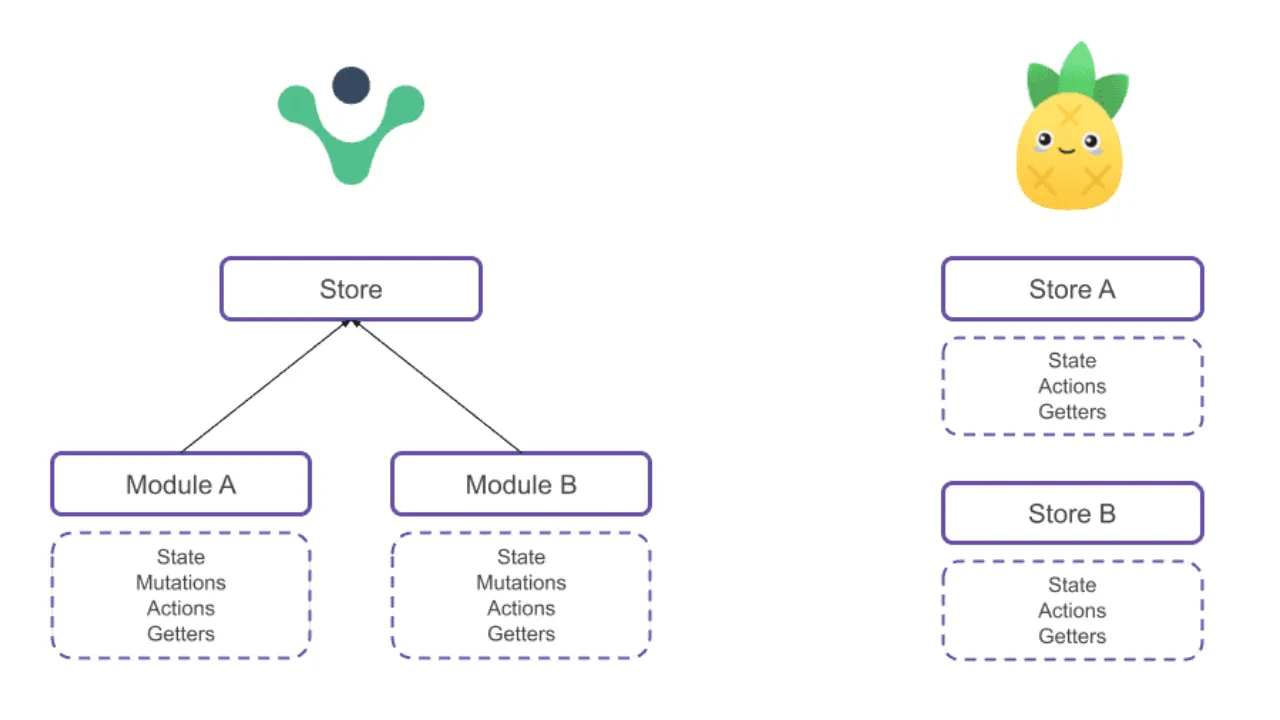
Core features of Pinia:
- Supports Vue2 and Vue3
- Minimalist API design
- Full TypeScript support
- Supports Composition API
- Modular design without nested modules
Pinia's flat structure allows components to connect directly to any store and take what they need, without going through tree modules or namespace paths. State flow is simple and direct, with low coupling.
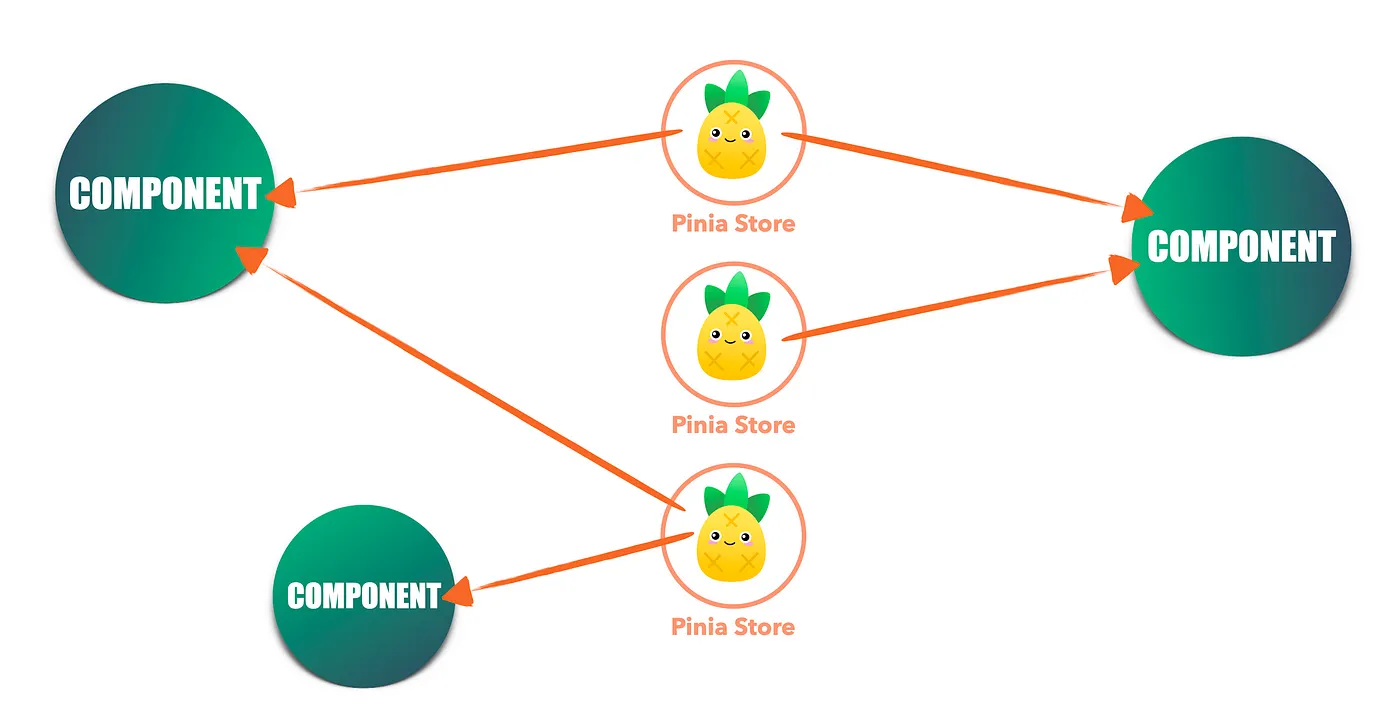
Installation and Configuration
Create a project with Vite:
npm create vite@latest vue-pinia-demo --template vue
cd vue-pinia-demo
npm install
Install Pinia
First, install Pinia in your Vue3 project:
npm install pinia
# 或者
yarn add pinia
Pinia has three parts:
- state: stores data
- getters: computes derived data
- actions: executes logic, modifies state
Configure Pinia
Configure Pinia in src/main.js or src/main.ts:
Example
import { createApp } from 'vue'
import { createPinia } from 'pinia'
import App from './App.vue'
// Create the Pinia instance
const pinia = createPinia()
// Create the Vue app
const app = createApp(App)
// Use Pinia
app.use(pinia)
app.mount('#app')
Create Your First Store
A store is the data warehouse in Pinia. Let's create a simple counter store.
Define a Store
Create a new file src/stores/useCounter.js:
Example
import { defineStore } from 'pinia'
// Define a store using defineStore
// The first parameter is the unique ID of the store
// The second parameter is the configuration options for the store
export const useCounterStore = defineStore('counter', {
// state: defines the store's state data
state: () => ({
count: 0,
name: 'My Counter'
}),
// getters: defines computed properties based on state
getters: {
doubleCount: (state) => state.count * 2,
// Use this to access other getters
doubleCountPlusOne() {
return this.doubleCount + 1
}
},
// actions: defines methods to modify state
actions: {
increment() {
this.count++
},
decrement() {
this.count--
},
// Can accept parameters
incrementBy(amount) {
this.count += amount
},
// Async action
async incrementAsync() {
// Simulate async operation
await new Promise(resolve => setTimeout(resolve, 1000))
this.count++
}
}
})
Store Structure Explanation
Let's understand the various parts of a store through a table:
| Part | Purpose | Example |
|---|---|---|
| state | Defines the stored data | count: 0 |
| getters | Computed properties based on state | doubleCount: state => state.count * 2 |
| actions | Methods to modify state | increment() { this.count++ } |
Using the Store in Components
Basic Usage
The component code for src/components/CounterComponent.vue is as follows:
Example
<template>
<div class="counter">
<h3>{{ store.name }}</h3>
<p>Current count: {{ store.count }}</p>
<p>Double count: {{ store.doubleCount }}</p>
<p>Double plus one: {{ store.doubleCountPlusOne }}</p>
<button @click="store.increment()">+1</button>
<button @click="store.decrement()">-1</button>
<button @click="store.incrementBy(5)">+5</button>
<button @click="store.incrementAsync()">Async +1</button>
<button @click="reset">Reset</button>
</div>
</template>
<script setup>
import { useCounterStore } from '../stores/useCounter'
// Use the store in setup
const store = useCounterStore()
// Method to reset state
function reset() {
store.$reset() // The $reset method can reset the state to its initial value
}
</script>
Modify src/App.vue as follows:
Example
import CounterComponent from './components/CounterComponent.vue'
</script>
<template>
<CounterComponent />
</template>
The entire project structure:

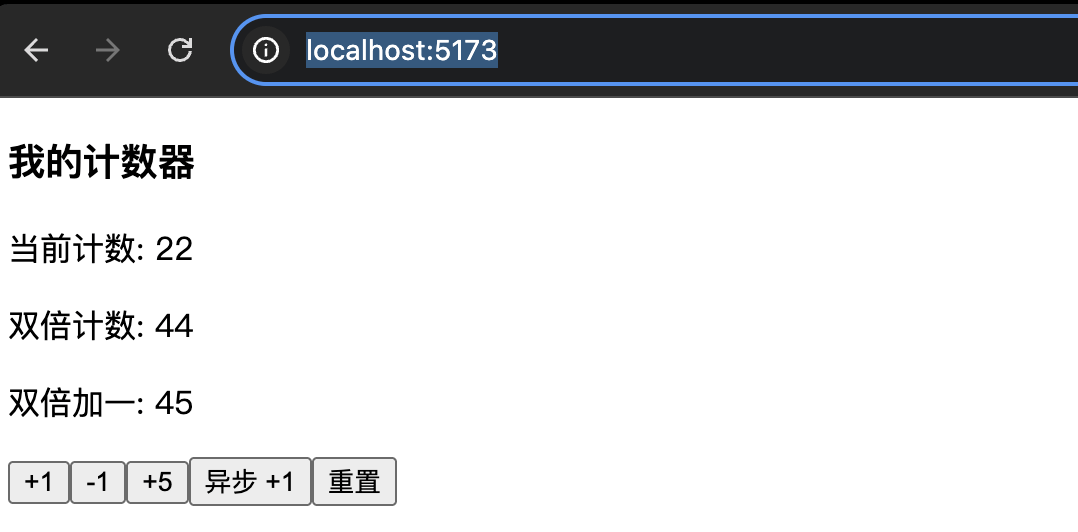
Runnpm run devcommand, and visit in the browserhttp://localhost:5173/, and view the effect:
Reactive Destructuring
If you want to directly use state properties in the template, you can usestoreToRefs:
Example
<div>
<p>Count: {{ count }}</p>
<p>Name: {{ name }}</p>
</div>
</template>
<script setup>
import { storeToRefs } from 'pinia'
import { useCounterStore } from '@/stores/counter'
const store = useCounterStore()
// Use storeToRefs to keep reactivity
const { count, name } = storeToRefs(store)
// Note: destructuring directly will lose reactivity!
// Wrong way: const { count, name } = store
</script>
Composition API Style Store
Pinia also supports defining stores using the Composition API style:
Example
import { defineStore } from 'pinia'
import { ref, computed } from 'vue'
export const useUserStore = defineStore('user', () => {
// state
const user = ref(null)
const isLoggedIn = ref(false)
// getters
const userName = computed(() => user.value?.name || 'Guest')
const userAge = computed(() => user.value?.age || 0)
// actions
function login(userData) {
user.value = userData
isLoggedIn.value = true
}
function logout() {
user.value = null
isLoggedIn.value = false
}
return {
user,
isLoggedIn,
userName,
userAge,
login,
logout
}
})
Interaction Between Stores
Multiple stores can call each other:
Example
import { defineStore } from 'pinia'
import { useUserStore } from './user'
export const useCartStore = defineStore('cart', {
state: () => ({
items: []
}),
actions: {
addItem(product) {
this.items.push(product)
// Call an action from another store
const userStore = useUserStore()
if (userStore.isLoggedIn) {
// Sync to the user's shopping cart
this.syncToUserCart()
}
}
}
})
Practical Example: Shopping Cart
Let's create a complete shopping cart example:
Example
export const useProductStore = defineStore('products', {
state: () => ({
products: [
{ id: 1, name: 'Laptop', price: 5999, stock: 10 },
{ id: 2, name: 'Smartphone', price: 3999, stock: 20 },
{ id: 3, name: 'Wireless Earphones', price: 299, stock: 50 }
]
}),
getters: {
// Get product by ID
getProductById: (state) => (id) => {
return state.products.find(product => product.id === id)
},
// Get products in stock
availableProducts: (state) => {
return state.products.filter(product => product.stock > 0)
}
}
})
Example
export const useCartStore = defineStore('cart', {
state: () => ({
items: [], // { productId, quantity }
discount: 0
}),
getters: {
// Total number of items in the cart
totalItems: (state) => {
return state.items.reduce((total, item) => total + item.quantity, 0)
},
// Total amount of the cart
totalPrice: (state) => {
const productStore = useProductStore()
return state.items.reduce((total, item) => {
const product = productStore.getProductById(item.productId)
return total + (product?.price || 0) * item.quantity
}, 0)
},
// Total price after discount
finalPrice: (state) => {
return state.totalPrice * (1 - state.discount / 100)
}
},
actions: {
// Add product to cart
addToCart(productId, quantity = 1) {
const existingItem = this.items.find(item => item.productId === productId)
if (existingItem) {
existingItem.quantity += quantity
} else {
this.items.push({ productId, quantity })
}
},
// Remove product from cart
removeFromCart(productId) {
this.items = this.items.filter(item => item.productId !== productId)
},
// Clear the cart
clearCart() {
this.items = []
this.discount = 0
},
// Set discount
setDiscount(percent) {
this.discount = Math.max(0, Math.min(100, percent))
}
}
})
Using the Shopping Cart in a Component
Example
<template>
<div class="shopping-cart">
<h3>Shopping Cart ({{ cart.totalItems }} items)</h3>
<div v-if="cart.items.length === 0">
<p>The cart is empty</p>
</div>
<div v-else>
<div v-for="item in cartItems" :key="item.product.id" class="cart-item">
<span>{{ item.product.name }}</span>
<span>¥{{ item.product.price }}</span>
<span>Quantity: {{ item.quantity }}</span>
<span>Subtotal: ¥{{ item.product.price * item.quantity }}</span>
<button @click="cart.removeFromCart(item.product.id)">Delete</button>
</div>
<div class="cart-summary">
<p>Total: ¥{{ cart.totalPrice }}</p>
<p v-if="cart.discount >0">Discount: {{ cart.discount }}%</p>
<p>Amount Paid: ¥{{ cart.finalPrice }}</p>
</div>
</div>
</div>
</template>
<script setup>
import { computed } from 'vue'
import { useCartStore } from '@/stores/cart'
import { useProductStore } from '@/stores/products'
const cart = useCartStore()
const products = useProductStore()
// Calculate shopping cart item details
const cartItems = computed(() => {
return cart.items.map(item => ({
product: products.getProductById(item.productId),
quantity: item.quantity
})).filter(item => item.product) // Filter out products that don't exist
})
</script>
Best Practices and Considerations
1. Store Naming Conventions
Example
export const useUserStore = defineStore('user', { /* ... */ })
export const useProductStore = defineStore('products', { /* ... */ })
// Naming to avoid
export const userStore = defineStore('user', { /* ... */ }) // Missing the use prefix
2. State Initialization
Example
state: () => ({
items: [],
loading: false,
error: null
})
// Not recommended: directly using an object
state: {
items: [] // This will cause all instances to share the same array!
}
3. Handling Async Operations
Example
async fetchUserData(userId) {
this.loading = true
this.error = null
try {
const response = await api.getUser(userId)
this.user = response.data
} catch (error) {
this.error = error.message
} finally {
this.loading = false
}
}
}
4. Data Persistence
For data that needs to be persisted, you can use a plugin:
npm install pinia-plugin-persistedstate
Example
import piniaPluginPersistedstate from 'pinia-plugin-persistedstate'
const pinia = createPinia()
pinia.use(piniaPluginPersistedstate)
export const useUserStore = defineStore('user', {
state: () => ({
token: '',
userInfo: {}
}),
// Enable persistence
persist: true
})
Pinia API
| Category | API | Description |
|---|---|---|
| Creating | defineStore |
Define an independent store, containing state / getters / actions |
| Instantiation | createPinia |
Create a Pinia root instance for app.use() |
| Component usage | useStore()(User-defined, e.g.useUserStore) |
Call a store, returns reactive state, getters, and actions |
| State | state |
Returns a function object, used to define mutable global state |
| State operations | store.$state |
Directly read/write the entire state (object-level) |
| State operations | store.$patch() |
Batch modify state, supports both object and function modes |
| State replacement | store.$reset() |
Reset to the initial state, only available when defined using the setup method |
| State subscription | store.$subscribe() |
Listen to state changes, suitable for local persistence |
| Action invocation | store.$onAction() |
Listen before and after action calls, can be used for logging and tracking |
| Getter | getters |
Derived data, automatically cached based on state |
| Plugins | pinia.use() |
Register plugins to extend store capabilities |
| Definition method | defineStore(id, options) |
Options API syntax |
| Definition method | defineStore(id, () => {...}) |
Setup syntax, returns state / getter / action |
| Store properties | store.$id |
Unique identifier of the current store |
| Store properties | store.$ready(Some versions) |
Status flag after store initialization is complete |
| Persistence (plugin) | persist |
Enable storage plugins (such as localStorage) |
| Utility functions | storeToRefs() |
Convert state / getters to refs, preserving reactivity |
Other extensionsFor more, refer to the Pinia official website:https://pinia.vuejs.org/