Vue3 Declarative Rendering
Declarative Rendering refers to driving view updates through data, rather than directly manipulating the DOM.
Declarative rendering allows developers to focus more on business logic without needing to worry about how to update the view and the DOM.
Vue3's declarative rendering is a template-based rendering approach that allows developers to describe the page structure and data binding relationships through concise template syntax, without needing to directly manipulate the DOM.
Vue3's declarative rendering simplifies the UI update process by using templates, directives (such as v-if, v-for, v-bind, etc.), and reactive data.
Vue's declarative rendering lets you only need to declare how the UI should be presented; Vue will automatically update the view based on data changes. When you change the data, the view responds automatically.
Vue3 uses template syntax (similar to HTML) to describe the UI, and expressions in the template (such as {{ message }}) are bound to the component's data model.
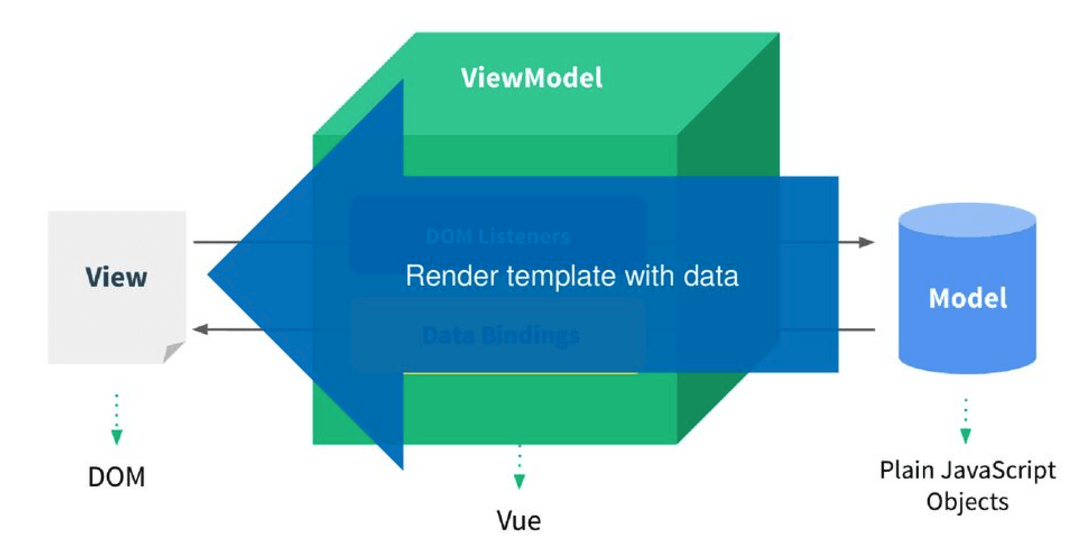
1. Data Binding
Data binding is the core of declarative rendering.
By binding data, Vue can automatically update the content of DOM elements, avoiding traditional manual DOM manipulation.
Interpolation Expression
The interpolation expression uses double curly braces{{ }}to insert the component's data into the HTML template.
Example
<div>
<h1>{{ message }}</h1>
</div>
</template>
<script>
export default {
data() {
return {
message: 'Hello, Vue 3!'
};
}
};
</script>
In the above example, the double curly braces{{ message }}will be rendered asHello, Vue 3!, and when the value of message changes, the view will automatically update.
The content inside double curly braces is not limited to identifiers or paths—we can use any valid JavaScript expression.
<h1>{{ message.split('').reverse().join('') }}</h1>
Attribute Binding
Throughv-binddirective, you can bind HTML attributes to the component's data, which allows the attributes of DOM elements (such as href, class, src) to be dynamically updated based on the component's state.
Example
<div>
<a v-bind:href="url">Click me</a>
</div>
</template>
<script>
export default {
data() {
return {
url: 'https://www.example.com'
};
}
};
</script>
In the above example, v-bind:href binds the url data to the href attribute of the <a> tag. When url changes, href will automatically update.
Conditional Rendering
Vue implements conditional rendering through the v-if, v-else-if, and v-else directives, deciding whether to render a DOM element based on a certain data condition.
Example
<div>
<p v-if="isVisible">This text is visible</p>
<button @click="toggleVisibility">Toggle visibility</button>
</div>
</template>
<script>
export default {
data() {
return {
isVisible: true
};
},
methods: {
toggleVisibility() {
this.isVisible = !this.isVisible;
}
}
};
</script>
In the above example, when isVisible is true, the <p> tag is rendered. When the button is clicked, isVisible toggles, and whether the <p> tag is displayed also changes automatically.
List Rendering
Use the v-for directive to render a list.
Vue renders the corresponding DOM element for each item in the array, and automatically updates the view when the array data changes.
Example
<div>
<ul>
<li v-for="item in items" :key="item.id">{{ item.name }}</li>
</ul>
</div>
</template>
<script>
export default {
data() {
return {
items: [
{ id: 1, name: 'Vue 3' },
{ id: 2, name: 'JavaScript' },
{ id: 3, name: 'HTML' }
]
};
}
};
</script>
In the above example, v-for renders a list based on the items array. Each list item has a key to help Vue track each item, thereby improving rendering efficiency.
Two-way Data Binding
Vue provides the v-model directive to implement two-way binding between form elements (such as <input>) and component data. In this way, the value of the form element stays in sync with the data model. When the user inputs, the data is automatically updated, and when the data changes, the view is automatically updated.
Example
<div>
<input v-model="message" placeholder=Enter some text />
<p>You entered: {{ message }}</p>
</div>
</template>
<script>
export default {
data() {
return {
message: ''
};
}
};
</script>
In the above example, v-model keeps the value of the input element in sync with the message data. When the user types text in the input field, message automatically updates, and the content in the <p> tag also changes automatically.
Event Handling
Vue provides the v-on directive to listen to DOM events and execute methods when events are triggered. This approach allows you to declaratively handle events such as user input and clicks.
Example
<div>
<button v-on:click="increment">Click me</button>
<p>Number of clicks: {{ count }}</p>
</div>
</template>
<script>
export default {
data() {
return {
count: 0
};
},
methods: {
increment() {
this.count += 1;
}
}
};
</script>
In the above example, v-on:click listens to the button's click event and calls the increment method on each click to increase the value of count. count is automatically updated in the view.
Computed Properties
Computed properties are a way Vue provides to declaratively calculate values.
Computed properties are based on reactive data and are only recalculated when the dependent data changes.
Example
<div>
<p>Original amount: {{ amount }}</p>
<p>Amount after tax: {{ computedAmount }}</p>
</div>
</template>
<script>
export default {
data() {
return {
amount: 100
};
},
computed: {
computedAmount() {
return this.amount * 1.1; // Assume the tax rate is 10%
}
}
};
</script>
computedAmount is a computed property that calculates the after-tax amount based on amount. When amount changes, computedAmount automatically updates without needing to manually trigger a view update.
Other Extensions