Vue3 Composition API
Vue3 Composition API is mainly used to improve the reusability of code logic in large components.
As business complexity increases, traditional components continue to grow in code size, and the entire code logic becomes difficult to read and understand.
The place where Vue3 uses the Composition API is the setup() function.setup。
In setup, we can group parts of the code by logical concerns, then extract logic snippets and share them with other components. Therefore, the Composition API allows us to write more organized code.
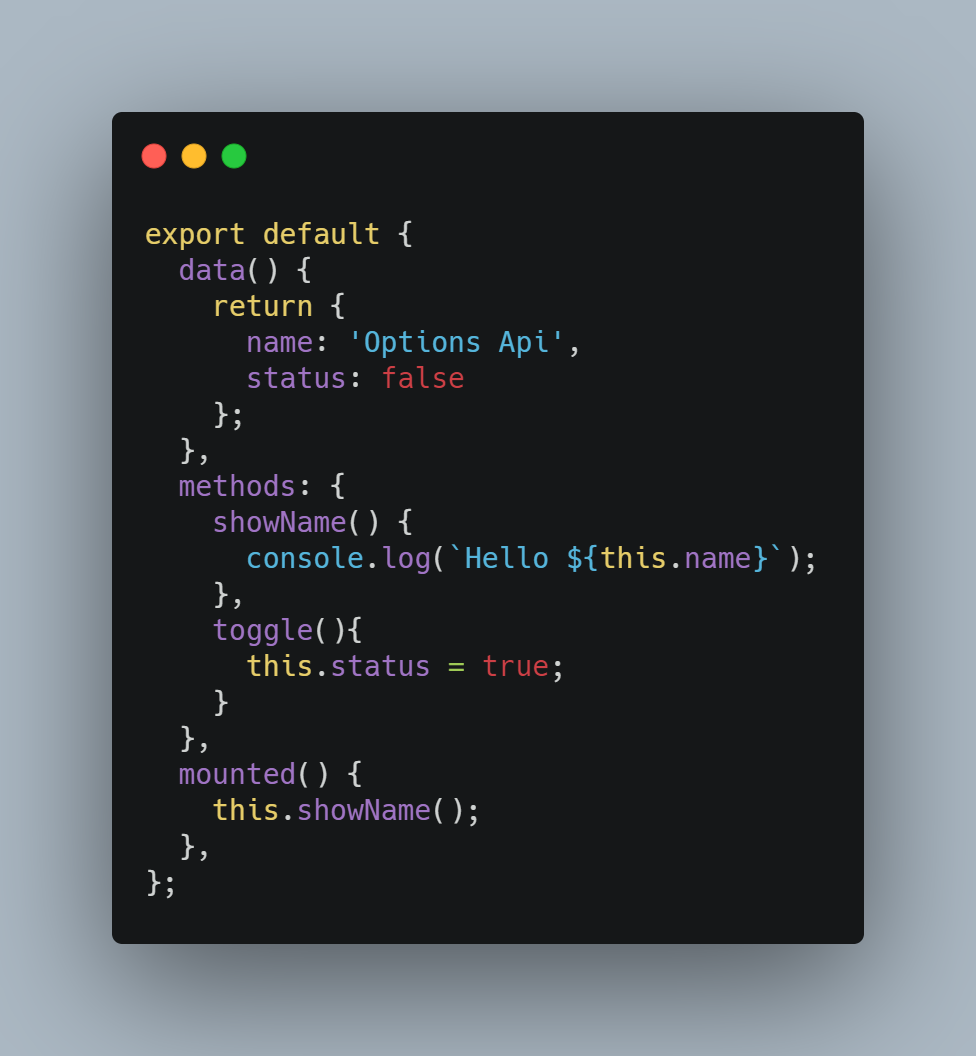
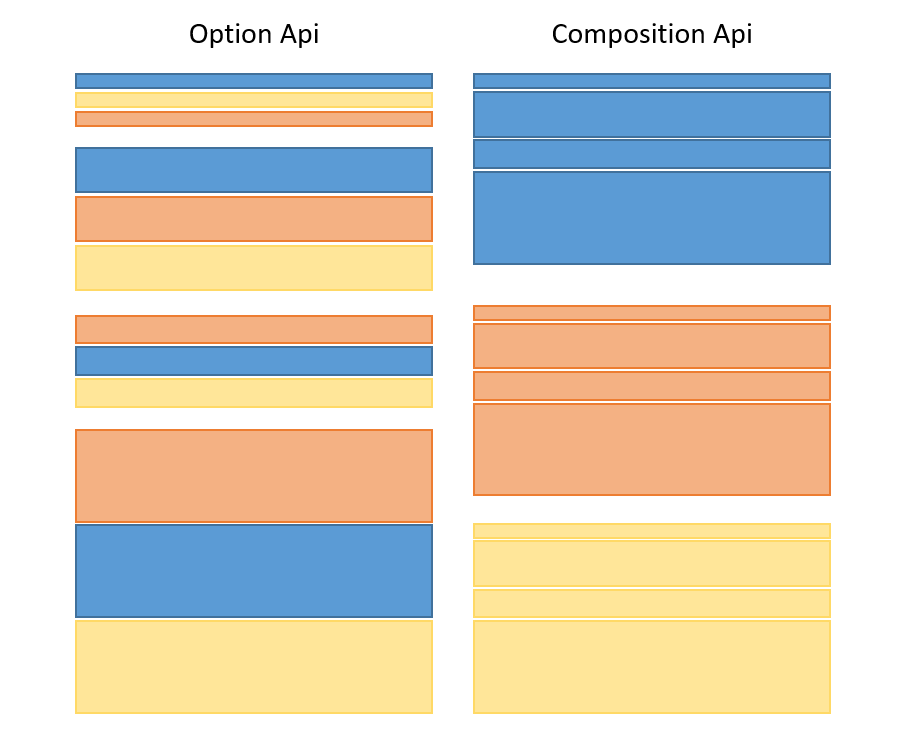 Compare the following two pieces of code:
1. Traditional components
2. Composition API
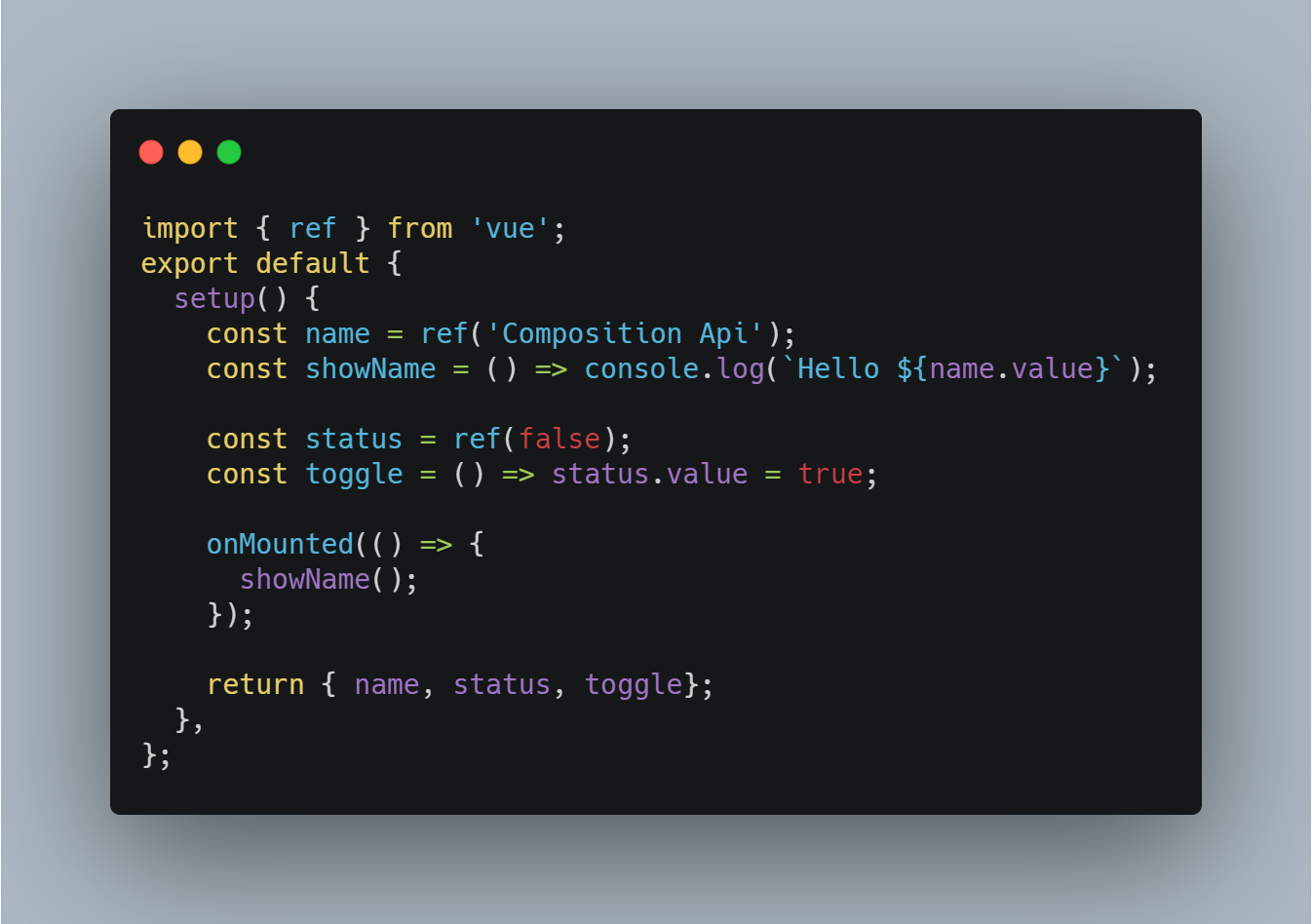
setup Component
The setup() function executes before the component is created (created()).
The setup() function accepts two parameters: props and context.
The first parameter, props, is reactive and will be updated when new props are passed in.
The second parameter, context, is a plain JavaScript object. It is a context object that exposes other values that may be useful in setup.
Note:In setup, you should avoid using this, because it will not find the component instance. The setup call occurs before data properties, computed properties, or methods are resolved, so they cannot be accessed in setup.
The following example uses the Composition API to define a counter:
Example (src/APP.vue)
<div>
<p>Counter example: {{ count }}</p>
<input @click="myFn" type="button" value="Click me to add 1">
</div>
</template>
<script>
import {ref, onMounted} from 'vue';
export default {
setup(){
// Define a variable with an initial value of 0. Use the ref method to assign it; if assigned directly, changes to the variable will not update the UI.
let count = ref(0);
// Define the click event myFn
function myFn(){
console.log(count);
count.value += 1;
}
// When the component is mounted, we use the onMounted hook to record some messages
onMounted(() => console.log('component mounted!'));
// Variables or methods defined with the Composition API are available in the template.
return {count, myFn} // The returned functions behave the same as methods
}
}
</script>
In Vue 3.0, we can use a new ref function to make any reactive variable work anywhere, as shown below:
import { ref } from 'vue'

let count = ref(0);
ref()The function creates a reactive data object based on the given value. The return value is an object with only one.value.value property.
In the setup() function, the reactive data created by ref() returns an object, so you need to use.value.value to access.
Example
const counter = ref(0)
console.log(counter) // { value: 0 }
console.log(counter.value) // 0
counter.value++
console.log(counter.value) // 1
Vue Composition API Lifecycle Hooks
In Vue2, we implement lifecycle hook functions in the following way:
Example
beforeMount() {
console.log('V2 beforeMount!')
},
mounted() {
console.log('V2 mounted!')
}
};
In Vue3 Composition API, lifecycle hook functions can be implemented insetup()the setup() function usingonon-prefixed functions:
Example
export default {
setup() {
onBeforeMount(() => {
console.log('V3 beforeMount!');
})
onMounted(() => {
console.log('V3 mounted!');
})
}
};
The following table shows the mapping between the Options API and the Composition API, including how to call lifecycle hooks inside setup():
| Vue2 Options-based API | Vue Composition API |
|---|---|
| beforeCreate | setup() |
| created | setup() |
| beforeMount | onBeforeMount |
| mounted | onMounted |
| beforeUpdate | onBeforeUpdate |
| updated | onUpdated |
| beforeDestroy | onBeforeUnmount |
| destroyed | onUnmounted |
| errorCaptured | onErrorCaptured |
Because setup runs around the beforeCreate and created lifecycle hooks, there is no need to explicitly define them. In other words, any code written in these hooks should be written directly in the setup function.
These functions accept a callback function that will be executed when the hook is called by the component:
Example
...
// When the component is mounted, we use the onMounted hook to record some messages
onMounted(() => console.log('component mounted!'));
...
}
Template Refs
When using the Composition API, reactive refs and template refs are unified concepts.
To obtain a reference to an element or component instance in the template, we can declare a ref as usual and return it from setup():
Example
<div ref="root">This is a root element</div>
</template>
<script>
import { ref, onMounted } from 'vue'
export default {
setup() {
const root = ref(null)
onMounted(() => {
// The DOM element will be assigned to the ref after the initial render
console.log(root.value) // <div>This is a root element</div>
})
return {
root
}
}
}
</script>
In the above example, we expose root in the render context and bind it to the div as its ref via ref="root".
Refs used as templates behave like any other ref: they are reactive and can be passed to (or returned from) composite functions.
Usage in v-for
When used inside v-for, template refs are not specially handled in the Composition API. Instead, use a function ref for custom handling:
Example
<div v-for="(item, i) in list" :ref="el => { if (el) divs[i] = el }">
{{ item }}
</div>
</template>
<script>
import { ref, reactive, onBeforeUpdate } from 'vue'
export default {
setup() {
const list = reactive([1, 2, 3])
const divs = ref([])
// Make sure to reset the ref before each update
onBeforeUpdate(() => {
divs.value = []
})
return {
list,
divs
}
}
}
</script>
Watching Template Refs
Watching template refs for changes can replace the lifecycle hooks demonstrated in the previous examples.
However, a key difference from lifecycle hooks is that watch() and watchEffect() run before the DOM is mounted or updated, which has side effects: when the watcher runs, template refs have not been updated yet.
Example
<div ref="root">This is a root element</div>
</template>
<script>
import { ref, watchEffect } from 'vue'
export default {
setup() {
const root = ref(null)
watchEffect(() => {
// This side effect runs before the DOM update, so the template ref does not yet hold a reference to the element.
console.log(root.value) // => null
})
return {
root
}
}
}
</script>
Therefore, watchers using template refs should be defined with the flush: 'post' option, which will run side effects after the DOM update, ensuring that template refs stay in sync with the DOM and reference the correct element.
Example
<div ref="root">This is a root element</div>
</template>
<script>
import { ref, watchEffect } from 'vue'
export default {
setup() {
const root = ref(null)
watchEffect(() => {
console.log(root.value) // => <div>This is a root element</div>
},
{
flush: 'post'
})
return {
root
}
}
}
</script>
API Reference
| Serial number | API and Description | Example |
|---|---|---|
| 1 | setup() The entry function in the component's Composition API, called when the component is instantiated, used to define reactive data and methods. | export default { setup() { const count = ref(0); return { count }; } } |
| 2 | ref() Create a reactive reference for wrapping primitive types or objects. | const count = ref(0) |
| 3 | computed() Create a value computed based on other reactive data. | const doubledCount = computed(() => count.value * 2) |
| 4 | reactive() Create a reactive object, suitable for objects or arrays. | const state = reactive({ count: 0 }) |
| 5 | readonly() Create read-only reactive data, prohibiting modification. | const state = readonly({ count: 0 }) |
| 6 | watchEffect() Create a reactive side effect that automatically tracks its related reactive dependencies. | watchEffect(() => { console.log(count.value) }) |
| 7 | watchPostEffect() A side effect triggered after the DOM is updated. | watchPostEffect(() => { console.log('Post effect') }) |
| 8 | watchSyncEffect() Execute side effects synchronously when reactive dependencies change. | watchSyncEffect(() => { console.log('Synchronized effect') }) |
| 9 | watch() Used to observe changes in reactive data; you can specify specific reactive data or computed properties. | watch(count, (newCount) => { console.log(newCount) }) |
| 10 | onWatcherCleanup() Clean up the watcher, called when the observed data is no longer needed. | watch(count, () => {}, onWatcherCleanup(() => { console.log('cleaned up') })) |
| 11 | isRef() Check whether a value is of refref type. | isRef(count) |
| 12 | unref() Unwrap a refref's value. | unref(count) |
| 13 | toRef() Create a reactive ref extracted from an object. | const countRef = toRef(state, 'count') |
| 14 | toValue() Unwrap reforreactivea value of ref type. | toValue(count) |
| 15 | toRefs() Convert each property of a reactive object into an independent ref. ref。 | const { count } = toRefs(state) |
| 16 | isProxy() Check whether an object is a Vue proxy object. | isProxy(state) |
| 17 | isReactive() Check whether an object is a reactive object. | isReactive(state) |
| 18 | isReadonly() Check whether an object is a read-only reactive object. | isReadonly(state) |
| 19 | shallowRef() Create a shallow reactive object, refmaking only the object's first-level properties reactive. | const state = shallowRef({ count: 0 }) |
| 20 | triggerRef() Force trigger refref's update. | triggerRef(count) |
| 21 | customRef() Create a custom reactive ref, allowing developers to customize getter and setter. | const count = customRef((track, trigger) => { let value = 0; return { get: () => value, set: (val) => { value = val; trigger() } } }) |
| 22 | shallowReactive() Create a shallow reactive object, where only the object's first-level properties are reactive. | const state = shallowReactive({ count: 0 }) |
| 23 | shallowReadonly() Create a shallow read-only reactive object, where only the object's first-level properties are read-only. | const state = shallowReadonly({ count: 0 }) |
| 24 | toRaw() Get the raw object of a proxy object. | const rawState = toRaw(state) |
| 25 | markRaw() Mark an object as non-proxyable, and Vue will skip reactive handling for that object. | const obj = markRaw({ count: 0 }) |
| 26 | effectScope() Create a new effect scope to manage side effects. | const scope = effectScope() |
| 27 | getCurrentScope() Get the current effect scope. | const scope = getCurrentScope() |
| 28 | onScopeDispose() Execute a cleanup function when the effect scope is destroyed. | onScopeDispose(() => { console.log('Scope disposed') }) |
| 29 | onMounted() Lifecycle hook called when the component is mounted. | onMounted(() => { console.log('Component mounted') }) |
| 30 | onUpdated() Lifecycle hook called when the component is updated. | onUpdated(() => { console.log('Component updated') }) |
| 31 | onUnmounted() Lifecycle hook called when the component is unmounted. | onUnmounted(() => { console.log('Component unmounted') }) |
| 32 | onBeforeMount() Lifecycle hook called before the component is mounted. | onBeforeMount(() => { console.log('Before mount') }) |
| 33 | onBeforeUpdate() Lifecycle hook called before the component is updated. | onBeforeUpdate(() => { console.log('Before update') }) |
| 34 | onBeforeUnmount() Lifecycle hook called before the component is unmounted. | onBeforeUnmount(() => { console.log('Before unmount') }) |
| 35 | onErrorCaptured() Capture unhandled errors in the component tree. | onErrorCaptured((err, instance, info) => { console.error(err) }) |
| 36 | onRenderTracked() Hook triggered when reactive data is tracked during component rendering. | onRenderTracked((event) => { console.log(event) }) |
| 37 | onRenderTriggered() Hook triggered when reactive data changes during component rendering. | onRenderTriggered((event) => { console.log(event) }) |
| 38 | onActivated() Lifecycle hook called when the component is activated (used for keep-alivecomponent). | onActivated(() => { console.log('Component activated') }) |
| 39 | onDeactivated() Lifecycle hook called when the component is deactivated (used for keep-alivecomponent). | onDeactivated(() => { console.log('Component deactivated') }) |
| 40 | onServerPrefetch() Hook for prefetching data when the component is rendered on the server side. | onServerPrefetch(async () => { await fetchData() }) |
| 41 | provide() Provide dependencies to descendant components. | provide('key', value) |
| 42 | inject() Inject dependencies from parent or ancestor components. | const value = inject('key') |
| 43 | hasInjectionContext() Check whether there is an injection context currently. | hasInjectionContext() |
| 44 | useAttrs() Get all attributes of the component, including HTML attributes passed to the component. | const attrs = useAttrs() |
| 45 | useSlots() Get the slot content of the component. | const slots = useSlots() |
| 46 | useModel() Get the current component's v-modelbound value. | const modelValue = useModel() |
| 47 | useTemplateRef() Get a reference to the element in the template. | const templateRef = useTemplateRef('elementId') |
| 48 | useId() Get a unique identifier. | const uniqueId = useId() |